Prosoft Special Bundle Savings
Drive Genius 3.2.x + Data Rescue 3 for Mac
Prosoft Drive Genius 3.2.x for Mac
Is your Mac running slower? Is your hard drive filling up and you don't know why? Are you seeing the beach ball more or having other issues with your hard drive?
Drive Genius 3.2.x is used by Apple at the Genius Bar as part of the ProCare Yearly Tune Up. Drive Genius 3.2.x now runs as a 64-bit application and includes new features such as DrivePulse®, the best way to monitor the overall health of your drive, alerting you to possible issues before they become major problems, RAID Support, Email Notifications, and has enhanced previous features including Defrag, Repartition and Scan from version 2.
Drive Genius 3.2.x is the best disk utility for the Mac platform. A new user interface, Drive Pulse®, 64-bit, Enhanced Defrag, RAID Support, Enhanced Repartition, Scan and Email Notifications are only a few of the award-winning features of Drive Genius 3.2.x. Optimize your drive with Drive Genius 3.2.x. Yes, this is the same product used by Apple at the Genius Bar to defrag your drive!*
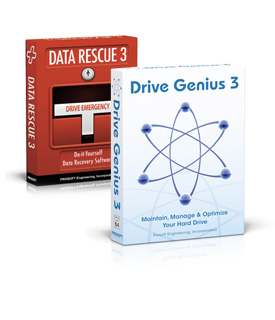
Box not included.
Traditionally, hard drive maintenance and management has been difficult, time-consuming and confusing. In many cases, people skip these critical activities - sometimes leading to disaster. Thankfully, Drive Genius 3.2.x makes these tedious tasks painless, fast and easy.
Data Rescue 3 Do-it-Yourself Data Recovery Software for Mac
Data Rescue 3 is the best digital data recovery software on the market for recovering files from a problem hard drive or that have been previously deleted. Data Rescue 3 is for computer data recovery and works when other tools fail. Data Rescue 3 is also completely safe to use since it does not attempt any risky repairs to the drive it's scanning. Data Rescue 3 is the safest, most powerful software for data recovery. Data Rescue 3 is the same software used by many data recovery services! Data Rescue 3 has saved our customers from having to use a data recovery service, which can cost thousands.
You will need to save your recovered files to either an internal or external hard drive (USB or FireWire), removable media device (such as a Zip or MO) or a networked drive.
Q: Why is Data Rescue 3 different than other products on the market?
A: Focusing on data recovery, instead of hard drive repair, Data Rescue 3 will work in more cases, recover more effectively, and deliver your files in better condition than other utilities you may have tried in the past. Data Rescue 3 analyzes your entire hard drive looking for your data, then it meticulously re-assembles your files and stores them to a different location.
- Recovers data from a crashed hard drive or accidental deletion.
- Award winning technology, works when other software fails
- Bootable emergency DVD
*Part of ProCare Yearly TuneUp
Drive Genius 3.2.x Specifications
Manufacturer Part Number
System Requirements
- Intel Processor-based Mac
- OS X 10.6.8 / 10.7 / 10.8
- 1GB RAM Minimum
- Intel® Processor
- DVD drive
Boot-disc Requirements
- DVD drive
- 512mb RAM Minimum
- Intel® Processor
Compatibility
- Drive Genius 3 ships on a bootable DVD created with from the latest Boot DDK from Apple. The current DDK does not support the following Macs:1
- MacBook Pro - Released in March 2011
- iMac - Released in May 2011
1Compatibility Note:
A. Booting from a secondary Mac
- Turn off the machine with the hard drive you want to work on.
- Connect both machines using a firewire cable.
- Boot the secondary Mac as you do normally.
- Boot the machine with the hard drive you want to work on, while holding the "T" key.
- Hold the "T" key until you see a FireWire icon floating across the screen.
B. Booting from a secondary hard drive with OSX installed on it
- Insert your Mac OS X install DVD & restart your system holding down the "C" key.
- When you see the Mac OS X language screen select your language & click the forward arrow to continue.
- Now you are at the Install Mac OS X screen.
- Select the disk you want to install Mac OS X; your options will appear in the window below.
Approximate disk space needed for different OS X versions:
10.5 Leopard = 16GB
10.6 Snow Leopard = 16GB
CAUTION: Choose your installation destination carefully. Take your time & identify the proper hard drive.
Do NOT select the drive you want to work on.
- Once the installation is complete, restart your Mac and hold down the "Option/Alt" key.
- When the option menu comes up, you will see your newly created Mac OS X hard drive, which you can now choose as your new startup disk.
- Once you boot from the new hard drive, you can install Drive Genius 3 and utilize all the features on your internal boot volume.
C. Booting from a USB thumb drive
- Insert your Mac OS X install DVD & restart your system holding down the "C" key.
- When you see the Mac OS X language screen select your language & click the forward arrow to continue.
- Now you are at the Install Mac OS X screen.
- Select the USB thumb drive you want to install Mac OS X; your options will appear in the window below.
Approximate disk space needed for different OS X versions:
10.5 Leopard = 16GB
10.6 Snow Leopard = 16GB
CAUTION: Choose your installation destination carefully. Take your time & identify the proper USB thumb drive.
Do NOT select the drive you want to work on.
- Once the installation is complete, restart your Mac and hold down the "Option/Alt" key.
- When the option menu comes up, you will see your newly created Mac OS X drive, which you can now choose as your new startup disk.
- Once you boot from the new USB thumb drive, you can install Drive Genius 3.2.x and utilize all the features on your internal boot volume.
Data Rescue 3 Specifications
Manufacturer Part Number
Application Requirements
- Mac OS X 10.4.11 or later
- 512MB RAM minimum, 1GB or more recommended
- PowerPC G4, G5, or Intel
- 1.0GHz processor minimum
- A Firewire, USB 2.0, eSATA or internal drive to recover to*
Boot-disc Requirements
- DVD drive
- 512MB RAM minimum, 1GB or more recommended
- PowerPC G4, G5, or Intel
- 1.0GHz processor minimum
- A Firewire, USB 2.0, eSATA or internal drive to recover to*.
In addition, to run the animated interface requires the following
- Quartz Extreme graphics card
- 32MB VRAM
- 1GHz CPU
- 512MB RAM
- Mac OS X 10.5.x or greater
If the minimum requirements for the animated interface are not met, the program will revert to a non-animated interface.
*This drive must have free space for recovered files, plus 1% the size of the drive or volume to be scanned.
Manufacturer provided specifications for Prosoft Engineering p/n PRSDGDR3BUN
Drive Genius 3.2.x
New Features
DrivePulse®
- Monitors the overall health of your drive, alerting you to possible issues before they become major problems
Enhanced Defrag
- Provides even better defragmentation of your files and even more fragmentation information in a new user interface.
RAID Support
- Support for hardware RAID and Apple's software RAID.
Enhanced Repartition
- Add, delete, hide, expand or shrink OS X partitions
so you can organize your drive more efficiently.
64-bit
- Runs as a 64-bit application on Mac OS 10.6 or later
with a compatible 64-bit processor.
Scan
- Realtime bad-block scanning and an extended block verification that stress tests the read/write validity.
Email Notifications
- E-mail notifications can be sent when long-running tasks complete and you are away from your computer.
Existing Features
Repair
- Quickly fix corruption and errors to get your damaged drive up and running fast.
Sector Editor
- Fine tune all aspects of your system with direct, advanced byte viewing and editing of all data on your drives, volumes and files (for expert users only).
Information
- In-depth report of specifications and space utilization of all drives or OS X volumes.
Initialize
- Easy, high level OS X formatting to prepare new
hard drives for use on your computer.
DriveSlim™
- Free up more space on your hard drive with Duplicate Files Search, Large Files Search, Language Support Removal and Universal Binary slimming.
Benchtests
- Make sure your hard drive performance is what it should
be with comprehensive speed tests and graphical
comparisons to other common configurations.
Shred
- Stop prying eyes with DoD compliant (5220.22 - m) secure erase. Removes all traces of data from free space and
deleted data on any drive or OS X volume.
Clone
- Fast and easy volume or entire drive cloning.
Integrity Check
- Find problems before they find you with these
comprehensive hardware verification tests.
Supports Hot File Adaptive Clustering
- OS X monitors the files that you access the most often
(read only). It then moves them to a special "hot zone"
on the hard drive. During this process OS X defragments
them and then stores them on an area of the hard
drive that has the fastest access time.
Data Rescue 3 Features
Do-it-Yourself Data Recovery Software
- Award-winning software, works when other software fails.
- Recovers all types of files from your hard drive.
- Works if the drive fails to mount or only partially operates.
- Recovers deleted, lost, and damaged files.
- Recovers digital pictures from your camera media even after it has been erased or reformatted.
- Recover your whole drive or just the files you need.
Fast and Easy Results
- Bootable Emergency DVD.
- No need to disassemble your computer.
- FREE technical support via phone or email.
Data Rescue 3 Reviews
Data Rescue 3 Reviews
-
 "It's also very easy to use, with a well-designed interface. It's the best overall data recovery program for general use on a Mac, and the animations are cute, too." Mac User UK - August 2011
-
 5 out of 5 Stars iCreate Magazine - October 2012


 "This is a rock-solid program that works as advertised. Drive Genius is definitely worth a place in your utility closet." ATPM
 "Beyond tasks that will directly diagnose or solve problems, Drive Genius has options to help you manage your drives." CNET Reviews
 "If you're interested in keeping your Mac in tip-top shape, it's hard to go wrong with a tool that the pros use." CNET Editors' Rating
 "A good update that makes this excellent precautionary tool even better." MacUser
 "Prosoft picked up where Norton's left off and frankly did a much better job." MacDirectory
 "Prosoft's Drive Genius lives up to its name by providing comprehensive disk-repair tools and performance enhancing defragmentation routines to keep your Mac's drive in tip-top condition." Mac Life
 "You may not need DriveGenius, but your Mac will be more efficient if you get it." MacNN
 "Drive Genius 3 is such a serious and comprehensive upgrade, it could be the only disk management tool you need." Macworld
 "For users who absolutely rely on their computer, DrivePulse will help detect small problems." MacTech
 "Drive Genius 3 is used by Apple at the Genius Bar as part of the ProCare Yearly Tune Up." Soft-Go
 "As far as Mac recovery software goes, Drive Genius 3 is a shining example of what happens when developers put thought and care into their software." Top Ten Reviews
 "We'd recommend this app for any technical Mac user as well as sysadmins looking for some GUI aid for that occasional maintenance and service of a fleet of Macintoshs." PC Advisor
 "With an interface that's close to foolproof, Drive Genius mixes advanced features with ease of use." Karl Hodge - Macworld UK
