|
Inquisitor 2.0
By Jamie Dresser
Apple has definitely taken over the Mac browser market since they released version 1.0 over 2 years ago. And one of the features of Safari that is used most is the Google search box on the top right of every page.
That simple search box is an item that most of us use every day, probably 10 or more times a day. And it's convenience has already saved anyone that uses it a ton of time. But how could it be made better?
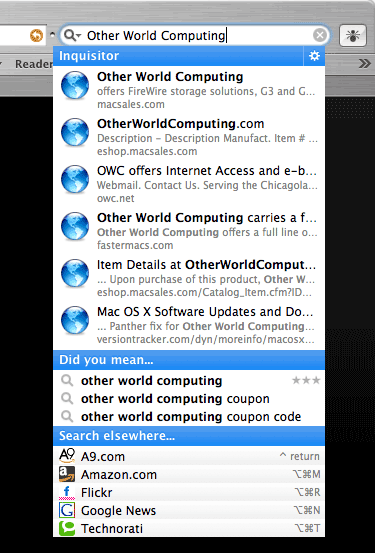
Enter Inquisitor. It does one thing - and boy does it do a good job of that one thing - speeding up your searches! How does it do that? Predictive searching as you type - think of it as the same kind of searching that Spotlight does (except a whole lot faster in my experience!). Don't want to use any of the results it returns? Ok, just hit return - and the Google search runs just like normal.
Inquisitor's author, David Watanabe says this about it:
"Inquisitor is an instant search technology that takes the waiting out of searching the web. It is an AJAX-style web application that retrieves web results and suggestions as-you-type."
Hmm. Sounds too good to be true. But, he has a web based version of it running on his site, so you can easily try it yourself - and be prepared to like what you see! I know I sure did!
One note: This software is not freeware, but donationware. Due to the previous versions also being donationware, and it not working out, you're required to donate before downloading. He'll email you a download link once you donate.
I'll put it this way; this technology is very cool - so cool, I'd expect Apple to do like they have done with other shareware/freeware, and copy it in a future OS release, just like they have done time and time again. It's that good!
Visit David's website and definitely give the web based search a try. It works exactly the software does in Safari. A perfect test drive! And when you're ready to download it, his site is right here.
Check out what a search for "Other World Computing" looks like:
| 


 1-800-275-4576


