30-DAY FREE TRIAL
Try SoftRAID COMPLETELY FREE for 30 days!
Start protecting yourself and your data today! Get all of SoftRAID's great disk checking and monitoring features, plus the fastest and most efficient software RAID there is.
Download SoftRAID (Mac)
OWC
SoftRAID
RAID Utility Software for Mac
The Best RAID Solution in the Universe
Five RAID Levels for All Uses
Choose between five RAID levels to suit all kinds of disk usage: RAID 0, 1, 4, 5 and 1+0. Keep your data super safe, access it lighting fast, or choose a combination of speed and safety.
Safeguard Your Data with SoftRAID RAID Volumes1
Standard Hardware RAID products only protect you from losing files when disks fail. SoftRAID does more by constantly checking your disks and warning you in advance — before a disk fails — giving you time to replace bad disks, saving precious files and data.
Not only do you gain peace of mind knowing that you'll be alerted about disk problems, SoftRAID will allow you to carry on with work even if a drive fails.
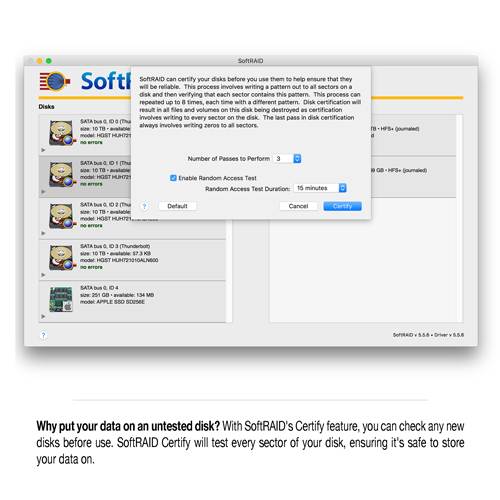
At any time you can verify your disks to make sure all sectors are readable. SoftRAID's Validate Volumes checks readability and parity and Certify Disk makes sure a disk is readable before you put your work on it (Note: Certifying your disk will destroy any data put on it).
Now Including SMART over USB
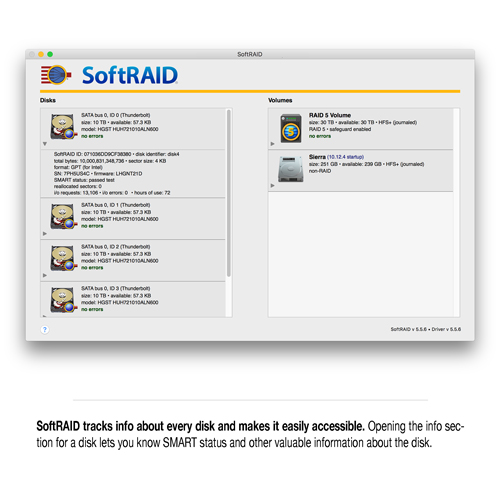
SoftRAID tests your SATA disks for SMART failure, and it can use SMART data to predict disk failure for USB and FireWire disks.
SoftRAID Monitor with Notifications
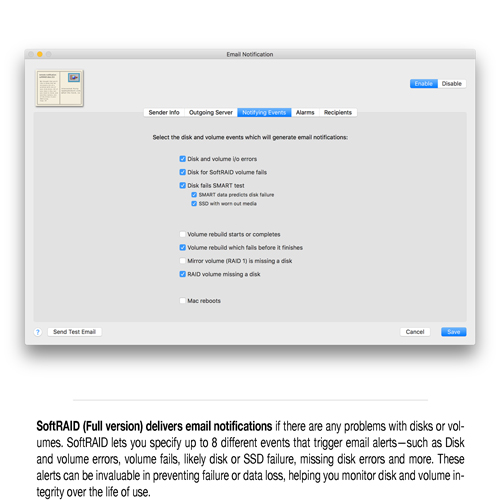
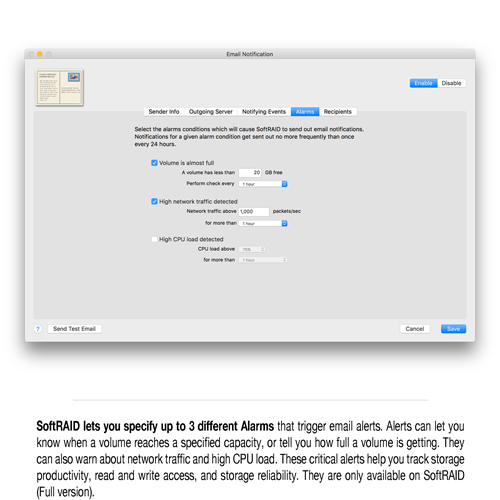
The SoftRAID Monitor is always running even when you're not logged in to your Mac. It watches your disks and volumes for errors and will warn you as soon as a problem occurs. It can even even send you an email.
The SoftRAID Monitor can also predict when a disk is about to fail. Most disks will start having internal errors a week or two before they fail. The SoftRAID Monitor checks for these errors and and warns you if a disk is having problems and likely to fail.
Worry Free Validation
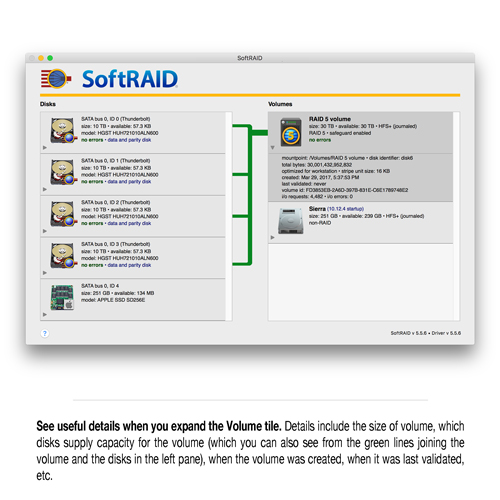
When you validate a volume, SoftRAID will read every block on the volume to make sure it can be read without errors. If there is an error, the SoftRAID Monitor will warn you and will add an entry to the SoftRAID log file. You can continue to use your volume normally while the SoftRAID driver is validating it.
The driver watches to see if you're using the volume, and if you start reading or writing files on the volume, it stops validating for a second or two then resumes validation where it left off. You can even validate your startup volume without worrying about damaging your data.
Highlights
- Up to 86% faster than AppleRAID
- Create advanced RAID 0, 1, 4, 5, 1+0 volumes for higher performance, greater data reliability, and/or redundancy
- Enterprise-class monitoring for disk and RAID volume health with email notifications
- Volume validation to ensure sectors can be read, parity is correct, and minimization of volume failure
- Disk certification checks that your disks are safe to store data on before use
- Disk failure prediction with early warning helps protect you from sudden disk failure
- Convert existing AppleRAID volumes to SoftRAID RAID volumes and preserve all the files on those volumes
- Support for English, French, German, Spanish & Now Japanese and Simplified Chinese
- Continually updated and improved
Going the Extra Step in Validating SoftRAID Volumes
SoftRAID ensures your volumes are working properly by taking that extra step during the validation process. When SoftRAID validates a mirror or RAID 1+0 volume, it reads from each disk in a mirror set and compares the data. If the data from all the disks in a mirror set do not match, SoftRAID updates the disks so they are all identical.
When validating a RAID 4 or RAID 5 volume, SoftRAID reads the data for each block and calculates the parity information. It then compares the calculated parity information with the parity information stored on the disks. If the parity information on the disks is incorrect, SoftRAID updates the disks with the correct information.
Certify Your Disk To Ensure Reliability
Storage disks are so big these days that manufacturers can't afford the time it takes to test every sector of disk. With SoftRAID's Certify Disk feature, you can perform the test that the factory should have done. When you use SoftRAID to Certify Disk, SoftRAID writes, then reads every sector of the disk (more than once). When it's complete, you are reassured that every sector of the disk is usable (or notified of a problem).
SoftRAID Keeps You Working—Even if a Disk Fails
SoftRAID keeps your data safe with advanced RAID volumes. With a SoftRAID mirror or RAID 1+0 volume, every time you write a file, the write goes to more than one disk at exactly the same time. If one disk fails, you'll have a copy of all the data on your volume.
With RAID 4 or 5 you'll get similar protection as missing data can be rebuilt from parity data that's stored every time you write to disk.
Convert Existing AppleRAID Volumes to SoftRAID Volumes
Now, you can easily convert your existing Apple RAID stripe (RAID 0) and mirror (RAID 1) volumes to SoftRAID volumes and preserve all the files on those volumes. Additionally, you can convert a standard Apple RAID stripe (RAID 0) and mirror (RAID 1) volume to a RAID 1+0, which continues to function after a disk fails.
New Language Support and Error Logging, Including Simplified Chinese
SoftRAID offers localized support for English, French, German, Spanish, Japanese, and Simplified Chinese.
- NOTE: The full version of SoftRAID is Mac only. SoftRAID Lite (RAID 0, 1) works with both Mac and Windows.
Product Specifications:
Manufacturer Part Number
Mac OS Compatibility
- OS X 10.10 Yosemite
- OS X 10.11 El Capitan
- macOS 10.12 Sierra
- macOS 10.13 High Sierra
- macOS 10.14 Mojave
- macOS 10.15 Catalina
PC OS Compatibility
- Windows 10 64-bit Edition
Other Requirements
- SoftRAID for Mac requires OS 10.10.5 or later
RAID Levels Supported
- RAID 0
- RAID 1
- RAID 4
- RAID 5
- RAID 1+0 (10)
Manufacturer provided specifications for SoftRAID p/n SOFTRAID5Q UPC#: 851382006001
Includes
- (1) SoftRAID Software Installation DVD
- (1) SoftRAID Serial Number (required for installation)
- (1) Quickstart Guide
- (1) Release Notes
Customer Ratings
Write a Review
3.7 / 5
12 out of 18 (67%) reviewers would recommend this product
Verified Buyer
Reviewer: rollacansada
Rating: 4/5
Expensive! but good
September 22, 2022
After paying more than $400 USD forthe software to run on Non-OWC enclosures, I think the message is clear-- buy an expensive OWC enclosure! I would recommend this item to a friend! This review is from OWC SoftRAID XT Advanced RAID Management Utility for macOS and Windows.
Response from OWC, Support
September 22, 2022
If you have another version of SoftRAID you can get a discount off of the Pro version so you're not paying full price entirely, if you have any questions please reach us at support@owc.com!
Verified Buyer
Reviewer: igor_karpov
Rating: 3/5
Mediocre buying experience and strange software.
September 6, 2022
Firstly, I was surprised when I've found out that Ukraine is missing from the drop-down list. I had to use my Amazon U.S. address to buy it, paying US tax. This is strange at least.
Secondly, there is no RAID 6 support yet. Gents, it is 2022. What are you waiting for? This review is from OWC SoftRAID XT Advanced RAID Management Utility for macOS and Windows.
Response from OWC, Support
September 8, 2022
Hello Igor, apologies about Ukraine missing from the shipping list. Currently we have a suspension on shipping as our carriers UPS, FedEX, and DHL all will not ship there currently. We do have options but you typically need to call in to speak to a shipping specialist in order to get it taken care of. As for RAID 6, it's currently in it's Beta stage and is being worked on, it should be released shortly and I do apologize for the time that it has taken to do so.
Verified Buyer
Reviewer: AdorableCoyote-94583
Rating: 1/5
Footage held for ransom
August 27, 2022
OWC sells enclosures but fails to mention that if you don’t pay them for continual software upgrades (even if you don’t use their software) they will lock you out of your drives unless you pay their ransom (or an upgrade, as they call it). Never again buying from these scammers. This review is from OWC SoftRAID XT Advanced RAID Management Utility for macOS and Windows.
Verified Buyer
Reviewer: SteveU75
Rating: 1/5
I have had this product for over 3 years. It has been down more than it has been up.
March 13, 2022
OWC Sold it to me when they knew that there was a bug with Catalina that would not allow it to work.
Every time Apple releases an update it stops working.
I understand that some things are out of OWC's Control and that there are challenges working with Apple but I have work to do.
I would not recommend buying it. It throws off enough heat that I had to get a fan for my office.
It was able to mount with the Beta software but when I installed the shipping version of the Beta it will not mount.
Sigh!! This review is from OWC SoftRAID Pro Advanced RAID Management Utility for macOS and Windows.
Response from OWC, Support
March 15, 2022
Thank you for contacting OWC! We are sorry to hear about your experience with SoftRAID software. We would like to try and and troubleshoot with you further on this matter. We will be reaching out to your shortly.
Verified Buyer
Reviewer: usma68
Rating: 5/5
SoftRaid
February 22, 2022
Works well with both Windows and Mac Os I would recommend this item to a friend! This review is from OWC SoftRAID XT Advanced RAID Management Utility for macOS and Windows.
Response from OWC, Support
February 22, 2022
Thank you for providing us with your feedback! Please do not hesitate to reach out to our support team if further assistance is needed.
Verified Buyer
Reviewer: rrnowell
Rating: 2/5
SoftRAID 6.2 Needs Improvement
December 15, 2021
I am a long time SoftRAID user. I like the product and want to see it excel. The SoftRAID 6 release is welcome, even though the promised RAID 6 is still a promise. Having said this, I am concerned with SoftRAID now as the OWC purchase or any purchase of a product often leads to its' decline and demise. I feel as I am begging to see this already. There is problem where a RAID 0 disk set doesn't realize consistent throughput enhancements when disks are added to the array. I almost have the sense that SoftRAID tech support is blaming the SSDs. If SoftRAID is going to support only OWC products it is a dead product. I hope this is not going to be the future, but there are a lot of examples of this. When SoftRAID was independent of OWC it was a product that served its' users not a particular storage vendor. I don't know that this is happening, but I am concerned.
If you presume an average SSD read/write speed of 500MB/s and you would have the following Raid 0 maximum limits as expectations...
2 SSDs 1000MB/s
3 SSDs 1500MB/s
4 SSDs 2000MB/s
5 SSDs 2500MB/s
6 SSDs 3000MB/s
7 SSDs 3500MB/s
8 SSDs 4000MB/s
I am seeing the following....
2 SSDs 0999MB/s
3 SSDs 1046MB/s
4 SSDs 1365MB/s
The good thing is that this is agreed to be a problem so as long as it is pursued there is hope it can be resolved. I do see new releases of SoftRAID with improvements and I do recognize that Apple puts their customers through too much for often a very small return and a return that is more about the Apple Ecosystem than it is customer satisfaction. SoftRAID is a great product and I hope these problems can be resolved soon. For now I will limp along hoping the next release at least fixes all the easiest problems/cases. I very much want to see SoftRAID succeed. For me right now just getting Raid 0 and Raid 10 to work optimally and then Raid 4 and 5 is more important than Raid 6.
I would recommend SoftRAID, but I could recommend it more strongly IF the Raid 0 and Raid 10 and Raid 4/5 worked with all the major SSD mfgs most importantly: Samsung, Crucial, Western Digital, SanDisk, Seagate, and others in order of marketshare. I would recommend this item to a friend! This review is from OWC SoftRAID Pro Advanced RAID Management Utility for macOS and Windows.
Response from OWC, Support
December 17, 2021
Thank you for taking the time to communicate your concerns. Your opinion and experiences are very important to us. We are so very sorry for any troubles or inconvenience this has caused you. We will let our team know of these issues pointed out! Please do not hesitate to reach out to our support team if further assistance is needed.
Verified Buyer
Reviewer: cmj
Rating: 2/5
ARCHAIC system
June 4, 2021
After my trial was up I purchased with enthusiasm a copy of SoftRaid XT. I gave them my email and credit card to pay in full. While I thought like most digital downloads the transaction was immediate, It states that I may have to wait 24 hours for my serial number and download. In the meantime I immediately got a slew of advertisements and junk emails from them immediately...while I still wait for my download...unable to work due to waiting to create a new raid set....GRRRRRR. who waits to send serials for a digital download??!!! This review is from OWC SoftRAID XT Advanced RAID Management Utility for macOS and Windows.
Verified Buyer
Reviewer: CineVideoSolutions
Rating: 2/5
Version 6 has yet to function with my M1 Mac!
May 25, 2021
Being a LONG TIME USER of more than 12 OWC quad raids and SoftRAID, Version 6 has yet to function with my M1 Mac! I have been corresponding with OWC tech support for weeks now!!! We have tried EVERYTHING! This review is from OWC SoftRAID XT Advanced RAID Management Utility for macOS and Windows.
Verified Buyer
Reviewer: JBBob
Location: Ft. Worth, TX
Age: Over 65
Experience Level: Power User
Owned Product: less than a month
Rating: 5/5
SoftRAID Line & Mercury enclosure are a great combination!
November 2, 2017
I had used SoftRAID Lite to create a RAID1 for my main TimeMachine using another enclosure and was not happy with the fact that the drives, nor the fans in that enclosure never shut down, even when the computer was asleep. Fortunately, I created the RAID using the independent mode of the enclosure and SoftRAID Lite. I ordered a Mercury Elite Pro Dual RAID USB 3.0 enclosure to move my backup to and was worried I would have to reformat and start my TimeMachine over from scratch. Fortunately when I received the Mercury enclosure all I had to do was install the drives. . . they came back up running RAID1 and my TimeMachine was only off line for less than thirty minutes. This Mercury enclosure shuts down the drives and its fans when not in use.
SoftRAID Line and the Mercury Elite Pro Dual RAID USB 3.0 enclosure are a great combination. Like most everything Mac; They Just Work!
I would recommend this item to a friend! This review is from OWC SoftRAID Lite Advanced RAID Management Utility for macOS and Windows - Physical Disc (DVD).
Verified Buyer
Reviewer: macsrwe
Location: Arizona
Age: 55-65
Experience Level: IT Professional
Owned Product: less than a month
Rating: 4/5
Hobbled version of a great product
November 8, 2016
As far as the SoftRaid software goes, I really like its feature set, interface, and reliability. First rate.
When I bought this particular product, I understood it to be a version discounted as a bundled premium for also purchasing a Thunderbolt bay. I was wrong -- it was a hobbled product that works only with disks in a Thunderbolt bay. The webpage really does not make this clear.
Had I known this, I would have opted for the regular SoftRAID Lite product instead. It is my intention to occasionally pair up a third drive temporarily to each volume in rotation, to store as an offsite backup, for which I was going to use an open-top Drive Dock when necessary, but this version doesn't allow me to do this.
I thought I would make sure other customers are aware that this limitation exists.
This review is from OWC SoftRAID Lite XT Advanced RAID Management Utility for macOS and Windows - Physical Disc (DVD).
Verified Buyer
Reviewer: Anonymous
Location: Cupertino, CA
Experience Level: Power User
Owned Product: 1-3 months
Rating: 5/5
A must for critical applications - easy to use as well
July 21, 2016
I bought this along with a used Mac Pro which I then outfitted with an SSD boot drive and four other HDDs. This allowed me to try out various RAID configurations.
SoftRAID was very easy to use and had even more advantages over Apple’s RAID administration: it will verify a disk before its use, and monitor it to warn you if it starts going bad. It also can validate the condition of a RAID volume.
I had a lot of fun trying the various RAID levels. RAID0 (striped) approached 3G SSD speeds. Using four disks, I set up two RAID1s and them mapped them into a RAID0, giving me the reliability of the former and the speed of the latter.
Note: verifying a disk takes a looong time (days), but you’ll want to do this if you plan to use them for critical applications.
I would recommend this item to a friend!
Verified Buyer Top 250 Contributor
Reviewer: Anonymous
Rating: 5/5
Works good
June 26, 2016
Good alternative to not having RAID within iMac. Glad price was lower than usual. I don't like adding third party software unless I have to. But this works great. I use RAID0. Although some are apprehensive about 0, but it works and I have three backups as I do photography. I would recommend this item to a friend! This review is from OWC SoftRAID Lite Advanced RAID Management Utility for macOS and Windows - Physical Disc (DVD).
Verified Buyer Top 50 Contributor
Reviewer: Anonymous
Location: Palm Bay, FL
Age: 55-65
Experience Level: IT Professional
Owned Product: 1-3 months
Rating: 5/5
Working great
March 4, 2016
I have no complaints about this software. In fact it does more than I expected as it gives you a great report on the status of your hardware, disk errors, etc...
If you would like to use software raid on your Mac, this is the package to get since the Mac OS does not support any sort of Raid 5 or better directly.
I would recommend this item to a friend!
Verified Buyer
Reviewer: Anonymous
Location: Switzerland
Age: 55-65
Experience Level: IT Professional
Owned Product: 1-3 months
Rating: 5/5
RAID 0 is back in El Capitan!
January 5, 2016
My trusted 2009 MacPro has2 SSD in RAID 0 as system disk and 4 WD HD in RAID 0 as working storage. SoftRAID lite has enabled me to finally upgrade to El Capitan ... and promptly flagged one HD as "will fail soon". Nice to be able to swap in a new HD and save myself the task of restoring terabytes of data. I would recommend this item to a friend! This review is from OWC SoftRAID Lite Advanced RAID Management Utility for macOS and Windows - Physical Disc (DVD).
Verified Buyer Top 250 Contributor
Reviewer: Anonymous
Location: Franklin, PA
Age: 35-44
Experience Level: IT Professional
Owned Product: 1-3 months
Rating: 4/5
Does what I need it to do
December 5, 2015
I got this to replace the now missing OSX RAID abilities. This does the basics; I just needed some RAID 0 and 1, with no fancy stuff. I would recommend this item to a friend! This review is from OWC SoftRAID Lite Advanced RAID Management Utility for macOS and Windows - Physical Disc (DVD).
Verified Buyer
Reviewer: Anonymous
Location: Germany
Age: 45-54
Experience Level: Power User
Owned Product: 1-3 months
Rating: 5/5
Very good.
July 24, 2015
Works as supposed; No Problems; OWC very helpful in Support. I would recommend this item to a friend!
Verified Buyer Top 250 Contributor
Reviewer: Valobal
Location: Mexico DF
Age: 35-44
Experience Level: Power User
Owned Product: 1-3 months
Rating: 5/5
Great RAID solution
April 2, 2015
It has a possibility to setup disk on RAID 5, and more over a MacPro OSX. It works great without problema until now and since 3 months ago. I would recommend this item to a friend!






 1-800-275-4576