• My OWC
  • Specials
  • Mac Software
  • Memory - RAM, SD...
  • Internal Storage - 2.5/3.5 HDD/SDD
  • External Storage - FireWire / USB / eSATA
  • CD / DVD / Blu-ray
  • Laptop Center - Adapters, Batteries...
  • iPod / iPhone
  • Accessories
  • Audio
  • Video
  • OWC Live Chat Support
  • OWC Newsletter
  • OWC Blog
Description: Ships: Price:
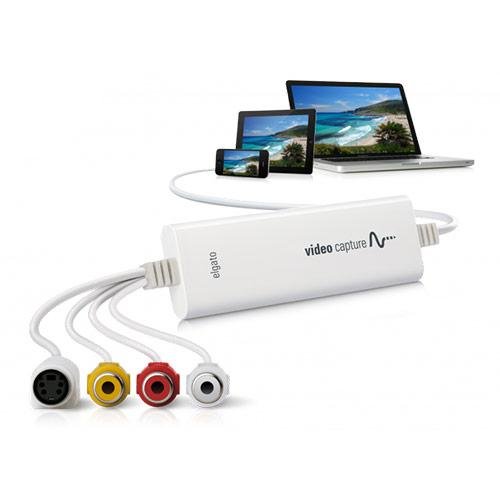
Elgato Video Capture - Capture analog video from any source for your Mac, iPod, and iPhone. Transfer video from VCR or other analog video source to your Mac in a format that is ready for iTunes, iPod or iPhone, YouTube, & iMovie. 1 Year Elgato Warranty. (10020840) Same Day $99.95
OWC Discounted Price: $96.97
Add to Your Basket:
 

Elgato
Video Capture
Capture Analog Video for your Mac, PC, iPad, and iPhone

Mac PC

Transfer video from a VCR or any other analog video source to your Mac or PC in a format that is ready for iTunes, your Windows Media Player library, your iPad, and YouTube.

Elgato Video Capture's easy-to-use software assists you through every step, from connecting an analog video source to recording the video on your computer and choosing how you will watch and share it.

There is no easier way to transfer home video to your computer to play in QuickTime or Windows Media Player, to sync with an iPad or iPhone, to edit in iMovie or Windows Live Movie Maker, or to upload to YouTube.


Turn analog into digital video

There is no easier or more convenient way to transfer home video to your Mac. Elgato Video Capture records from analog video sources in the H.264 or MPEG-4 formats that are native to iTunes. Your video is captured in real-time and no lengthy re-encoding is necessary; the video is immediately ready to sync with an iPod, iPhone, or Apple TV, to play in QuickTime, to edit in iMovie, or to upload directly to YouTube.

Put Family Memories on your computer

The era of VHS tapes is winding down, and after three decades there is a lot of video content to transfer for modern playback devices. What's more, any video stored on magnetic tape (such as VHS, Video8 and Hi8) has a limited life span and deteriorates over time.

Elgato Video Capture provides an easy way to bring those precious memories into iTunes or your Windows Media Player library.

Import from a DVR, DVD Player, or Set-Top Box

Perhaps you've been given a DVD from a family event or reunion and you want to share it by posting it on your website or on YouTube. Or you've saved some great movies and TV shows on your DVR and want to play them back on your iPad.

Elgato Video Capture can connect and capture video to your Mac or PC from any device that has composite "RCA" or S-Video outputs. It also comes with a SCART adapter.

Every step is made simple

Elgato Video Capture is very easy to use. The software assistant guides you through every step, from connecting an analog video device to capturing video and choosing how you will watch and share it. The software offers a simple tool to trim the beginning and end of the captured video.

With just one click, you can add your video to iTunes or to your Windows Media Player library; you can play back the video on your computer or sync it with your iPad or iPhone; you can upload your video directly to YouTube; and you can edit it right away in iMovie or Windows Live Movie Maker.

Package Includes
  • Video Capture Hardware
  • CD ROM
      Video Capture Software for PC and Mac
  • Composite to SCART adapter
  • Composite Video /RCA Stereo Cable
Specifications  
Video resolution
  • 640×480 (4:3) or 640×360 (16:9)
Video format Mac Software
  • H.264 at 1.4 MBit/sec or MPEG-4 at 2.4 MBit/sec
Video format PC Software
  • H.264 at 1.4 MBit/sec
Audio
  • AAC, 48kHZ, 128 kBit/sec
Mac System Requirements
  • Intel Core® processor
  • Mac OS X v10.5.8 or later
  • 1 GB RAM
  • built-in USB 2.0 port
PC System Requirements
  • Windows 7
  • 2.0 GHz Intel/AMD CPU or Intel Atom CPU
  • 1 GB RAM
  • built-in USB 2.0 port
Notes
  • Elgato Video Capture automatically detects NTSC, SECAM, PAL and PAL/60 video formats for worldwide compatibility.
  • Generated files can be synced with video capable iPads, iPods, iPhones and Apple TV and can be edited in iMovie or Windows Live Movie Maker without re-encoding.
Warranty 1 Year Manufacturer Warranty
Physical  
Dimensions 4.09" x 1.38" x 0.47" (104 x 35 x 12mm)
Weight 2.82 oz. (80 g)
cap
Load Time: 0.013 seconds, Guest ID: 210117914