CYBER WEEK DEALS

Sale Ends in

1d: 19h: 11m: 40s
Shop the Event »
Free shipping available on orders $99 & up!
  • Region: US/Intl icon arrow
    • Select your preferredcountry / region:

    • USA RegionUSA + International
    • Canada RegionOWC Canada

    • Experience local shipping options and optimized product inventory for your region.

  • Phone Icon1-800-275-4576
  • Intl: 1-815-338-8685
MacSales.com Powered By OWC
  • Support
  • Chat Contact
  • Account
    • Hello, Sign In
    • My Account
    • Order Status
    • Write A Review
    • Warranty & Returns
  • Cart
MacSales.com Powered By OWC
  • Support
  • Chat Contact
  • Account
    • Hello, Sign In
    • My Account
    • Order Status
    • Write A Review
    • Warranty & Returns
  • Cart
  • Featured & Specials
  • What's New
  • Chat
  • Support
      • Shop All
        • External Drives
        • Internal Drives
        • Apple & Macs
        • Docks & Connectivity
        • Cards & Readers
        • Batteries
        • Software & Apps
        • Cables & Adapters
        • Memory
        • PCIe Expansion
        • Specials & Featured
        Home » Thunderbolt » Thunderbolt Expansion Chassis

        We're sorry, but this item is no longer for sale. However, there may be more Thunderbolt » Thunderbolt Expansion Chassis items available.

        Firmtek

        ThunderTek/PX Thunderbolt™ to PCIe Chassis

        Mac / Thunderbolt / PCIe
        4-Port eSATA to Thunderbolt Adapter with Port Multiplier Compatibility
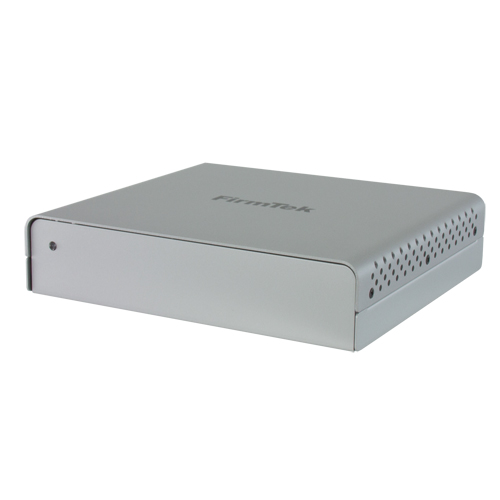
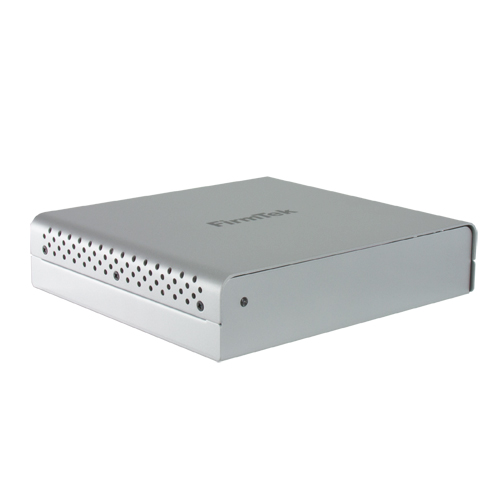
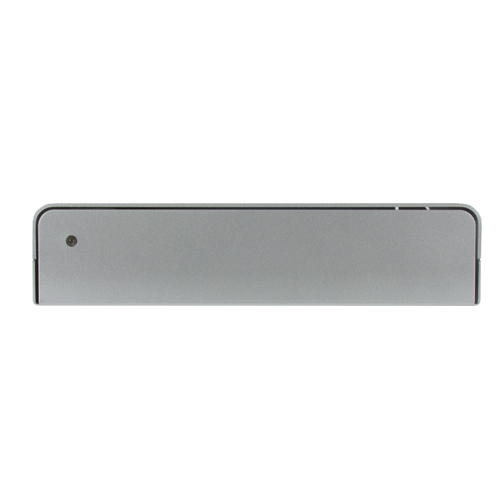
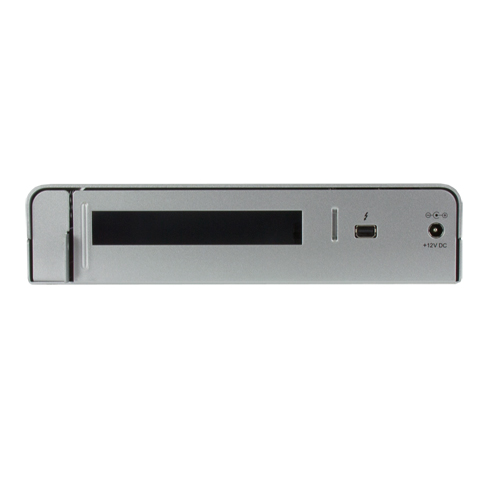
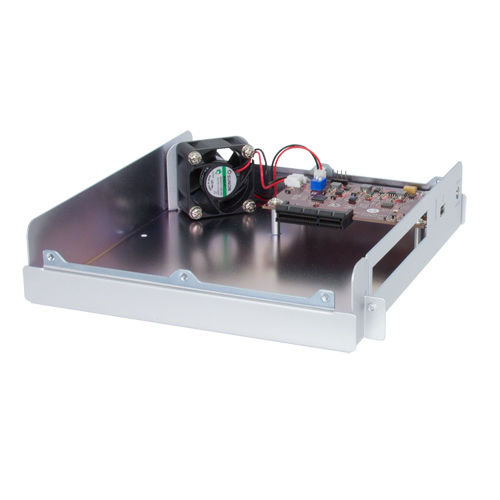
        The small, lightweight ThunderTek/PX, is perfect for supporting a single half-length PCIe card. Its silver brushed aluminum body provides durability and active heat dissipation, along with a whisper quiet fan. Installing a compatible PCIe card is simple. Just remove the screws on each side, take the top off and install your PCIe card inside the ThunderTek/PX chassis. Attach the Thunderbolt cable and your expansion card is ready to go.
        Blazing Fast Speeds
        This chassis is designed for connecting a PCIe 2.0 card to your 2011 or later MacBook Pro, MacBook Air, iMac, Mac mini, 2013 Mac Pro or other Thunderbolt equipped computers. Thunderbolt technology provides ultra fast 10Gbs bi-directional, dual channel bandwidth with the use of a single, compact port. This new high performance standard brings the power of PCIe expansion to notebooks as well as desktop computers. In the past, high performance PCIe slots were usually only found on bulky desktop computers. With the ThunderTek/PX in hand, customers can now connect a professional PCIe expansion card to any computer with a Thunderbolt port.
        Main Image
        • Gallery
        • Arrow
        • Gallery Pic 1
        • Gallery Pic 2
        • Gallery Pic 3
        •  
        • Gallery Pic 4
        • Gallery Pic 5
        • Gallery Pic 6
        Highlights
        • Adds PCIe 2.0 Expansion slot to Mac OS Computer with a Thunderbolt Port
        • Supports one half-length Thunderbolt enabled PCIe 2.0 card
        • Easy to set up: Simply Plug and Play
        • High-performance 10 Gb/s, dual channel, Thunderbolt technology
        • Energy Efficient: Powers on/off automatically with the computer
        • Attractive, light-weight, portable ThunderTek/PX PCIe expansion chassis
        • Silver aluminum chassis for maximum durability and heat dissipation
        • 1 Year Firmtek Warranty
        • SPECS
        • GALLERY
        • COMPATIBILITY
        • INCLUDES

        ThunderTek/PX Chassis Specifications:

        Firmtek Part Number

        • TT-PX

        System Requirements

        • Mac OS X 10.6.8 and later with an available Thunderbolt port
        • Windows 7 and later with an available built-in Thunderbolt port

        PCIe Slot Capacity

        • Accepts one PCIe card, up to 6-inches in length
        • Chassis supports compatible single half-length x1, x2 or x4 PCIe 2.0 card

        External Connectors

        • One Thunderbolt receptacle
        • One power adapter plug

        Cables Supported

        • Thunderbolt cable, up to 3 meter in length (copper)
        • Thunderbolt cable not included

        PCIe Cards Supported

        • FirmTek eSATA PCIe controllers (SeriTek/Q6G, SeriTek/e6G, SeriTek/2ME4-E)
        • Thunderbolt aware 3rd party PCIe controllers
        • PCIe based video cards are not supported.

        Data Transfer Rates

        • Thunderbolt bandwidth up to 1000 Mbytes/second or 10 Gbps burst data
        • PCIe controller installed will determine final transfer rates

        Advanced Power Features

        • Chassis auto powers down if no Thunderbolt host detected
        • Chassis auto powers down in Mac OS X sleep mode

        Color

        • Silver Aluminum

        Status LEDs

        • Enclosure Power on - Blue

        Power

        • Universal power adapter
        • Input: 105 - 240 VAC; 1.2A, 50-60Hz
        • Output: 12V 3.0A

        Environmental

        • Operation Temperature: +41°F to +131°F ( +5°C to +55°C)
        • Quiet fan with speed control

        Dimensions

        • 7.42" x 1.7" x 6.7" (188.5 x 43.5 x 170.5 mm)

        Weight

        • 1.5 lbs. (0.68 kg)

        Warranty

        • 1 Year Firmtek Warranty
        Manufacturer provided specifications for Firmtek p/n TT-PX

        Gallery


        Gallery Pic 1 Gallery Pic 2 Gallery Pic 3
        Gallery Pic 4 Gallery Pic 5 Gallery Pic 6
        This product is compatible with... Learn how to find your Mac's model ID
        Mac Pro
        Mac Pro
        (December, 2013)
        Model ID: MacPro6,1
        2.7GHz 3.0GHz, 3.5GHz, 3.7GHz
        Detailed specs
        Install Videos
        iMac Intel
        iMac w/Retina 5K display
        (27-inch Mid 2015)
        (May 2015)
        Model ID: iMac15,1
        3.3GHz i5, 3.5GHz i5, 4.0GHz i7
        Detailed specs
        Install Videos
        iMac Intel
        iMac w/Retina 5K display
        (27-inch Late 2014)
        (October 2014)
        Model ID: iMac15,1
        3.5GHz i5, 4.0GHz i7
        Detailed specs
        Install Videos
        iMac Intel
        iMac (27-inch Late 2013)
        (September 2013)
        Model ID: iMac14,2
        3.2GHz i5, 3.4GHz i5, 3.5GHz i7
        Detailed specs
        Install Videos
        iMac Intel
        iMac (27-inch Late 2012)
        (October 2012)
        Model ID: iMac13,2
        2.9GHz i5, 3.2GHz i5, 3.4GHz i7
        Detailed specs
        Install Videos
        iMac Intel
        iMac (27-inch Mid 2011)
        (May 2011)
        Model ID: iMac12,2
        2.7GHz i5, 3.1GHz i5, 3.4GHz i7
        Detailed specs
        Install Videos
        iMac Intel
        iMac (21.5-inch Mid 2014)
        (June 2014)
        Model ID: iMac14,4
        1.4GHz i5
        Detailed specs
        Install Videos
        iMac Intel
        iMac (21.5-inch Late 2013)
        (September 2013)
        Model ID: iMac14,3
        2.9GHz i5 or 3.1GHz i7
        Detailed specs
        Install Videos
        iMac Intel
        iMac (21.5-inch Late 2013)
        (September 2013)
        Model ID: iMac14,1
        2.7GHz i5
        Detailed specs
        Install Videos
        iMac Intel
        iMac (21.5-inch Early 2013)
        (March 2013)
        Model ID: iMac13,1
        3.3GHz i3
        Detailed specs
        Install Videos
        iMac Intel
        iMac (21.5-inch Late 2012)
        (October 2012)
        Model ID: iMac13,1
        2.7GHz i5 , 2.9GHz i5, 3.1GHz i7
        Detailed specs
        Install Videos
        iMac Intel
        iMac (21.5-inch Late 2011)
        (August 2011)
        Model ID: iMac12,1
        3.1GHz i3
        Detailed specs
        Install Videos
        iMac Intel
        iMac (21.5-inch Mid 2011)
        (May 2011)
        Model ID: iMac12,1
        2.5GHz i5 , 2.7GHz i5, 2.8GHz i7
        Detailed specs
        Install Videos
        Mac mini Intel
        Mac mini (Late 2014)
        (October, 2014)
        Model ID: Macmini7,1
        1.4GHz, 2.6GHz, 2.8GHz, 3.0GHz
        Detailed specs
        Mac mini Intel
        Mac mini (Late 2012)
        (October, 2012)
        Model ID: Macmini6,1 & Macmini6,2
        2.3GHz, 2.5GHz, 2.6GHz
        Detailed specs
        Install Videos
        Mac mini Intel
        Mac mini (Late 2012 Server)
        (October, 2012)
        Model ID: Macmini6,2
        2.3GHz, 2.6GHz
        Detailed specs
        Install Videos
        Mac mini Intel
        Mac mini (Mid 2011)
        (July, 2011)
        Model ID: Macmini5,1 & Macmini5,2
        2.3GHz, 2.5GHz, 2.7GHz
        Detailed specs
        Install Videos
        Mac mini Intel
        Mac mini (Mid 2011 Server)
        (July, 2011)
        Model ID: Macmini5,3
        2.0GHz
        Detailed specs
        Install Videos
        MacBook Pro Retina
        MacBook Pro (15-inch Retina display Mid 2015)
        (May, 2015)
        Model ID: MacBookPro11,4; MacBookPro11,5
        2.2GHz, 2.5GHz, 2.8GHz
        Detailed specs
        Install Videos
        MacBook Pro Retina
        MacBook Pro (13-inch Retina display Early 2015)
        (March, 2015)
        Model ID: MacBookPro12,1
        2.7GHz, 2.9GHz, 3.1GHz
        Detailed specs
        Install Videos
        MacBook Pro Retina
        MacBook Pro (13-inch Retina Display 2013 - 2014)
        (October, 2013 - July, 2014)
        Model ID: MacBookPro11,1
        2.4GHz, 2.6GHz, 2.8GHz, 2.9GHz, 3.0GHz
        MacBook Pro Retina
        MacBook Pro (15-inch Retina Display 2013 - 2014)
        (October, 2013 - July, 2014)
        Model ID: MacBookPro11,2
        2.0GHz, 2.2GHz, 2.5GHz, 2.8GHz
        MacBook Pro Retina
        MacBook Pro (15-inch Retina Display 2013 - 2014)
        (October, 2013 - July, 2014)
        Model ID: MacBookPro11,3
        2.3GHz, 2.5GHz, 2.6GHz, 2.8GHz
        MacBook Pro Retina
        MacBook Pro (15-inch Retina Display 2013)
        (January, 2013)
        Model ID: MacBookPro10,1
        2.4GHz, 2.7GHz, 2.8GHz
        Detailed specs
        MacBook Pro Retina
        MacBook Pro (13-inch Retina Display 2013)
        (January, 2013)
        Model ID: MacBookPro10,2
        2.5GHz, 2.6GHz, 2.9GHz, 3.0GHz
        Detailed specs
        MacBook Pro Retina
        MacBook Pro (13-inch Retina Display 2012-2013)
        (October, 2012)
        Model ID: MacBookPro10,2
        2.5GHz, 2.9GHz
        Detailed specs
        MacBook Pro Retina
        MacBook Pro (15-inch Retina Display 2012)
        (June, 2012)
        Model ID: MacBookPro10,1
        2.3GHz, 2.6GHz, 2.7GHz
        Detailed specs
        Install Videos
        MacBook Pro Unibody
        MacBook Pro (15-inch 2012)
        (June, 2012)
        Model ID: MacBookPro9,1
        2.3GHz, 2.6GHz, 2.7GHz
        Install Videos
        MacBook Pro Unibody
        MacBook Pro (13-inch 2012)
        (June, 2012)
        Model ID: MacBookPro9,2
        2.5GHz, 2.9GHz
        Install Videos
        MacBook Pro Unibody
        MacBook Pro (17-inch 2011)
        (October, 2011)
        Model ID: MacBookPro8,3
        2.4GHz, 2.5GHz
        Install Videos
        MacBook Pro Unibody
        MacBook Pro (15-inch 2011)
        (October, 2011)
        Model ID: MacBookPro8,2
        2.2GHz, 2.4GHz, 2.5GHz
        Install Videos
        MacBook Pro Unibody
        MacBook Pro (13-inch 2011)
        (October, 2011)
        Model ID: MacBookPro8,1
        2.4GHz, 2.8GHz
        Detailed specs
        Install Videos
        MacBook Pro Unibody
        MacBook Pro (17-inch Early 2011)
        (February, 2011)
        Model ID: MacBookPro8,3
        2.2GHz, 2.3GHz
        Detailed specs
        Install Videos
        MacBook Pro Unibody
        MacBook Pro (15-inch Early 2011)
        (February, 2011)
        Model ID: MacBookPro8,2
        2.0GHz, 2.2GHz, 2.3GHz
        Detailed specs
        Install Videos
        MacBook Pro Unibody
        MacBook Pro (15-inch Early 2011)
        (February, 2011)
        Model ID: MacBookPro8,2
        2.0GHz, 2.2GHz, 2.3GHz
        Detailed specs
        Install Videos
        MacBook Air
        MacBook Air (13-inch Mid 2017)
        (June 2017)
        Model ID: MacBookAir7,2
        1.8GHz i5, 2.2GHz i7
        Detailed specs
        Install Videos
        MacBook Air
        MacBook Air (13-inch Early 2015)
        (March 2015)
        Model ID: MacBookAir7,2
        1.6GHz i5, 2.2GHz i7
        Detailed specs
        Install Videos
        MacBook Air
        MacBook Air (11-inch Early 2015)
        (March 2015)
        Model ID: MacBookAir7,1
        1.6GHz i5, 2.2GHz i7
        Detailed specs
        Install Videos
        MacBook Air
        MacBook Air (13-inch Mid 2013)
        (June, 2013)
        Model ID: MacBookAir6,2
        1.3GHz, 1.7GHz
        MacBook Air
        MacBook Air (11-inch Mid 2013)
        (June, 2013)
        Model ID: MacBookAir6,1
        1.3GHz, 1.7GHz
        MacBook Air
        MacBook Air (13-inch Mid 2012)
        (June, 2012)
        Model ID: MacBookAir5,2
        1.8GHz, 2.0GHz
        Detailed specs
        Install Videos
        MacBook Air
        MacBook Air (11-inch Mid 2012)
        (June, 2012)
        Model ID: MacBookAir5,1
        1.7GHz, 2.0GHz
        Detailed specs
        Install Videos
        MacBook Air
        MacBook Air (13-inch Mid 2011)
        (July, 2011)
        Model ID: MacBookAir4,2
        1.7GHz, 1.8GHz
        Detailed specs
        Install Videos
        MacBook Air
        MacBook Air (11-inch Mid 2011)
        (July, 2011)
        Model ID: MacBookAir4,1
        1.6GHz, 1.8GHz
        Detailed specs
        Install Videos

        Includes

        • One ThunderTek/PX external chassis
        • Four rubber feet
        • Universal power adapter
        • One CD-ROM containing the ThunderTek/PX User's Manual
        Firmtek ThunderTek/PX Thunderbolt to PCIe Chassis Mfr P/N: TT-PX OWC SKU: FTKTTPX Adds a PCIe 2.0 Expansion slot to Mac OS Computer with a Thunderbolt Port Firmtek 1 Year Limited Warranty Ships: Sold Out
        Be the first
        Only $199.95Garage Sale Price $175.00
        Sold OutSold OutFirmtek TT-PX, Click to Buy Now
        Recommended Items:
        Cable OWC Thunderbolt cables
        0.5 to 30 Meters
        From $34.75
        PCIe Thunderbolt-aware PCIe cards From $9.99
        Helpful Links
        • About Us
        • DIY Install Videos
        • Join our Affiliate Network
        • Where to Buy
        • Accessibility Statement
        • Sustainability is Good Business
        • Join the OWC Team
        • Media+Newsroom
        • Privacy Promise
        Join the OWC Newsletter

        Join hundreds-of-thousands of tech enthusiasts across the planet and gain access to specials, clearance, and holiday savings on the OWC upgrades, drives, and docks everyone loves.

        • bbb
        © 2000-2025 Other World Computing, Inc., All Rights Reserved. Site Terms Guest ID:
        Your Privacy Choices
        This item has been added to your cart