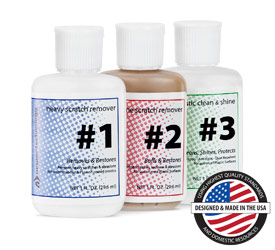
Manufacturer provided specifications for Newer Technology p/n NEWPOLISH UPC#: 853404001179
Instructions
#1 Heavy Scratch Remover
Requires use of #2 for final finishing. Shake well. Test in an inconspicuous area. Apply #1 liberally. Using a clean, soft cloth, polish with a firm back-and-forth motion at right angles to the scratches. Keep the cloth saturated with polish at all times. Continue polishing until only fine scratches remain. Using a clean cloth, it is important to remove all remaining polish! Using a clean cloth, apply #2 in a circular motion uniformly to entire surface. Polish using light pressure until #2 dries to a light haze. Using a clean portion of the cloth, buff the surface clean. Follow with #1 for best results.
#2 Fine Scratch Remover
Shake well. Test in an inconspicuous area. Apply #2 liberally. Using a clean, soft cloth, polish with a firm back-and-forth motion at right angles to the scratches. Keep the cloth saturated with polish at all times. When the worst scratches have been polished out, reapply #2 uniformly in a circular motion to the entire surface using short, circular strokes and light pressure. Allow to dry to a light haze. Using a clean portion of the cloth, buff the surface to a slippery glaze using firm, short strokes. This procedure is imperative in achieving the best results. For heavy scratches, multiple applications of #2 or application of #1 may be required. Follow with #3 for best results.
#3 Plastic Clean & Shine
If the surface is extremely dirty, apply #3 liberally and wipe using long, sweeping strokes. Do not use pressure at this time or large dirt particles may scratch the plastic. Re-apply #3. Polish using short, circular strokes with a clean portion of the cloth. When surface is thoroughly clean and uniformly covered, buff to a slippery glaze with a clean portion of the cloth. Surfaces buffed to a high glaze are more resistant to dust and future scratching. Reapply #3 regularly to maintain the anti static, smudge and scratch resistant properties.
Includes
(1) Bottle of Heavy Scratch Remover
(1) Bottle of Fine Scratch Remover
(1) Bottle of Plastic Clean & Shine
(1) Polishing Cloth
NewerTechClean and Polish KitMfr P/N: NEWPOLISHOWC SKU: NWTNEWPOLISH 3 step plastic polish system. Absolutely THE best way to remove scratches from your Apple iPod, iBook, MacBook (white) or any plastic surface!Ships: Sold Out


 1-800-275-4576