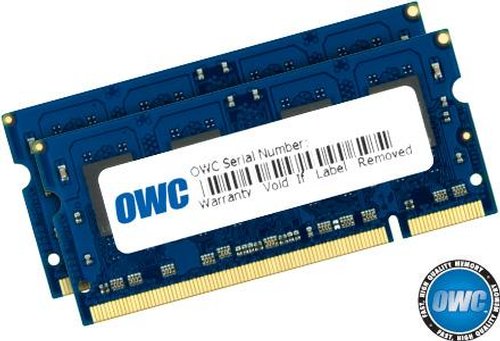
OWC 4GB High-Performance CL4 PC5300 DDR2 667MHz DIMM Upgrade Kit |
|


|
These High-Performance CAS 4 Low-Latency modules are designed and built for the true Power User seeking every last drop of system performance. Compared to standard spec CAS 5 modules, this CAS 4 SPD Optimized 4.0GB Kit provides roughly 5-6% more memory read/write maximum bandwidth. Real-world application benefit varies, but typically is at best a 1-2% benefit compared to having 4.0GB of standard spec CAS 5.0 memory.
Barefeats has done testing online here which you can see our OWC CAS4, CAS5 and competitor’s modules compared.
Whether you select our CAS 4 or our CAS 5 4.0GB Kit, just by upgrading your Intel Core 2 Duo Mac to 4.0GB gives a huge boost compared to a stock config with only 1.0GB or even 2.0GB installed. Amazingly even when you’re going from a 2.0GB to a 4.0GB with our standard CAS 5 memory can literally make your Mac 3X faster with certain real-world application usages. Only have 1GB and going to 4.0GB? – Prepare to be blown away! No matter which OWC memory you install, the most significant performance benefit comes from that additional memory being there. Our real-world memory performance test series which compares Apple factory installed base memory configurations vs. the same Intel Macs with up to 4.0GB of our standard Apple Spec CAS 5 memory by clicking here. |
Product Specifications:
-
Size: 4096MB (4GB) (2x 2GB Modules)
-
200-pin DIMMs
-
Data Rate = 667MHz
-
CAS: 4.0 Optimized SPD
-
Low Noise 8-Layer PCB
-
Premium Grade 800MHz DRAM clocked for optimized 667MHz Operation
-
Not overclocked memory, fully within DRAM specification!
-
Exceeds Apple/Intel Specifications
-
Fully compliant with JEDEC specifications
-
Lifetime Advance Replacement Warranty
|
|
OWC offers rebates on memory!
A rebate from OWC on your old memory module helps make upgrading to higher capacity chips even easier! From the date of purchase of a qualifying new memory module from OWC, we allow 60 days for you to return your old memory for a cash rebate! Once you've received and are satisfied with your new memory, just fill out our online rebate form or contact OWC Customer Service by phone Monday - Friday between 8:30AM and 8PM for a rebate RMA.
Please allow up to 14 Days from the time we receive your memory for testing and rebate processing. Your memory must be functioning correctly to qualify. Upon successful testing, a rebate check for the qualifying amount will be mailed to the billing address used on your new memory module purchase. It's that easy! :)
When you upgrade your memory from Other World Computing, a rebate for up to the same number of memory modules purchased is available for the return of your old module or modules! Module(s) must be in working order. |
| Click here to get your Model Identifier number |
| This module is compatible with the following MacBook Pro "Intel Core 2 Duo" Models: |
 |
Machines Have Model Identifier MacBookPro4,1
2.4GHz MacBook Pro 15" (Intel Core 2 Duo "Penryn" - February, 2008)
2.5GHz MacBook Pro 15" (Intel Core 2 Duo "Penryn" - February, 2008)
2.6GHz MacBook Pro 15" (Intel Core 2 Duo "Penryn" - February, 2008)
2.5GHz MacBook Pro 17" (Intel Core 2 Duo "Penryn" - February, 2008)
2.6GHz MacBook Pro 17" (Intel Core 2 Duo "Penryn" - February, 2008)
|
|
Machines Have Model Identifier MacBookPro3,1
2.2GHz MacBook Pro 15" (Intel Core 2 Duo "Santa Rosa" - June, 2007)
2.4GHz MacBook Pro 15" (Intel Core 2 Duo "Santa Rosa" - June, 2007)
2.6GHz MacBook Pro 15" (Intel Core 2 Duo "Santa Rosa" - November, 2007)
2.4GHz MacBook Pro 17" (Intel Core 2 Duo "Santa Rosa" - June, 2007)
2.6GHz MacBook Pro 17" (Intel Core 2 Duo "Santa Rosa" - November, 2007) |
 |
2.16GHz MacBook Pro 15" MacBookPro2,2 (Intel Core 2 Duo - October, 2006)
2.33GHz MacBook Pro 15" MacBookPro2,2 (Intel Core 2 Duo - October, 2006)
2.33GHz MacBook Pro 17" MacBookPro2,1 (Intel Core 2 Duo - October, 2006)
|
|
| This module is compatible with the following MacBook "Intel Core 2 Duo" Models: |
 |
2.0GHz MacBook 13.3" MacBook5,2 (nVidia GeForce 9200M) January 2009) |
 |
Machines Have Model Identifier MacBook4,1
2.1GHz MacBook 13.3" (Intel Core 2 Duo "Penryn" February 2008)
2.4GHz MacBook 13.3" (Intel Core 2 Duo "Penryn" February 2008) |
|
Machines Have Model Identifier MacBookPro3,1
2.0GHz MacBook 13.3" (Intel Core 2 Duo "Santa Rosa" Late 2007)
2.2GHz MacBook 13.3" (Intel Core 2 Duo "Santa Rosa" Late 2007) |
 |
Machines Have Model Identifier MacBookPro2,1
1.83GHz MacBook 13.3" (Intel Core 2 Duo)
2.0GHz MacBook 13.3" (Intel Core 2 Duo)
2.16GHz Macbook 13.3" (Intel Core 2 Duo)
|

(1.83GHz / 2.0GHz)

(2.0GHz / 2.16GHz) |
| This module is compatible with the following iMac "Intel Core 2 Duo" (Late 2007) Models: |
|
Machines Have Model Identifier iMac7,1
20" or 24" Models
2.0GHz iMac (Intel Core 2 Duo)
2.4GHz iMac (Intel Core 2 Duo) |
|
| This module is compatible with the following iMac "Intel Core 2 Duo Extreme" (Late 2007) Models: |
|
Machines Have Model Identifier iMac7,1
20" or 24" Models
2.8GHz iMac (Intel Core 2 Duo Extreme) |
|
| This module is compatible with the following iMac "Intel Core 2 Duo" (Late 2006) Models: |
|
17", 20" or 24" Models
2.0GHz iMac (Intel Core 2 Duo) iMac5,1
2.16GHz iMac (Intel Core 2 Duo) iMac5,1 & iMac6,1
2.33GHz iMac (Intel Core 2 Duo) iMac5,1 & iMac6,1
|
|
| This module is compatible with the following Mac mini "Intel Core 2 Duo" (Mid 2007) Models: |
|
Machines Have Model Identifier Macmini2,1
1.83GHz Mac mini (Intel Core 2 Duo)
2.0GHz Mac mini (Intel Core 2 Duo)
|
|
| This module is compatible with the following PC/Wintel Computers: |
- Compatible with Intel / AMD Process based PCs capable of using a module of the Specifications listed below. Our modules comply with JEDEC Specifications, document JESD79-2A.
|
| Special Notes: |
| Apple's Intel processor Mac models use "one of the fastest memory technologies available today—667 MHz, double data rate (DDR2), synchronous dynamic random-access memory (SDRAM). It ensures high performance and reliability by synchronizing memory speed with the speed of the central processor so that data can be delivered continuously and more rapidly to the processor. And if both slots are loaded with an equal amount of RAM, you can take advantage of the system's dual-channel memory architecture for an additional performance boost. With a dual-channel memory interface, both banks of SDRAM can be addressed at the same time, enabling Intel based Mac systems to reach a memory throughput of up to 10.7 GBps."
The above quoted portion is from Apple's website.
For a detailed comparison showing real-world performance gains, OWC has this page "Upgrading Memory in your MacBook - To Pair or Not to Pair". Click here to read that informative article.
|
|
|