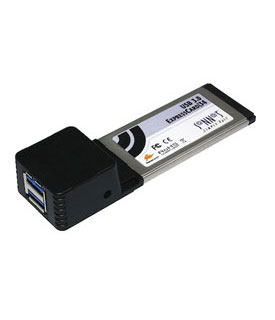
ExpressCard/34 SuperSpeed USB 3.0 Host Adapter
Supports Hot-Swap & Bus Power for USB 2.0* | Up to 127 USB 3.0 Devices
This card adds:
- Two External USB 3.0 Ports (up to 127 devices)
Requires:
- Available ExpressCard/34 Slot
See Specifiactions below for system and/or OS compatibility information |
- Simple way to add two SuperSpeed USB 3.0 ports to a MacBook Pro or PC notebook computer with ExpressCard/34 slot
- Transfers data up to 10x faster than over USB 2.0 connections
- Supports hot-swappable device connection—plug in and disconnect peripherals without shutting off your computer
|
 |
|
Add SuperSpeed USB Connections to Your MacBook Pro or PC Notebook Computer
Your MacBook Pro or PC notebook computer has USB 2.0 ports, and they've served you well. Talk about compatibility—keyboards, mice, printers, scanners, joysticks, digital cameras, flash drives—what couldn't you plug in? Talk about performance—well, that's where USB ports 2.0 are merely passable—they limit data transfer speeds to around 25–30 MB/s. For most peripherals, that's perfectly adequate, but when you connect an external drive and expect great performance, that bottleneck is a problem—video editing, backing up, and other data-intensive activities suffer as a result. Enter Sonnet's USB 3.0 ExpressCard/34 adapter, the bottleneck breaker! This Sonnet host controller is based on the new USB 3.0 standard that offers up to 10x the performance of the decade-old USB 2.0 interface. A single hard drive with a USB 3.0 interface is capable of transferring data at up to 125 MB/s, while SSDs (solid state drives) are capable of even faster transfers—insert Sonnet's USB 3.0 ExpressCard/34 adapter into your notebook computer's ExpressCard slot to exploit the full performance potential of these fast drives.
Sonnet's USB 3.0 ExpressCard/34 works in ExpressCard/34 and ExpressCard/54 slots. Each of this card's ports supports bus-powered peripherals (devices that work without a separate power supply, including some external drives and scanners*). Not only is this card backward-compatible with your USB 2.0 and USB 1.1 peripherals, it also supports hot-swappable device connection. Insert Sonnet's USB 3.0 ExpressCard/34 adapter into your MacBook Pro or PC notebook to experience the super speed of USB 3.0 connectivity firsthand. |
|
| Includes |
- Allegro USB 3.0 ExpressCard/34 host controller card
- Quick start guide
|
|
|
| Specifications |
| Ports |
|
| Connections |
|
| Bus Specifications |
|
| Form Factor |
|
| Transfer Rates |
- USB 3.0: 5.0Gb/s (or 500MB/s)
- USB 2.0: 480Mb/s (or 60MB/s)
- USB 1.1: 12Mb/s (or 1.5MB/s)
|
| Chipset |
|
| Operating System Support |
- Mac OS X Version 10.6+
- Windows 7
- Windows Vista
- Windows XP
|
| External Connectivity |
|
| Internal Connectivity |
|
| Hot Plug Support |
|
| Hot Swap Support |
|
| Agency Approvals & Compliance |
|
| Notes |
- The Mac OS X driver for this card does not support most USB 2.0 and USB 1.1 devices. iPods and iPhones are not supported. USB 3.0 hubs are not supported. Non-storage devices are not supported.
- Supports USB 3.0 media readers such as:
• Sonnet DiO Pro CompactFlash and SDXC USB 3.0 Media Reader
• Delkin Ddreader 42 USB 3.0 Universal Memory Card Reader
• Kingston USB 3.0 Media Reader
• Lexar Professional USB 3.0 Dual-Slot Reader
• Sony USB 3.0 XQD Card Reader
Not compatible with:
• Transcend USB 3.0 Super Speed Multi-Card Reader
- This is insufficient power to support USB 3.0 bus-powered 2.5" hard drives or SSDs. It is generally sufficient to support flash drives.
- USB 3.0 devices require USB 3.0 cables to support USB 3.0 (SuperSpeed) transfer speeds (up to 5 Gb/s). Use of USB 2.0 cables between USB 3.0 devices and USB 3.0 ExpressCard/34 is supported, but data transfers are limited to USB 2.0 speeds (up to 480 Mb/s).
- USB attached SCSI devices, such as the LaCie d2 USB 3.0 Thunderbolt Series under OS X 10.7+, not compatible with USB 3.0 duplicator stations, such as the Addonics Mini HDD Duplicatior Station.
- Not currently compatible with Echo ExpressCard Thunderbolt Adapter
|
| Warranty |
|
| Physical |
|
| Dimensions |
- 113mm(L) x 34mm(W) x 4mm(H)
|
| Weight |
|
|
| |
| Click here to get your Model Identifier number |
| This is compatible with the following laptops: |
 |
Machines Have Model Identifier MacBookPro8,3
MacBook Pro (17-inch Early 2011, 2.2GHz, 2.3GHz)
(February, 2011)
|
 |
 |
Machines Have Model Identifier MacBookPro6,1
MacBook Pro (17-inch Mid 2010, 2.53GHz, 2.66GHz, 2.8GHz)
(April, 2010)
|
 |
 |
Machines Have Model Identifier MacBookPro5,2
MacBook Pro (17-inch Mid 2009, 2.8GHz, 3.06GHz)
(June, 2009)
|
 |
 |
Machines Have Model Identifier MacBookPro5,2
MacBook Pro (17-inch Early 2009, 2.66GHz, 2.93GHz)
(January, 2009)
|
 |
 |
Machines Have Model Identifier MacBookPro4,1
MacBook Pro (17-inch Early 2008, 2.5GHz, 2.6GHz)
(February, 2008)
|
 |
 |
Machines Have Model Identifier MacBookPro3,1
MacBook Pro (17-inch Mid/Late 2007, 2.4GHz, 2.6GHz)
(June, 2007)
|
 |
 |
Machines Have Model Identifier MacBookPro2,1
MacBook Pro (17-inch Core 2 Duo, 2.33GHz)
(October, 2006)
|
 |
 |
Machines Have Model Identifier MacBookPro1,2
MacBook Pro (17-inch, 2.16GHz)
(April, 2006)
|
 |
 |
Machines Have Model Identifier MacBookPro5,1
MacBook Pro (15-inch Late 2008, 2.4GHz, 2.53GHz, 2.66GHz 2.8GHz)
(October, 2008)
|
 |
 |
Machines Have Model Identifier MacBookPro4,1
MacBook Pro (15-inch Early 2008, 2.4GHz, 2.5GHz, 2.6GHz)
(February, 2008)
|
 |
 |
Machines Have Model Identifier MacBookPro3,1
MacBook Pro (15-inch Mid/Late 2007, 2.2GHz, 2.4GHz, 2.6GHz)
(June, 2007)
|
 |
 |
Machines Have Model Identifier MacBookPro2,2
MacBook Pro (15-inch Core 2 Duo, 2.16GHz, 2.33GHz)
(October, 2006)
|
 |
 |
Machines Have Model Identifier MacBookPro1,1
MacBook Pro (15-inch Glossy, 2.0GHz, 2.16GHz)
(May, 2006)
|
 |
 |
Machines Have Model Identifier MacBookPro1,1
MacBook Pro (15-inch, 1.83GHz, 2.0GHz, 2.16GHz)
(January, 2006)
|
 |
 |
PC/Wintel Laptops running Windows XP or Windows 7
with available ExpressCard/34 slot
|
|
|
|