Free shipping available on orders $99 & up!
  • Business Icon For Business & More icon arrow
    • Creative, Production & PostCreative, Production & Post
    • Corporate & EnterpriseCorporate & Enterprise
    • Higher EducationHigher Education
    • State, Local & K-12 EducationState, Local & K-12 Education
    • House of WorshipHouse of Worship
    • Systems IntegratorSystems Integrator
    • HealthcareHealthcare
    • Federal, State & Local GovernmentFederal, State & Local Government
    • Join Today!

      Already registered? Sign In

  • Region: US/Intl icon arrow
    • Select your preferredcountry / region:

    • USA RegionUSA + International
    • Canada RegionOWC Canada

    • Experience local shipping options and optimized product inventory for your region.

  • Phone Icon1-800-275-4576
  • Intl: 1-815-338-8685
MacSales.com Powered By OWC
Site Search
  • Blog
  • Support
  • Account
    • Hello, Sign In
    • My Account
    • Order Status
    • Write A Review
    • Warranty & Returns
  • Cart
MacSales.com Powered By OWC
  • Support
  • Chat Contact
  • Account
    • Hello, Sign In
    • My Account
    • Order Status
    • Write A Review
    • Warranty & Returns
  • Cart
  • Specials & Featured
  • Rocket Yard Blog
  • Chat
  • Support
      • Shop All
        • Internal Drives
        • External Drives
        • Apple & Macs
        • Docks & Connectivity
        • Cards & Readers
        • Batteries
        • Software & Apps
        • Cables & Adapters
        • Memory
        • PCIe Expansion
        • Specials & Featured
        Home » Expansion Cards

        We're sorry, but this item is no longer for sale. However, there may be more Expansion Cards items available.
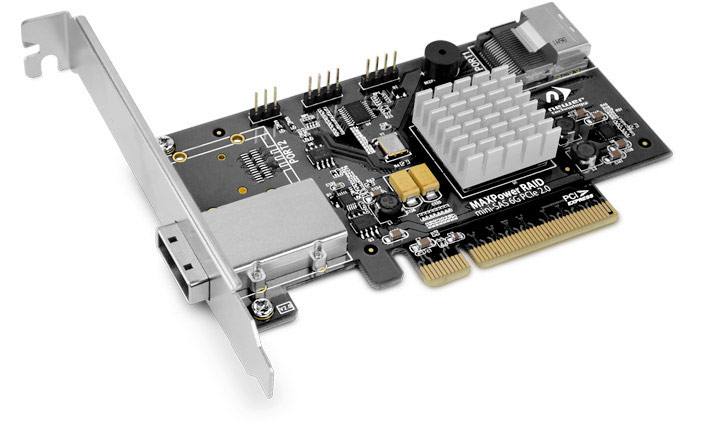
        MAXPower RAID mini-SAS 6G-1e1i
        One port external & one port internal mini-SAS 6Gb/s RAID controller card

        MAXPower RAID mini-SAS 6G

        Unleash your Performance Potential with up to 4800MB/s Data Transfer Rates!
        Eliminate the SATA drive bus speed limit! Adding the MAXPower RAID mini-SAS 6G-1e1i to your Mac or PC provides a SAS/SATA 6G (6.0Gb/s) drive bus with up to twice the data transfer speed, regardless  of your computer's built-in SATA 3G (3.0Gb/s) data bus. Utilizing the MAXPower's RAID processor, you can maximize your total performance up to 4800MB/s in RAID 0 mode or achieve the perfect balance of performance and protection in RAID 5 mode.

        This feature-rich, high-value mass storage controller card is an ideal solution for those working with multiple high-speed HD video streams and/or anyone seeking high performance daily IT operation and back-up for an SMB. With mini-SAS, there's no loss of throughput as it provides full data transfer of four drives through one connection.

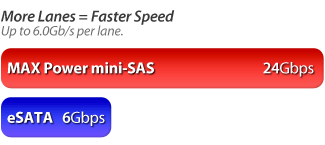
        More Lanes = Faster Speed
        Mini-SAS is like traffic moving on 4 lanes on the highway instead of just 1 lane.  Mini-SAS offers more "lanes" for data to travel, providing the ability to reach higher speeds.  Just like the SATA/eSATA interface, mini-SAS offers the convenience of a one cable connection. However, in a multi-drive SATA/eSATA solution which, only offers one lane for four drives to send/receive data on, mini-SAS provides four separate lanes so each drive can deliver its maximum capable data transfer rate. Now you can use one or more mini-SAS equipped external storage enclosures like the OWC Mercury Rack Pro for greater speed, protection, or both compared to single channel multi-drive eSATA RAID or eSATA Port Multiplier solutions.

        Why mini-SAS Chart

        Internal & External Ports
        The MAXPower RAID mini-SAS 6G-1e1i card features one external mini-SAS port and one internal mini-SAS port to connect and RAID external enclosures and internal drives.
        Automatic Device Passthrough
        The MAXPower RAID mini-SAS 6G-1e1i has an automatic passthrough feature that will pass any connected drive to the OS without needing to initialize it via the Web Manager. With other RAID cards, the card's RAID system takes immediate control of the drive rendering it unusable until you configure it. With the MAXPower RAID mini-SAS 6G-1e1i card, as soon as an unformatted drive is inserted, it is immediately available for formatting with no need to release it from the RAID system. This feature lets the card act like a non-RAID card, which is helpful when you just want to swap single non-RAIDed drives in and out quickly.

        Spare Pool Support
        The MAXPower RAID mini-SAS 6G-1e1i card can be configured to set aside extra drives in a "spare pool". If a drive should fail in RAID 1, 5, 10 or 50 modes, a drive from the spare pool is instantly implemented so a rebuild can start immediately, minimizing the risk of data loss.

        NewerTech RAID Manager Offers Easy Array Management
        This easy to use, web browser-based utility automatically logs all events that occur on the MAXPower RAID mini-SAS 6G-1e1i from minor issues like inconsistent data to major issues like a failed drive. The built-in scheduling system offers quick convenience in setting up RAID arrays, managing connected drives, viewing storage health status, and reviewing information about your connected storage. See RAID Manager tab below for specific details.
        What Is RAID?
        RAID stands for Redundant Array of Independent Drives. This means taking multiple matching drives and arranging them together to achieve a large storage space, high speed, data protection, or any combination of the three. The MAXPower RAID mini-SAS 6G-1e1i controller card supports RAID 0, 1, 5, 10 and 50 levels as well as supporting JBOD (SPAN and individual drive modes).

        JBOD (Independent Drives)
        Each drive appears independently with each drive presenting its stated capacity for use.
        JBOD (SPAN)
        Combines capacity of two or more drives of the same size without any RAID data distribution scheme into one logical desktop volume. Will also combine the capacity of varying size drives based on the lowest capacity drive in the set.
        RAID 0 (Stripe)
        Data is split into blocks over two or more drives at the same time for high speed and large capacity. This is the ideal RAID setting for demanding video production/editing.
        RAID 1 (Mirror)
        Data is written at the same time to two drives to provide a high level of data safety and redundancy.
        RAID 5 (Stripe with Parity)
        Data is Striped (RAID 0) while incorporating redundancy over three or more drives for the best combination of speed, capacity, and redundancy.
        RAID 10 (1+0)
        Data is Striped (RAID 0) over two Mirrored sets (RAID 1) of drives for fast redundancy.
        RAID 50 (5+0)
        Data is striped (RAID 0) over two RAID 5 sets to provide increased speed while maintaining redundancy.


        • FEATURES
        • INCLUDES
        • SPECS
        • RAID MANAGER
        • COMPATIBILITY
        • DOWNLOADS
        • RATINGS

        Features

        • High speed PCIe 2.0 x8 bandwidth for up to 4GB/s data throughput. PCIe 1.0 compatible with reduced speed.
        • Two mini-SAS Ports
          • 1x SFF-8088 external and 1x SFF-8087 internal mini-SAS port
        • SAS Expander support for connecting up to 128 SAS/SATA devices
        • Multiple RAID level support: 0/1/5/10/50 and JBOD
        • Hot plug and hot swap drive and solution support
        • Automatic device pass-through to OS
        • Easy to use browser based NewerTech RAID Manager interface
        • SHI (Storage Health Inspector) for monitoring and setting up reports, even via email, of array drives
        • Compatible with SAS and SATA based hard drives and SSDs
        • Compatibility
          • Intel-based Mac with OS X 10.6.8 or later (Including OS X Yosemite) and available PCIe x8 slot or through Thunderbolt with a PCIe expansion chassis.
          • PC with available PCIe x8 slot and Windows XP 32-bit and later;
          • x8 PCIe 2.0 slot or better required for optimal performance, but is backward compatible with PCIe 1.0.
        • 3 Year NewerTech Product Limited Warranty

        Includes

        MAXPower RAID mini-SAS 6G includes
        • MAXPower RAID mini-SAS 6G-1e1i RAID Controller Card
        • Low profile PCIe slot cover

        Product Specifications:

        Connector Type

        • External: 1x mini-SAS (SFF-8088)
        • Internal: 1x mini-SAS (SFF-8087)

        Channels

        • Eight total SAS/SATA 6.0Gb/s channels

        PCIe Slot Requirement

        • x8 (8 lane) PCIe 2.0 for optimum 4GB/s performance.
        • PCIe 1.0 compatible but delivers reduced speed up to 2GB/s.

        Bracket

        • Standard, full height with low profile option included

        Form factor

        • Low profile

        Drive support

        • SATA or SAS devices; larger than 2.2TB drive supported via 64bit LBA and sector size customization

        RAID Level

        • 0, 1, 5, 10, 50, JBOD (Independent and SPAN/Concatenated modes)

        Physical size

        • 4.96" (L) x 2.68" (W) (126.14mm (L) x 68.07mm (W)

        Weight

        • 2.9 ounces

        Color

        • Black PCB, silver heat sink

        Compatibility

        • Intel-based Mac with OS X 10.6.8 - 10.11 and available PCIe x8 slot or through Thunderbolt with a PCIe expansion chassis.
        • PC with available PCIe x8 slot and Windows XP 32-bit and later
        • x8 PCIe 2.0 slot or better required for optimal performance, but is backward compatible with PCIe 1.0.

        Bootability

        • Mac OS X Bootable: No
        • Windows Bootable: Yes from BIOS

        Operating Environment:

        Operating Temperature

        • +5 ~ +55 C

        Non-operating Temperature

        • -20 ~ +80 C

        Relative Humidity

        • 5%~60% non-condensing

        Operating Voltage

        • 3.3V (4W max) / 12V (1W max)
        * 48Gb/s total speed with up to 24Gb/s total speed per mini-SAS port. Speed depending on PCIe configuration, selected drives, RAID setting, and external mini-SAS equipped storage device. Manufacturer provided specifications for Newer Technology p/n NWTMXPRMS6G1E1I UPC#: 811643011977
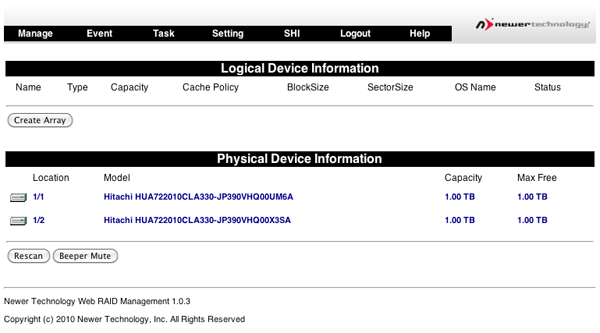
        NewerTech® Web Manager
        RAID Manager Screenshot
        The NewerTech® Web Manager is an easy-to-use browser-based utility to set up RAID arrays, manage connected drives, view storage health status, and view information about your connected storage.
        • Device management
        • Array management
        • Spare pool management
        • Event log
        • SHI (Storage Health Inspector)
        • Task scheduler
        • Settings
        Device Management
        RAID Manager Screenshot
        • Automatic Device Passthrough
        • Initializing Devices
        • Changing Device Settings
        • Rescanning for Devices
        • Unplugging Devices
        Array Management
        RAID Manager Screenshot
        The Array Management screen acts as the Web Manager's home screen, but to access it from any other screen click on the "Manage" menu item and select "Array" to enter the Array Management screen.
        Spare Pool Management
        RAID Manager Screenshot
        The purpose of a spare pool is to have drives in reserve to instantly take the place of any failed drives in a redundant RAID array such as a RAID 1, RAID 5, RAID 10, or RAID 50 array. This allows rebuilds to start instantly in order to minimize the risk of data loss.
        Events
        RAID Manager Screenshot
        The NewerTech Web Manager software will automatically log all events that occur on the MAXPower® controller card.
        • Indicates general information and occurrences.
        • Warning of minor occurrences and issues. These include plugging of devices into the card and minor issues such as inconsistent data that can be easily fixed by a verify or rebuild.
        • Warns of major occurrences and problems such as failed drives and improper disconnections of drives and arrays.
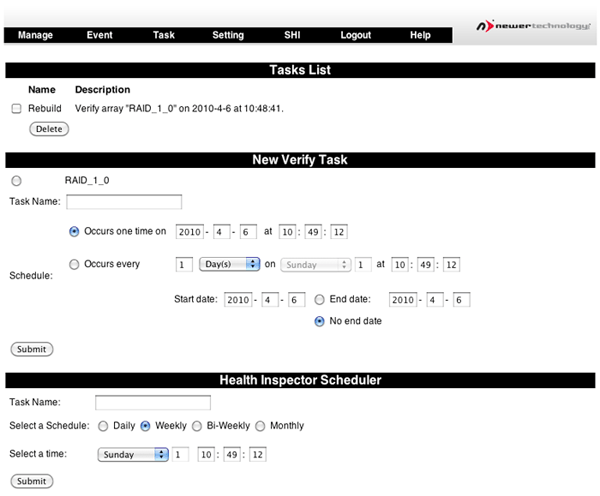
        Tasks
        RAID Manager Screenshot
        The NewerTech® Web Manager has a built-in scheduling system to run background rebuilds, verifications, integrity, and health checks to the attached arrays and drives. To enter the task scheduling systems, click on "Task" menu item.
        Settings
        RAID Manager Screenshot
        General configuration settings for the NewerTech® MAXPower® RAID mini-SAS 6G controller card can be set in the Settings page by clicking on the "Setting" menu item.
        • Auto Rebuild
        • Continue Rebuilding on Error
        • Audible Alarm
        • Rebuild Priority
        • Spindown Idle Disk
        • SAF-TE
        • Listening Port
        • Password
        • SMTP Setting / Recipients / Add Recipient
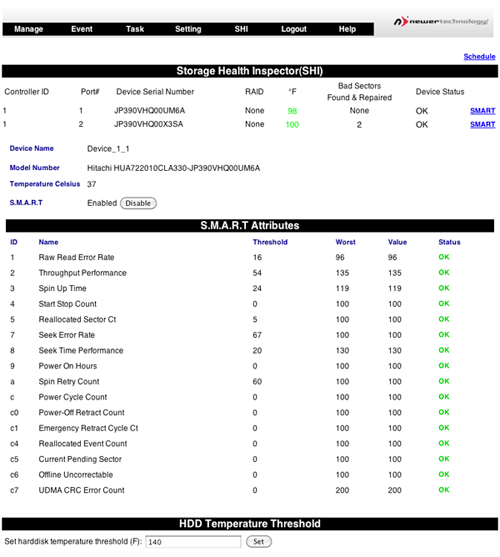
        SHI (Storage Health Inspector)
        RAID Manager Screenshot
        The NewerTech® Web Manager has a built-in health monitoring system to allow for monitoring of drive characteristics and S.M.A.R.T status attributes. To access, click on the "SHI" menu item.

        Self-Monitoring, Analysis, and Reporting Technology (S.M.A.R.T.) is a monitoring system built into drives to monitor different health attributes to assist in warning of potential problems before catastrophic failure can occur. To view the S.M.A.R.T status attributes of an attached drive, click on "SMART" to expand the attributes for viewing.
        Does the MAXPower mini-SAS 6G card support tape devices? The MAXPower mini-SAS 6G card was optimized to RAID HDD's and SSD's and does not support tape devices.
        Which Connecting Cable Should You Choose? When using Passive/passthrough mini-SAS storage solutions equipped with "6G" 6Gb/s (SATA 3.0 Revision) drives, we strongly recommend only using connecting cables of 1 meter or shorter length due to the increased signal integrity requirements of 6G drives. Active storage solutions such as SAS expander systems equipped with 6G drives can utilize mini-SAS connecting cables up to 10 meters in length. This is dependent upon the external enclosure.
        Boot Camp Compatibility Please note that running the MAXPower RAID mini-SAS 6G card in Windows XP is only supported on a PC and is not supported via Boot Camp on a Mac.  Windows Vista and 7 are fully compatible with the MAXPower RAID mini-SAS 6G card via Boot Camp on a Mac.


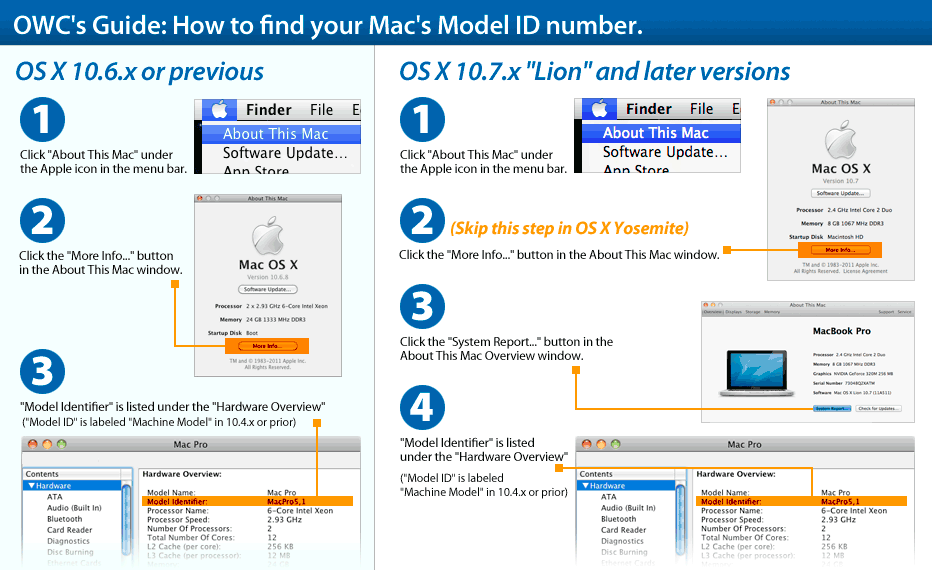
        This card is compatible with... Learn how to find your Mac's model ID
        Mac Pro
        Mac Pro 4-core (Mid 2006)
        (August, 2006)
        Model ID: MacPro1,1
        2.0GHz, 2.66GHz, 3.0GHz
        Detailed specs
        Install Videos
        Mac Pro
        Mac Pro 8-core (Early 2007)
        (April, 2007)
        Model ID: MacPro2,1
        3.0GHz
        Detailed specs
        Install Videos
        Mac Pro
        Mac Pro 4-Core (Early 2008)
        (January, 2008)
        Model ID: MacPro3,1
        2.8GHz
        Detailed specs
        Install Videos
        Mac Pro
        Mac Pro 8-Core (Early 2008)
        (January, 2008)
        Model ID: MacPro3,1
        2.8GHz, 3.0GHz, 3.2GHz
        Detailed specs
        Install Videos
        Mac Pro
        Mac Pro 4-Core (Early 2009)
        (March, 2009)
        Model ID: MacPro4,1
        2.66GHz, 2.93GHz, 3.33GHz
        Detailed specs
        Install Videos
        Mac Pro
        Mac Pro 12-Core (Mid 2012)
        (June, 2012)
        Model ID: MacPro5,1
        2.4GHz, 2.66GHz, 3.06GHz
        Detailed specs
        Install Videos
        Mac Pro
        Mac Pro 6-Core (Mid 2012)
        (June, 2012)
        Model ID: MacPro5,1
        3.33GHz
        Detailed specs
        Install Videos
        Mac Pro
        Mac Pro 4-Core (Mid 2012)
        (June, 2012)
        Model ID: MacPro5,1
        3.2GHz
        Detailed specs
        Install Videos
        Mac Pro
        Mac Pro 12-Core (Mid 2010)
        (July, 2010)
        Model ID: MacPro5,1
        2.66GHz, 2.93GHz
        Detailed specs
        Install Videos
        Mac Pro
        Mac Pro 8-Core (Mid 2010)
        (July, 2010)
        Model ID: MacPro5,1
        2.4GHz
        Detailed specs
        Install Videos
        Mac Pro
        Mac Pro 6-Core (Mid 2010)
        (July, 2010)
        Model ID: MacPro5,1
        3.33GHz
        Detailed specs
        Install Videos
        Mac Pro
        Mac Pro 4-Core (Mid 2010)
        (July, 2010)
        Model ID: MacPro5,1
        2.8GHz, 3.2GHz
        Detailed specs
        Install Videos
        Xserve Intel
        Xserve Quad-Core (Early 2009)
        (April, 2009)
        Model ID: Xserve3,1
        2.26GHz
        Detailed specs
        Xserve Intel
        Xserve 8-Core (Early 2009)
        (April, 2009)
        Model ID: Xserve3,1
        2.26GHz, 2.66GHz, 2.93GHz
        Detailed specs
        PC Desktop
        PC Desktops
        Compatible with Intel / AMD Process based PCs capable with the specifications listed above.
        OWC Helios
        OWC Mercury Helios
        Thunderbolt PCIe
        expansion chassis
        More info

        Downloads

        • Windows Drivers & Software ZIP file (5.2MB)
        • MAXPower RAID User Manual (3.3MB)
        • Download OS X Driver and Web RAID Manager for Mac (2.7MB)

        Customer Ratings

        Write a Review 4.7 / 5 58 out of 63 (92%) reviewers would recommend this product
        1 2 3
        Verified Buyer
        Reviewer: BassyBrooks Location: New Jersey Age: 45-54 Experience Level: IT Professional Owned Product: less than a month
        Rating: 5/5 "The place to go if you really want to get going" December 29, 2016 I've been a very long time satisfied customer of OWC now Mac sales. I can promise you that no matter how many internet searches you may go through seeking Apple/Mac technology or knowledge old and new, you will find yourself at Macsales.com. The truth of the matter is, Mac Sales is "The place to go if you really want to get going"

        I would recommend this item to a friend! This review is from NewerTech MAXPower 2x2 USB + eSATA 6G PCIe Expansion Card.

        Verified Buyer
        Reviewer: aapple Location: California Age: Over 65 Experience Level: Power User Owned Product: over 6 months
        Rating: 3/5 Works well with a caveat September 4, 2016 Once a drive mounts, it meets my expectations. However, it does not always mount the drive. I often have to power off the drive, disconnect, and restart to get it to mount. The card has been kindly replaced by OWC, but the problem persists so it must be inherent to the card or to the eSata protocol on my Mac.

        I would recommend this item to a friend! This review is from (*) NewerTech MAXPower 2-Port eSATA 6G Pro PCIe Expansion Card.

        Verified Buyer
        Reviewer: Anonymous Location: Cupertino, CA Experience Level: Power User Owned Product: 1-3 months
        Rating: 5/5 Adds eSATA & USB3 to a Pro July 21, 2016 Bought this along with a used Mac Pro for USB3 and eSata external disks. Went in easily enough and works fine for both types of disks. When I originally installed it, it would not power my Elite Mini USB3 drive. Working with Tech Support, it seemed the board had not “set” properly. Once I reinstalled it, it worked fine.

        I would recommend this item to a friend! This review is from NewerTech MAXPower 2x2 USB + eSATA 6G PCIe Expansion Card.

        Verified Buyer
        Reviewer: Anonymous Location: Halifax, NS Age: 55-65 Experience Level: Power User Owned Product: 5-6 months
        Rating: 5/5 Better than the rest, does what it says. June 16, 2016 This card just does what it says - USB 3 and esata - and does it really well. With other cards I have used (two others), drives can randomly unmount. Not with this one; it's uber reliable and requires no drivers.

        For me, this replaces a Caldigit combo card that was nothing but trouble, with no help from Caldigit support. Finally, a chip literally fell off the card. It was not soldered correctly.

        The Newertech card on the other hand, is well made and OWC support is excellent, before and after the sale. We use many of their products, including esata and thunderbolt raids.

        I would recommend this item to a friend! This review is from NewerTech MAXPower 2x2 USB + eSATA 6G PCIe Expansion Card.

        Verified Buyer Top 250 Contributor
        Reviewer: Anonymous Location: Jackson, MS Age: 25-34 Experience Level: IT Professional Owned Product: 3-4 months
        Rating: 5/5 Great Product! March 14, 2016 Works great-using it mostly for USB 3 connections while editing video.

        I would recommend this item to a friend! This review is from NewerTech MAXPower 2x2 USB + eSATA 6G PCIe Expansion Card.

        Verified Buyer
        Reviewer: Anonymous Age: 45-54 Experience Level: Hobbiest Owned Product: 1-3 months
        Rating: 5/5 Fantastic Addition January 1, 2016 Fast shipping and no issues with the item. Very Satisfied!

        I would recommend this item to a friend!

        Verified Buyer
        Reviewer: Anonymous
        Rating: 5/5 Update the Driver for El Capitan December 31, 2015 This is a Great card so Great that I purchased 5 of them. The problem, OWC isn't updating the driver so the card can work with OS X El Capitan. This leaves me in a really bad situation. I'm using these for my business and I can't upgrade my computers or buy a new computer. Because any new computers are running OS X El Capitan. I'm sure they sold a ton of these cards. I hope they make it right and make a driver for the card so I can upgrade to OS X El Capitan and future OS X operating systems.

        I would recommend this item to a friend! This review is from NewerTech MAXPower RAID Mini-SAS 6G 6G-2e PCIe Expansion Card.

        Verified Buyer Top 100 Contributor
        Reviewer: Anonymous Location: Tasmania, Australia Experience Level: Power User Owned Product: 1-3 months
        Rating: 5/5 Drop in and go December 3, 2015 I bought this board on the recommendation of OWC to replace an older board that required a driver but was no longer supported under OSX 10.11.

        I dropped it into my elderly Mac Pro and it has worked flawlessly since. Highly recommended.

        I would recommend this item to a friend! This review is from NewerTech MAXPower 2x2 USB + eSATA 6G PCIe Expansion Card.

        Verified Buyer
        Reviewer: Anonymous Location: Vancouver, Canada Age: 45-54 Experience Level: Power User Owned Product: over 6 months
        Rating: 4/5 Works well with my Mac Pro 5,1 and 14 drive RAID but... November 7, 2015 ...it's kind of wonky with El Capitan. It needs a driver refresh in order to work properly.

        I would recommend this item to a friend! This review is from NewerTech MAXPower 4-Port eSATA 6G PCIe Expansion Card.

        Response from OWC, Technical Support November 9, 2015 As stated in the specifications...Please note: Not supported by OS X 10.11 El Capitan at this time. Compatibility updates will be posted as they are made available. NewerTech is working on an updated driver.
        Verified Buyer Top 50 Contributor
        Reviewer: Anonymous Location: LFP Age: Over 65 Experience Level: Power User Owned Product: 5-6 months
        Rating: 5/5 Great speed boost for MacPro October 12, 2015 I had difficulty with a previous card; this one works flawlessly

        I would recommend this item to a friend! This review is from NewerTech MAXPower 2x2 USB + eSATA 6G PCIe Expansion Card.

        Verified Buyer Top 250 Contributor
        Reviewer: Anonymous Location: New York, NY Age: Over 65 Experience Level: Home User Owned Product: 1-3 months
        Rating: 5/5 Works fine August 25, 2015 No problems installing, works fine. The video helped.

        I would recommend this item to a friend! This review is from NewerTech MAXPower 2x2 USB + eSATA 6G PCIe Expansion Card.

        Verified Buyer
        Reviewer: Anonymous Location: SF CA Age: 35-44 Experience Level: Power User Owned Product: 1-3 months
        Rating: 5/5 works for me! August 24, 2015 Does exactly what it says, no fuss. I popped it in, plugged in eSATA, and away I went. No driver, no restarts, no "hmm . . . it was suppose to show up?"

        I would recommend this item to a friend! This review is from NewerTech MAXPower 2x2 USB + eSATA 6G PCIe Expansion Card.

        Verified Buyer Top 100 Contributor
        Reviewer: Anonymous Location: Dunedin, New Zealand Age: 45-54 Experience Level: IT Professional Owned Product: over 6 months
        Rating: 4/5 Great for old Mac Pros August 16, 2015 I kept my old Mac Pro going for another year by using this card.

        The eSATA ports don't always work with eSATA Docks with more than one bay, but that's an eSATA problem, not a problem with this card.

        I would recommend this item to a friend! This review is from (*) NewerTech MAXPower 2x2 USB + eSATA 6G PCIe Expansion Card.

        Verified Buyer
        Reviewer: Anonymous Location: Maryland Experience Level: IT Professional Owned Product: 3-4 months
        Rating: 5/5 Reliably Connects our two Sans Digital TR8M6Gs May 15, 2015 Pretty great solution, this card is the same chipset as the RR-644L I believe, at a great price. Works great in a Mac 1.1 server. Two 8 bay RAID towers hanging off this machine now, this card replaces the individual 2-port 642Ls that come with the towerrs. Very reliable, 24-7 uptime, all the time, now that everything is set. Took some finagling with the SD housings ("backplane" issues), but with everything under 1 year replacement warranty and patience, it worked out great. No troubles with the card, you'll need it for this type of application.

        I would recommend this item to a friend! This review is from NewerTech MAXPower 4-Port eSATA 6G PCIe Expansion Card.

        Reviewer: Anonymous Location: Indy, IN
        Rating: 5/5 Great card but incompatible with Drobo 5D May 12, 2015 This card worked perfectly with my Voyager S3 and my Mac Pro Early 2009 recognized it via the USB 3 port. I really enjoyed the USB 3 speed improvement over eSata. Unfortunately, it is not compatible with Drobo Dashboard according to Drobo tech support. I replaced it with the CalDigit FASTA-6GU3 Pro which was one of the USB 3 cards the Drobo support page recommended.

        I would recommend this item to a friend! This review is from NewerTech MAXPower 2x2 USB + eSATA 6G PCIe Expansion Card.

        Verified Buyer
        Reviewer: Anonymous Location: Pinehurst, NC Age: 35-44 Experience Level: Power User Owned Product: 1-3 months
        Rating: 4/5 Plug & Play Simplicity (Mac) May 5, 2015 Though I would love to have a new "black trash can" Mac Pro a purchase of a new Mac is not soon coming. As such, I am looking to get as much life out of my aging 2010 Pro. I've maxed out RAM, the startup drive is an SSD. The boundary I had reached was the I/Os. The Pro has USB 2.0 that are showing their age. Exchanging files of movies and pics that are collectively several gigs back and forth to external storage was time intensive. I had a couple of PCI slots I hadn't ever used and thought it was time.

        It was.

        This card was easily installed (I still marvel at the detail Apple puts into their machines, things that may never been seen/used like screws holding the plates on the back of the machine), removing place holding plate and lining up to logic board it was in. No software drivers needed, rebooting Mac and all ports were recognized and usable.

        The only caveat is that I did not need eSATA ports. I was looking for USB 3.0 connectivity and this was the only solution available. I have an external drive enclosure I use as an iTunes backup that has eSATA connectivity and other drives so this feature won't go to waste (though cables were needed to use them since I didn't have any). A fully USB 3.0 adapter would have been ideal but if you need to add life to your aging desktop this is your best bet. I forget sometimes about the drives connected and am amazed at how much faster the transfers are.

        This review is from NewerTech MAXPower 2x2 USB + eSATA 6G PCIe Expansion Card.

        Verified Buyer
        Reviewer: Anonymous Owned Product: 1-3 months
        Rating: 4/5 great card for external pcie box May 3, 2015 I put this card in a PCIe expansion box that has a mini-sas back-plane and four SSDs. Once support pointed me to the application I needed to run to get access to the card configuration, I was able to set up a striped set. I get just under 900MB/s read and write from four inferior SSDs. I do not think the card or the bus are the limiting factors, but the SSDs that I am using which are relatively cheap. I have connected the external mini-sas to an eSata docking station and the performance was poor, but I believe that was the docking station, not the card, since that docking station did not perform better connected to another eSata card or to USB3.

        I would recommend this item to a friend!

        Verified Buyer Top 250 Contributor
        Reviewer: Anonymous Location: South Bend, IN Age: 55-65 Experience Level: IT Professional Owned Product: 1-3 months
        Rating: 5/5 Works great for external eSATA RAID 5 April 30, 2015 Purchased this because I was running out of USB ports and wanted to give eSATA a try with my external RAID 5 box. Works great, fast, reliable, and inexpensive. Plug and chug, no software needed. Great little card.

        I would recommend this item to a friend! This review is from (*) NewerTech MAXPower 2-Port eSATA 6G Pro PCIe Expansion Card.

        Verified Buyer
        Reviewer: Anonymous Location: utah Age: 35-44 Experience Level: IT Professional Owned Product: 3-4 months
        Rating: 5/5 Quick Install and Good Performance April 24, 2015 Used 3x WD red nas drives to setup an esata raid 5 array. With only that many drives I'm still seeing good performance and stability. Web interface helps me setup tasks and view events. Using it as a data storage area yet still windows wont boot while esata cable is connected so still looking into that.

        *allows for hot spare that wasnt listed on the technical details/specs. would have liked to see more details on the site

        I would recommend this item to a friend! This review is from NewerTech MAXPower 4-Port eSATA 6G PCIe Expansion Card.

        Verified Buyer Top 250 Contributor
        Reviewer: Valobal Location: Mexico DF Age: 35-44 Experience Level: Power User Owned Product: 1-3 months
        Rating: 5/5 It gives to my MacPro early 2008 a new life! April 2, 2015 It gives to my MacPro early 2008 a new life! With USB 3.0 drives or sticks get faster speed transfers. So on, with the eSATA port, it is a great choice to make a old MacPro with a newer and faster connectivity.

        I would recommend this item to a friend! This review is from NewerTech MAXPower 2x2 USB + eSATA 6G PCIe Expansion Card.

        Reviewer: Anonymous Location: mid-west US Age: 55-65 Experience Level: IT Professional Owned Product: 1-3 months
        Rating: 5/5 works as advertized, good performace, great value March 1, 2015 This card works as advertised (bootable, no driver needed, stable, good performance, does not support port-multiplexer). The data transfer rate is good but not quite maximal. When directly connected to a high-performance SSD drive (Samsung 850 EVO, capable of 500MB/s) it maxes out at about 375 MB/s (even under optimal conditions; only card on bus, one disk connected, 2.93GHz MacPro4,1). However it is great value for the money and has good support for external cases such as the NT silver miniStack.

        I would recommend this item to a friend! This review is from (*) NewerTech MAXPower 2-Port eSATA 6G Pro PCIe Expansion Card.

        Verified Buyer Top 250 Contributor
        Reviewer: Anonymous Location: California Age: Over 65 Experience Level: Power User Owned Product: 3-4 months
        Rating: 5/5 Feel like a geek and install a PC card January 19, 2015 I wanted to have USB3 access on my MacPro tower from 4 years ago. This card works like a charm, and so I bought another one - total of two - so I could plug in 4 external USB 3 items. Just wish the ports on the front of the machine were USB3. Still it is super to be able to keep this older computer working at closer to new computer speeds.

        I would recommend this item to a friend! This review is from NewerTech MAXPower 2x2 USB + eSATA 6G PCIe Expansion Card.

        Verified Buyer Top 250 Contributor
        Reviewer: Anonymous Location: La. Age: 55-65 Experience Level: Power User Owned Product: over 6 months
        Rating: 5/5 outstanding fast e-sata card January 14, 2015 I've had this card for a year now and it works perfect . No issues at all . It also Boots . I might have to buy another one because I can't find a USB 3.0 card that will boot .

        I would recommend this item to a friend! This review is from (*) NewerTech MAXPower 2-Port eSATA 6G Pro PCIe Expansion Card.

        Verified Buyer
        Reviewer: Anonymous
        Rating: 5/5 Solid upgrade to MacPro tower January 5, 2015 This is a solid card, and was purchased because it works with OS X 10.6.8. The only odd thing is that it requires a password when ejecting a drive - but no performance glitches at all.

        I would recommend this item to a friend! This review is from NewerTech MAXPower 2x2 USB + eSATA 6G PCIe Expansion Card for Mac OS X 10.6 to 10.8.2.

        Verified Buyer
        Reviewer: Anonymous Location: Los Angeles, CA Age: 55-65 Experience Level: Home User Owned Product: 1-3 months
        Rating: 5/5 Just Right December 11, 2014 I was looking for a card that would allow me to use USB 3.0 on an early 2009 Mac Pro running Snow Leopard. At one point--at another site--I was told there was no such thing. Well, yes there is and here it is. And it works fine, at least up to this point in time. I had to get an external drive that has a port only for USB 3.0. It's working perfectly, no problems.

        That speaks for the card.

        And thanks to Robert (If I'm remembering correctly?) for his help. People here are great, always knowledgeable; thus, very helpful.

        I would recommend this item to a friend! This review is from NewerTech MAXPower 2x2 USB + eSATA 6G PCIe Expansion Card for Mac OS X 10.6 to 10.8.2.

        1 2 3
        NewerTech® MAXPower RAID mini-SAS 6G-1e1i One port external & one port internal mini-SAS 6Gb/s RAID controller card Mfr P/N: NWTMXPRMS6G1E1I OWC SKU: NWTMXPRMS6G1E1I 3 Year Newer Technology Limited Warranty Ships: Sold Out
        Reviews (63)
        Only $279.99MacSales.com Price $229.00
        Sold OutSold OutNewer Technology NWTMXPRMS6G1E1I, Click to Buy Now
        Additional Options: With USB 3.2 (5Gb/s) Ports
        • 4 x USB
          • Ships: In Stock
          • Only $49.99
          • CyberSaver $44.99
        Related Items:
        OWC Mercury EXTREME Pro SSD OWC 1 Meter External Mini-SAS Cable For greater speed, protection, or both compared to single channel multi-drive eSATA RAID or eSATA Port Multiplier solutions. only $29.75
        Micro Accessories OWC Mercury Rack Pro 4 Bay 1U Rackmount RAID Ready Solution with SAS Interface. from $649.99
        Helpful Links
        • About Us
        • DIY Install Videos
        • Join our Affiliate Network
        • Where to Buy (opens in a new tab)
        • Accessibility Statement
        • Sustainability is Good Business
        • Join the MacSales.com Team
        • Media+Newsroom
        • Privacy Promise
        • MacSales.com for Business
        Join the MacSales.com Newsletter

        Join hundreds-of-thousands of tech enthusiasts across the planet and gain access to specials, clearance, and holiday savings on the OWC upgrades, drives, and docks everyone loves.

        Newsletter Subscription

        Please enter a valid email address.

        • bbb
        © 2000-2026 Other World Computing, Inc., All Rights Reserved. Site Terms Guest ID:
        Your Privacy Choices
        This item has been added to your cart