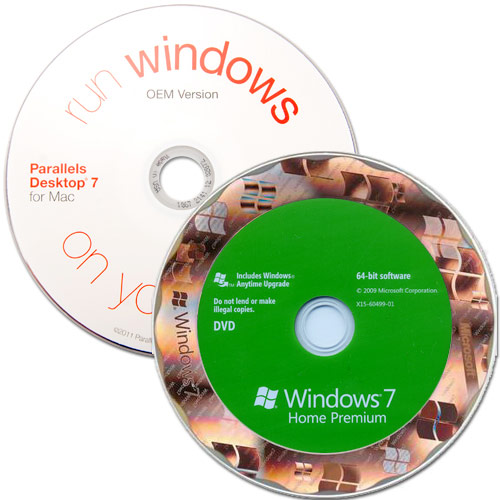
Desktop 7 For Mac/Windows 7 Home Premium OEM
OEM Versions | No Retail Box | Run 64 Bit Windows On Your Mac!
OWC Note: All purchases of Parallels 7 dated July 25, 2012 or later are entitled to a FREE upgrade to Parallels 8 when it is released on September 4th, 2012.
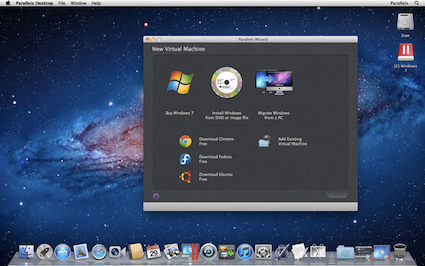
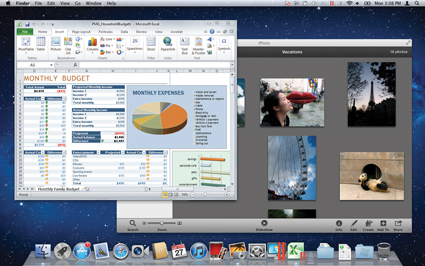
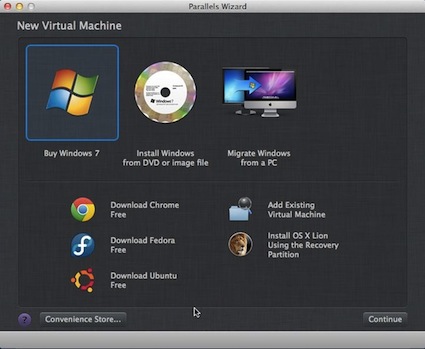
Parallels Desktop 7 for Mac is the #1 choice of customers worldwide to seamlessly run Windows applications on a Mac without rebooting. Run your day-to-day Windows productivity applications, and even the most demanding graphical apps without compromise. Run Internet Explorer, Windows Media Player, Access, OneNote or other applications not available on the Mac, and Parallels Desktop 7 even gives all these and other Windows applications some of the user interface improvements in Mac OS X 10.7 ("Lion").
Windows 7 Home Premium makes the things you do every day easier. With fewer clicks, faster searching, easier browsing, and simpler ways to connect, there's less between you and what you want to do. Windows 7 is designed to improve the performance of your PC, so it's faster, more secure, and more reliable. PCs with Windows 7 simply work the way you want them to work.
|
|
|
Parallels Desktop 7 is the fastest way to run the most graphical intensive Windows programs and the most powerful cross-platform Windows development tools. Access your Windows applications on all your Apple devices everywhere you go by remotely controlling Windows program from your iPad or iPhone with the improved Parallels Mobile app. Get the look & feel that you feel most comfortable with: if you love the look & feel of the Mac OS, make Windows invisible while still using its applications. If you're new to Mac, keep the familiar Windows background and Start menu on your Mac. Either way, run Windows and Mac applications side-by-side with no compromises in performance.
|
Run Windows applications like
they were made for your Mac. |
Enjoy the best performance
on the market |
Run thousands of Windows applications at lightning speed
on your Mac |
Parallels Desktop 7 for Mac takes advantage of Mac OS X Lion's great features and applies them to Windows programs, like support for Launchpad and Mission Control.
With over 90 new and enhanced features, this latest version makes your Windows applications feel like they were made for Mac. The result? A more intuitive and powerful way to use Windows and Mac side-by-side in a seamless user experience. |
- New! Lion integration and support, including Launchpad and Mission Control for Windows programs
- New! Shared iSight and FaceTime HD cameras in both Windows and Mac applications
- New! Lion as a guest OS
- Enhanced! Up to 1 GB of video memory, for ultra-high resolutions and maximum quality settings
- Enhanced! With the new Parallels Mobile App, copy-and-paste, enjoy audio, and access your Mac and Windows programs with your iPad, iPhone or iPod touch.
|
- Enhanced! Increased graphics performance: up to 45% faster for 3D graphics compared to previous versions
- Enhanced! Start, stop and resume Windows more quickly, as much as 60 %, every time you launch Windows
- Enhanced! When copying files within Windows, Parallels Desktop 7 outperforms its competitor by 120 %
|
|
| System Requirements |
|
| Software Requirements |
- Mac OS X Lion v10.7.0 or later
- Mac OS X Snow Leopard v10.6.3 or later
- Mac OS X Leopard v10.5.8 or later
Note: Mac OS X Tiger v10.4.x is not supported in this version of Parallels Desktop.
|
| Hardware Requirements |
- A Mac computer with an Intel Core 2 Duo, Core i3, Core i5, Core i7, or Xeon processor.
- Minimum 2 GB of memory (4 GB of memory is recommended to run Windows 7 in a virtual machine or if your host OS is Lion)
- About 500 MB of disk space on the boot volume (Macintosh HD) for Parallels Desktop installation.
- About 15 GB of disk space for each virtual machine.
|
| Windows Requirements |
- Required Processor
1 GHz or faster 64-bit processor
- Required Memory
2 GB RAM
- Required Hard Disk Space
20 GB available disk space
- Required Media Drive
DVD/CD authoring requires a compatible optical drive
- Required Connectivity
Internet access (fees may apply)
- Required Sound Card
Music and sound require audio output
- Required Video Card
DirectX 9 graphics processor with WDDM 1.0 or later driver
- Additional System Requirements
Product functionality and graphics may vary based on your system configuration. Some features may require advanced or additional hardware.
- Depending on resolution, video playback may require additional memory and advanced graphics hardware.
- Other System Requirements
Additional requirements to use certain features: Internet access (fees may apply). Depending on resolution, video playback may require additional memory and advanced graphics hardware. For some Windows Media Center functionality, a TV tuner and additional hardware may be required. Windows Touch and Tablet PCs require specific hardware. HomeGroup requires a network and PCs running Windows 7. DVD/CD authoring requires a compatible optical drive. Music and sound require audio output. Product functionality and graphics may vary based on your system configuration. Some features may require advanced or additional hardware.
|
| Supported Guest Operating Systems |
- 32-bit Operating Systems
- Windows 7
- Windows Vista® SP 0, SP 1, SP 2
- Windows Server® 2008 R2, SP2, SP1, SP0
- Windows Server® 2003 R2, SP2, SP1, SP0
- Windows XP Professional SP3, SP2, SP1, SP0
- Windows XP Home SP3, SP2, SP1, SP0
- Windows 2000 Professional SP4
- Windows 2000 Server SP4
- Windows NT 4.0 Server SP6
- Windows NT 4.0 Workstation SP6
- Windows ME
- Windows 98 SE
- Windows 95
- Windows 3.11
- MS-DOS 6.22
- Red Hat Enterprise 5.x, 4.x
- Fedora 14, 13, 12
- Ubuntu 10.10, 10.04, 9.10, 9.04, 8.10
- CentOS 5.x, 4.x
- Debian 5.0
- Suse Linux Enterprise Server 11, 10 SP2
- Suse Linux Enterprise Desktop 11
- OpenSUSE Linux 11.x
- Mandriva 2010, 2009
- Solaris 10
- Open Solaris 2009.06
- FreeBSD 8.x, 7.x
- OS/2® Warp 4.5, 4
- eComStation™ 1.2
- Mac OS X Leopard Server 10.5.x
- Mac OS X Snow Leopard Server 10.6.x
- 64-bit Operating Systems
- Windows 7 (Included)
- Windows Vista® SP 0, SP 1, SP 2
- Windows Server® 2008 R2, SP2, SP1, SP0
- Windows Server® 2003 R2, SP2, SP1, SP0
- Windows XP Professional SP2
- Red Hat Enterprise 5.x
- Fedora 14, 13, 12
- Ubuntu 10.10, 10.04, 9.10, 9.04, 8.10
- CentOS 5.x
- Debian 5.0
- Suse Linux Enterprise Server 11, 10 SP2
- Suse Linux Enterprise Desktop 11
- OpenSUSE Linux 11.x
- Mandriva 2010, 2009
- Solaris 10
- Open Solaris 2009.06
- FreeBSD 8.x,7.x
- Mac OS X Leopard Server 10.5.x
- Mac OS X Snow Leopard Server 10.6.x
* - Virtual machine operating systems - such as Windows, Linux, and Solaris - are not included. |
|


 1-800-275-4576