


 1-800-275-4576

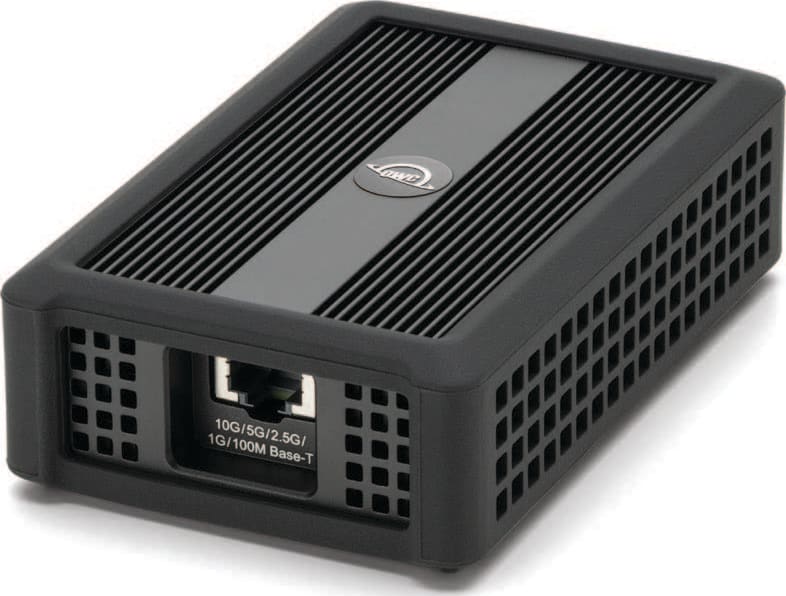
OWC Thunderbolt 4 10G Ethernet Adapter
Support Manual
Introduction
1.1 System Requirements
Operating System & Hardware
- Works with any Thunderbolt 5 | Thunderbolt 4 | Thunderbolt 3 (Mac Only) | USB4 | USB-C equipped:
- Mac: macOS 12.x or later
- Intel Mac systems require macOS 15.x or later
- PC: Windows 11 or later
- Mac: macOS 12.x or later
Network Connections:
- 10GbE, 5GbE, 2.5GbE, 1GbE & 100MbE
Required Drivers:
- Windows: Marvell AQC113 Driver
1.2 Package Contents
- (1) OWC Thunderbolt 4 10G Ethernet Adapter
- (1) 0.3M (12") Thunderbolt 4 Cable
1.3 Front Overview
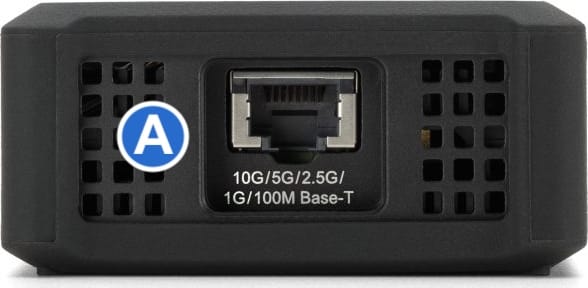
A. (1) RJ45 (10GBase-T) Ethernet Port:
- Left LED (100M/1G/2.5G/5G) = Solid Green
- Left LED (10G) = Solid Orange
- Right LED (Network Connection) = Solid Green
- Right LED (Network Activity) = Blink Green
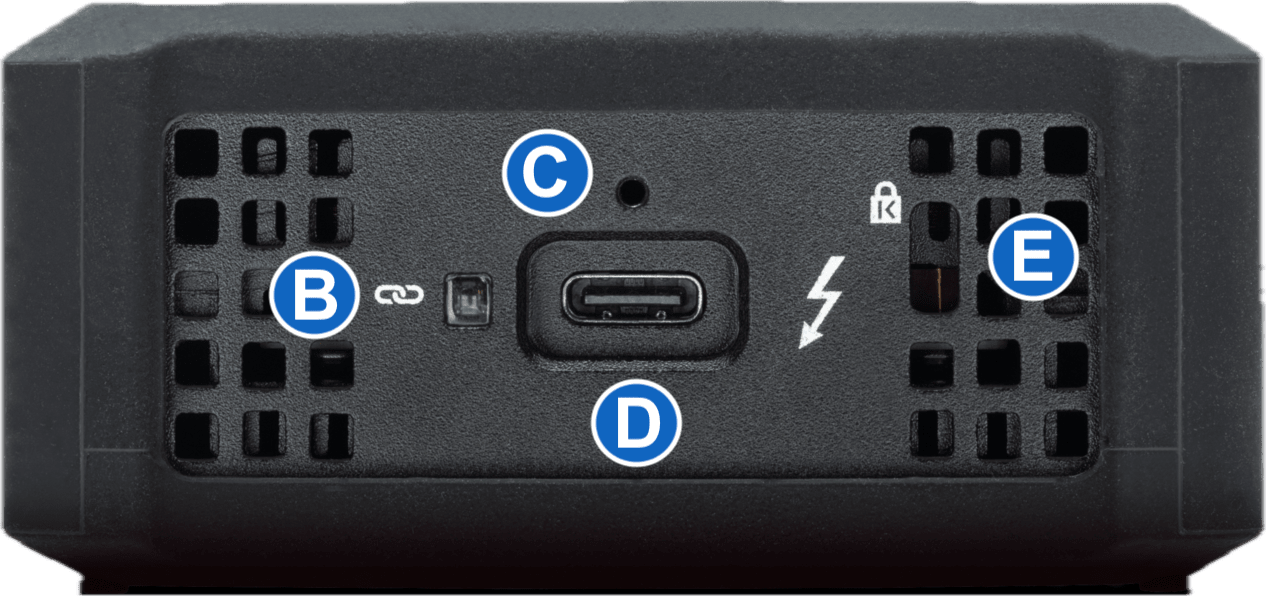
B. (1) Network Connection LED Indicator = Solid Blue
C. (1) OWC ClingOn-ready cable stabilizer mount – Affix ClingOn to help prevent accidental cable disconnections (sold separately)
D. (1) Thunderbolt 4 Host Port - Connect included Thunderbolt cable to a compatible system
E. (1) Kensington Security Slot – Attach a Kensington Security lock.
Getting Started
2.1 Device Setup
1. Connect the included 0.3M (12") Thunderbolt 4 Cable to the Thunderbolt 4 Host Port on the OWC Thunderbolt 4 10G Ethernet Adapter. Connect the other end of the cable into a compatible host.
2. Connect a Cat6 ethernet cable to the RJ45 (10GBase-T) Ethernet Port on the OWC Thunderbolt 4 10G Ethernet Adapter. Connect the other end of the cable into a desired network host.
Device Management
3.1 Windows Driver Instructions
The OWC Thunderbolt 4 10G Ethernet Adapter requires a driver to work properly with Windows or Linux.
- Downloaded the required driver by visiting: www.marvell.com/support/downloads.html#
- Filter the available drivers by selecting the following for the available sections:
- Category: Marvell Public Drivers
- Platform: Windows or Linux
- Part Number: AQC113
- Locate and download the appropriate "Marvell AQtion Driver" from the listed available options.
- NOTE: The "Marvell AQtion Firmware Updater Utility" is not required and should not be downloaded.
- Access the downloaded driver folder and launch the Marvell AQtion Installer.
3.2 Usage Notes
- High quality Cat-6A Ethernet cable is recommended for distances up to 100m. At shorter distances, it’s possible to use cables of lower grade (e.g. Cat-6 for 10G or Cat-5e for 5G up to 55m).
Support Resources
4.1 Troubleshooting
- Verify the Thunderbolt 4 cable is securely connected between the OWC Thunderbolt 4 10G Ethernet Adapter and host.
- Connect the OWC Thunderbolt 4 10G Ethernet Adapter and host with a different Thunderbolt 4 cable.
- Connect the OWC Thunderbolt 4 10G Ethernet Adapter to a different host.
- Connect the OWC Thunderbolt 4 10G Ethernet Adapter and network host with a different Cat cable.
- Confirm the network host is activity providing a connection.
- We are very sorry If issues continue to occur. Please know that OWC support is here to help. Contact information for our support can be found in section 4.4 "Contacting Support". Please have your serial number ready which is located on the bottom of the OWC Thunderbolt 4 10G Ethernet Adapter and printed on the original packaging.
4.2 Online Resources
- OWC Thunderbolt 4 10G Ethernet Adapter Product Page
- OWC Thunderbolt 4 10G Ethernet Adapter Support Guide Page
4.3 About Data Backup
To ensure that your files are protected and to prevent data loss, we strongly suggest that you keep two copies of your data on either your internal drive or another storage medium, such as an optical backup, or on another external storage unit. Any data loss or corruption while using the OWC Thunderbolt 4 10G Ethernet Adapter is the sole responsibility of the user, and under no circumstances may OWC, its parents, partners, affiliates, officers, employees, or agents be held liable for loss of the use of data including compensation of any kind or recovery of the data.
4.4 Contacting Support
4.5 About This Manual
The images and descriptions may vary slightly between this manual and the unit shipped. Functions and features may change depending on the firmware version. The latest product details and warranty information can be found on the product web page. OWC’s Limited Warranty is not transferable and
General Use Precautions
- To avoid damage, do not expose the device to temperatures outside the following ranges:
- Environmental (Operating)
- Temperature (ºF): 41º — 95º
- Temperature (ºC): 5º — 35º
- Environmental (Non-Operating)
- Temperature (ºF): -4º — 140º
- Temperature (ºC): -20º — 60º
- Environmental (Operating)
- Always unplug the device from the electrical outlet if there is a risk of lightning or if it will be unused for an extended period-of-time. Otherwise, there is an increased risk of electrical shock, short-circuiting, or fire.
- Protect your device from excessive exposure to dust during use or storage. Dust can build up inside the device, increasing the risk of electrical shock, short-circuiting, or fire.
Safety Precautions
- Use proper anti-static precautions when handling this device. Failure to do so can increase the risk of electrical shock or short-circuiting.
- Never expose your device to rain, or use it near water, or in damp wet conditions. Never place objects containing liquids on the device, as they may spill everywhere and into the openings. This will increase the risk of electrical shock, short-circuiting, fire, or personal injury.
- To avoid any risk of electrical shock, short-circuiting, fire, or dangerous emissions, never insert any metallic object into the device.
- Please cease use of the device and contact OWC Support if it appears to be malfunctioning.
Terms & Conditions of Sale
Warranty
OWC’s products are subject to OWC’s Terms & Conditions of Sale located at Terms of Sale or other applicable terms. The OWC Thunderbolt 4 10G Ethernet Adapter comes with a 1-Year Limited Warranty. Additional warranty information can be viewed by visiting Hardware Warranties.
Changes
The material in this document is for information purposes only and subject to change without notice. While reasonable efforts have been made in the preparation of this document to assure its accuracy, OWC, its parent, partners, affiliates, officers, employees, and agents assume no liability resulting from errors or omissions in this document, or from the use of the information contained herein. OWC reserves the right to make changes or revisions in the product design or the product manual without reservation and without obligation to notify any person of such revisions and changes.
FCC Statement
Warning! Modifications not authorized by the manufacturer may void the user’s authority to operate this device.
NOTE: This equipment has been tested and found to comply with the limits for a Class B digital device, pursuant to Part 15 of the FCC Rules. These limits are designed to provide reasonable protection against harmful interference in a residential installation. This equipment generates, uses and can radiate radio frequency energy and, if not installed and used in accordance with the instructions, may cause harmful interference to radio communications. However, there is no guarantee that interference will not occur in a particular installation. If this equipment does cause harmful interference with radio or television reception, which can be determined by turning the equipment off and on, the user is encouraged to try to correct the interference by one or more of the following measures:
- Reorient or relocate the receiving antenna.
- Increase the separation between the equipment and receiver.
- Connect the equipment to an outlet on a circuit different from that to which the receiver is connected.
Copyrights and Trademarks
No part of this publication may be reproduced, stored in a retrieval system, or transmitted in any form or by any means, electronic, mechanical, photocopying, recording or otherwise, without the prior written consent of OWC.
© 2025 Other World Computing, Inc. All rights reserved. Express, OWC, and the OWC logo are trademarks of New Concepts Development Corporation, registered in the U.S. and/or other countries. Mac and macOS are trademarks of Apple Inc., registered in the U.S. and other countries. Thunderbolt and the Thunderbolt logo are trademarks of Intel Corporation in the U.S. and/or other countries. Other marks may be the trademark or registered trademark property of their owners.
Free Support Chat
Our free award-winning support team is ready to answer all of your questions. Technical support is available Monday - Friday: 9AM - 6PM. Customer Support & Sales is available Monday - Friday: 9AM - 6PM. Support is unavailable on U.S. Federal holidays. Talk to a human today.