Free shipping available on orders $99 & up!
  • Business Icon For Business & More icon arrow
    • Creative, Production & PostCreative, Production & Post
    • Corporate & EnterpriseCorporate & Enterprise
    • Higher EducationHigher Education
    • State, Local & K-12 EducationState, Local & K-12 Education
    • House of WorshipHouse of Worship
    • Systems IntegratorSystems Integrator
    • HealthcareHealthcare
    • Federal, State & Local GovernmentFederal, State & Local Government
    • Join Today!

      Already registered? Sign In

  • Region: US/Intl icon arrow
    • Select your preferredcountry / region:

    • USA RegionUSA + International
    • Canada RegionOWC Canada

    • Experience local shipping options and optimized product inventory for your region.

  • Phone Icon1-800-275-4576
  • Intl: 1-815-338-8685
MacSales.com Powered By OWC
  • Blog
  • Support
  • Account
    • Hello, Sign In
    • My Account
    • Order Status
    • Write A Review
    • Warranty & Returns
  • Cart
MacSales.com Powered By OWC
  • Support
  • Chat Contact
  • Account
    • Hello, Sign In
    • My Account
    • Order Status
    • Write A Review
    • Warranty & Returns
  • Cart
  • Specials & Featured
  • Rocket Yard Blog
  • Chat
  • Support
      • Shop All
        • Internal Drives
        • External Drives
        • Apple & Macs
        • Docks & Connectivity
        • Cards & Readers
        • Batteries
        • Software & Apps
        • Cables & Adapters
        • Memory
        • PCIe Expansion
        • Specials & Featured
        Home » Wireless Networking » Network Adapters » Add via Apple AirPort Slot » 802.11b Airport

        We're sorry, but this item is no longer for sale. However, there may be more Wireless Networking » Network Adapters » Add via Apple AirPort Slot » 802.11b Airport items available.

        This was a used product listing. For more great deals on Open Box, Refurbished and Used items, keep an eye on our Garage Sale page. Or join our email list and be the first to know when new items become available!

        Apple

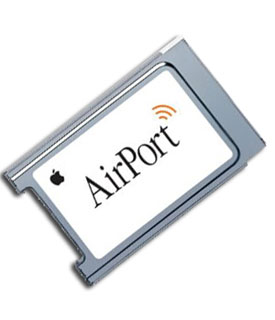
        AirPort
        802.11b Wireless Card

        Mac / 802.11b
        Surf the Web from Anywhere
        Powerful, affordable, and incredibly easy to use, AirPort gives you the freedom to use your portable computer anywhere, set up your desktop computer anyplace, and share a single, wireless Internet connection with your family, students, or employees.

        Connecting yesterday's Macs to the internet ties you to one network connection and one location. So much for portability. To access the internet with more than one computer, you had two choices. You could order another telephone line for the second computer-and a second account if you didn't want to wait your turn to go online. Or you could wire the computers together in a network-drilling holes in walls, running messy cables through rooms, and negotiating complex networking software.

        Not anymore! Based on an 11-megabit-per-second wireless local area network technology instead of traditional cabling, Airport is an easy-to-use system that lets your vintage Macs go wireless in minutes

        Main Image
        • SPECS
        • COMPATIBILITY
        • RATINGS

        Product Specifications:

        Apple Part Number

        • 630-2883

        Wireless Standard

        • IEEE 802.11b, 802.11a

        Frequency Band

        • 2.4 GHz

        Data Rate

        • 802.11b: 11/5.5/2/1Mbps

        System Requirements

        • Mac OS 9.2 - OS X 10.4.11
        • PowerPC G3 or G4

        Humidity

        • Max 95% (non-condensing)

        Temperature

        • 32° to 95° F (0° to 35° C)

        Dimensions (l x w x h)

        • 3.38" x 2.09" x 0.12" (8.6 x 5.3 x 0.3 cm)

        Weight

        • 1.1 oz (31.2 g)

        Warranty

        • 1 Year OWC Fulfilled Limited Warranty
        Manufacturer provided specifications for Apple p/n 630-2883 UPC#: 718908429389
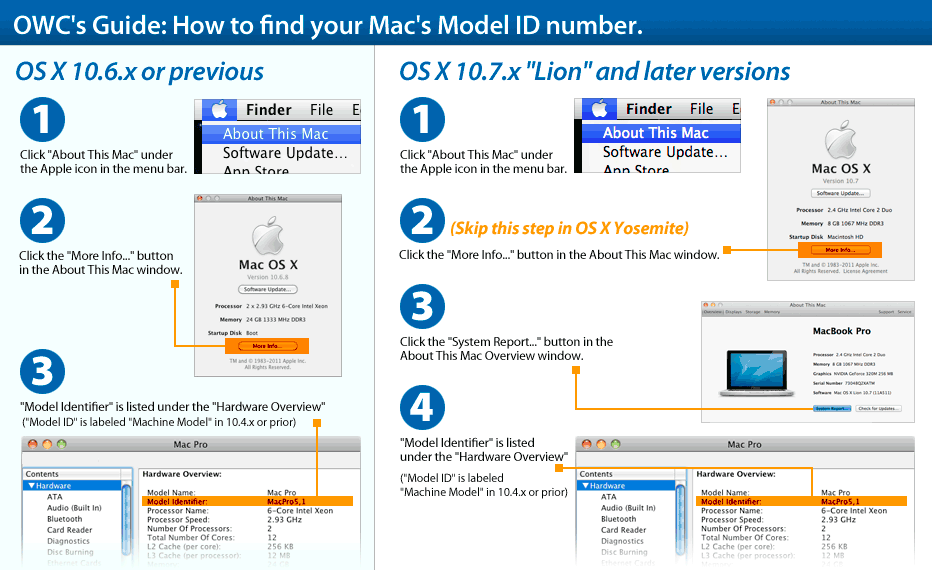
        This product is compatible with... Learn how to find your Mac's model ID
        PowerMac G4
        Power Mac G4 (Mirrored Drive Doors 2003)
        (June, 2003)
        Model ID: PowerMac3,6
        1.25GHz, dual 1.25GHz
        Detailed specs
        Install Videos
        PowerMac G4
        Power Mac G4 (FW 800)
        (January, 2003)
        Model ID: PowerMac3,6
        1.0GHz, dual 1.25GHz, dual 1.42GHz
        Detailed specs
        Install Videos
        PowerMac G4
        Power Mac G4 (Mirrored Drive Doors)
        (August, 2002)
        Model ID: PowerMac3,6
        dual 867MHz, dual 1.0GHz, dual 1.25GHz
        Detailed specs
        Install Videos
        PowerMac G4
        Power Mac G4 (QuickSilver 2002 ED)
        (August, 2002)
        Model ID: PowerMac3,5
        867MHz
        Install Videos
        PowerMac G4
        Power Mac G4 (QuickSilver 2002)
        (January, 2002)
        Model ID: PowerMac3,5
        733MHz, 800MHz, 933MHz, dual 1.0GHz
        Detailed specs
        Install Videos
        PowerMac G4
        Power Mac G4 (QuickSilver)
        (July, 2001)
        Model ID: PowerMac3,5
        733MHz, 867MHz, dual 800MHz
        Detailed specs
        Install Videos
        PowerMac G4
        Power Mac G4 (Digital Audio)
        (January, 2001)
        Model ID: PowerMac3,4
        466MHz, 533MHz, dual 533MHz, 667MHz, 733MHz
        Detailed specs
        PowerMac G4
        Power Mac G4 (Gigabit Ethernet)
        (July, 2000)
        Model ID: PowerMac3,3
        400GHz, dual 450MHz, dual 500GHz
        Detailed specs
        Install Videos
        PowerMac G4
        Power Mac G4 Cube
        (July, 2000)
        Model ID: PowerMac5,1
        450MHz, 500MHz
        Detailed specs
        Install Videos
        PowerMac G4
        Power Mac G4 (AGP Graphics)
        (September, 1999)
        Model ID: PowerMac3,1
        350MHz, 400MHz, 450GHz, 500GHz
        Detailed specs
        Install Videos
        iMac G4
        iMac G4 (17-inch Flat Panel)
        (July, 2002)
        Model ID: PowerMac4,5
        800Mhz
        Detailed specs
        iMac G4
        iMac G4 (Flat Panel)
        (January, 2002)
        Model ID: PowerMac4,2
        700MHz, 800Mhz
        Detailed specs
        eMac April 2002
        eMac
        (April, 2002)
        Model ID: PowerMac4,4
        700MHz, 800MHz
        Detailed specs
        Install Videos
        PowerBook G4
        PowerBook G4 (1GHz/867MHz)
        (November, 2002)
        Model ID: PowerBook3,5
        867MHz, 1.0GHz
        Install Videos
        PowerBook G4
        PowerBook G4 (DVI)
        (April, 2002)
        Model ID: PowerBook3,4
        667MHz, 800MHz
        Detailed specs
        Install Videos
        PowerBook G4
        PowerBook G4 (Gigabit Ethernet)
        (October, 2001)
        Model ID: PowerBook3,3
        550MHz, 667MHz
        Detailed specs
        Install Videos
        PowerBook G4
        PowerBook G4
        (January, 2001)
        Model ID: PowerBook3,2
        400MHz, 500MHz
        Detailed specs
        Install Videos
        PowerBook G3
        PowerBook G3 (Pismo)
        (February, 2000)
        Model ID: PowerBook3,1
        400MHz, 500MHz
        Detailed specs
        iBook G3
        iBook (14-inch 900 MHz 32 VRAM)
        (April, 2003)
        Model ID: PowerBook4,3
        900MHz
        Detailed specs
        iBook G3
        iBook (800/900 MHz 32 VRAM)
        (April, 2003)
        Model ID: PowerBook4,3
        800Mhz, 900MHz
        Detailed specs
        iBook G3
        iBook (Opaque 16 VRAM)
        (November, 2002)
        Model ID: PowerBook4,3
        700MHz
        Detailed specs
        iBook G3
        iBook (14-inch 32 VRAM)
        (November, 2002)
        Model ID: PowerBook4,3
        800MHz
        Detailed specs
        iBook G3
        iBook (32 VRAM)
        (November, 2002)
        Model ID: PowerBook4,3
        800MHz
        Detailed specs
        iBook G3
        iBook (14-inch 16 VRAM)
        (May, 2002)
        Model ID: PowerBook4,3
        700MHz
        Detailed specs
        iBook G3
        iBook (16 VRAM)
        (May, 2002)
        Model ID: PowerBook4,3
        600MHz, 700MHz
        Detailed specs
        iBook G3
        iBook (14-inch LCD)
        (January, 2002)
        Model ID: PowerBook4,2
        600MHz
        iBook G3
        iBook (Late 2001)
        (October, 2001)
        Model ID: PowerBook4,1
        500MHz, 600MHz
        Detailed specs
        iBook G3
        iBook (Dual USB)
        (May, 2001)
        Model ID: PowerBook4,1
        500MHz
        Detailed specs
        iBook G3
        iBook (FireWire)
        (September, 2000)
        Model ID: PowerBook2,2
        366MHz, 466MHz
        Detailed specs
        iBook G3
        iBook
        (July, 1999)
        Model ID: PowerBook2,1
        300MHz, 366MHz
        Detailed specs

        Customer Ratings

        Write a Review 4.7 / 5 6 out of 7 (86%) reviewers would recommend this product
        Verified Buyer
        Reviewer: Steve10
        Rating: 5/5 Fine card, but needed an apple base station to work March 14, 2018 I installed this card in a G4 which had no airport card. The G4 recognized my network, but could not connect to it, or any other network. I suspected an incompatibility with my Xfinity (Comcast) modem. Sure enough, when I connected an Apple Airport Extreme base station to my modem, the Airport card saw and readily connected to my network, allowing full speed. It works fine. I've read that Airport cards don't like to work with non-apple modems and in my case the Airport base station ($15 on eBay) resolved the problem.

        I would recommend this item to a friend!

        Verified Buyer
        Reviewer: grouch0 Age: Over 65 Experience Level: IT Professional Owned Product: less than a month
        Rating: 4/5 Works great when the software's right September 4, 2017 I was surprised to discover that this old Digital Audio Mac even had a port that would accept this kind of card, but it fit my need exactly... except that version 10.3 of the operating system recognized the card but wouldn't connect it to my home network. OWC tech support was easily available and had reasonable information-seeking questions followed by suggestions about my home network but nothing improved my situation. Fortunately, I had also ordered enough RAM to allow upgrading the OS to 10.4 whereupon everything worked fine. That OS upgrade took care of my problem. One weird thing - More technical info about this card was automatically presented by the OWC site when I selected it for review than I found when I sought it during my pre-purchase research.

        I would recommend this item to a friend!

        Verified Buyer Top 100 Contributor
        Reviewer: CyclingDan Location: Pittsburgh PA Age: Over 65 Experience Level: Power User Owned Product: 1-3 months
        Rating: 5/5 Became Obsolete November 11, 2016 Great condition, like new when we got it. Worked fine in an older iMac until the router upgrade made the product obsolete.

        Verified Buyer Top 250 Contributor
        Reviewer: Anonymous Location: Austria Age: 35-44 Experience Level: Power User Owned Product: 3-4 months
        Rating: 5/5 iMac G4 December 22, 2014 now working Wireless again. Thanx OWC !

        I would recommend this item to a friend!

        Verified Buyer
        Reviewer: Anonymous Location: Torrance, CA Age: 55-65 Experience Level: Home User Owned Product: less than a month
        Rating: 4/5 Slow but good. November 25, 2014 These are old products, they work, and they are slow. Fits my old G4 Mirrored Disk Drive Macintosh and works with Leopard 10.5.8. The main concern is security - Any network they connect to must use WEP or WPA security. This device was made before WPA2 and can not connect to a network using WPA2. So all networks it connects to would have to be changed to use the older WPA security. Probably not a problem but not the highest security available today.

        I would recommend this item to a friend!

        Verified Buyer
        Reviewer: Anonymous Location: AZ Age: 55-65 Experience Level: Power User Owned Product: 1-3 months
        Rating: 5/5 Air Port Card Got Me Back Online! September 7, 2013 I upgraded my Mac Power Book Titanium and G4 Tower a few years ago with OWC parts and they worked great! Then I lost my job and home...and then, no more "land line" modem phone line! So my Macs were out of commission for the internet and could not afford to replace them, and ended up with a "virus sucking" cheap Window's Laptop... Nothing but virus problems with Windows that I never had on my Macs. Now being disgusted with Window's Virus problems, I decided to get Air Port Cards for both my older Macs... Now even my old Mac Titanium 400 mhz laptop can get online...It's not fast, and software updates are few, but it does get on line and is usable for word processing and other useful applications. The 2001 G4 Dual Processor Tower was upgraded with from Dual 450 mhz to Dual 1.8 GHZ processors and an M-Audio 24/96k sound card, and another hard drive... The upgrade of the G4 to 1.8 dual processors makes it a real fast and reliable workhorse and a "keeper". No problems getting online now with the Air Port Card, and no reason to have to spend over $3,500.00 to replace it with a Mac Pro. OWC supplied the quality upgrade parts, and they have twice now had my online orders processed within one hour with tracking numbers, and I have gotten the parts I need in about 2 to 3 days with free shipping! Best of all, I no longer have to contend with Window's Viruses on the non-Intel OSX Macs, and that suits me just fine.

        I would recommend this item to a friend!

        Verified Buyer
        Reviewer: pjovideo Location: Arvada, Colorado Age: 55-65 Experience Level: Power User Owned Product: less than a month
        Rating: 5/5 Hard to find Airport 802.11b May 20, 2011 This review isn't really for the product, shoot, we all knew it was going to work! My review is about OWC and how every time I need to fix or replace something, they always seem to have it. Saved my life more than a few times! You guys are the greatest. This Airport was for my old Power MAC M5183. Since Apple computers never seem to die, I had set it up as my jukebox, hiding in the corner of a closet playing all of the tunes I've stored on it. When the Airport stopped working I was in a panic, because I never thought I'd find a replacement. I was wrong and once again OWC came through for me.

        I would recommend this item to a friend!

        Apple AirPort 802.11b Wireless Card Mfr P/N: 630-2883 OWC SKU: APLM7600LLE For PowerBook G3 FireWire; all PowerBook G4 'Titanium' models; all iBook G3s; Power Mac G4 AGP Models 350-1GHz; Power Mac G4 Cube, eMac G4 700/800MHz. System Pulls. 1 Year OWC Fulfilled Limited Warranty Ships: Sold Out
        Reviews (7)
        Only $99.00MacSales.com Price $19.99
        Sold OutSold OutApple 630-2883, Click to Buy Now
        Helpful Links
        • About Us
        • DIY Install Videos
        • Join our Affiliate Network
        • Where to Buy
        • Accessibility Statement
        • Sustainability is Good Business
        • Join the OWC Team
        • Media+Newsroom
        • Privacy Promise
        • MacSales.com for Business
        Join the OWC Newsletter

        Join hundreds-of-thousands of tech enthusiasts across the planet and gain access to specials, clearance, and holiday savings on the OWC upgrades, drives, and docks everyone loves.

        • bbb
        © 2000-2026 Other World Computing, Inc., All Rights Reserved. Site Terms Guest ID:
        Your Privacy Choices
        This item has been added to your cart