Free shipping available on orders $99 & up!
  • Business Icon For Business & More icon arrow
    • Creative, Production & PostCreative, Production & Post
    • Corporate & EnterpriseCorporate & Enterprise
    • Higher EducationHigher Education
    • State, Local & K-12 EducationState, Local & K-12 Education
    • House of WorshipHouse of Worship
    • Systems IntegratorSystems Integrator
    • HealthcareHealthcare
    • Federal, State & Local GovernmentFederal, State & Local Government
    • Join Today!

      Already registered? Sign In

  • Region: US/Intl icon arrow
    • Select your preferredcountry / region:

    • USA RegionUSA + International
    • Canada RegionOWC Canada

    • Experience local shipping options and optimized product inventory for your region.

  • Phone Icon1-800-275-4576
  • Intl: 1-815-338-8685
MacSales.com Powered By OWC
  • Blog
  • Support
  • Account
    • Hello, Sign In
    • My Account
    • Order Status
    • Write A Review
    • Warranty & Returns
  • Cart
MacSales.com Powered By OWC
  • Support
  • Chat Contact
  • Account
    • Hello, Sign In
    • My Account
    • Order Status
    • Write A Review
    • Warranty & Returns
  • Cart
  • Specials & Featured
  • Rocket Yard Blog
  • Chat
  • Support
      • Shop All
        • Internal Drives
        • External Drives
        • Apple & Macs
        • Docks & Connectivity
        • Cards & Readers
        • Batteries
        • Software & Apps
        • Cables & Adapters
        • Memory
        • PCIe Expansion
        • Specials & Featured
        Home » Software » Utilities » OWC MacDrive

        We're sorry, but this item is no longer for sale. However, there may be more Software » Utilities items available.

        Mediafour

        MacDrive 10 Standard
        Access Mac Disks on Windows

        PC / Windows
        Works with Windows 10
        Seamlessly Access Mac Formatted Drives on Windows Systems
        Introducing the all-new MacDrive 10 Standard
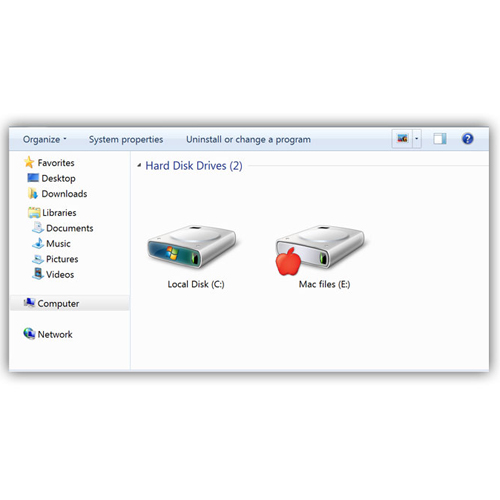
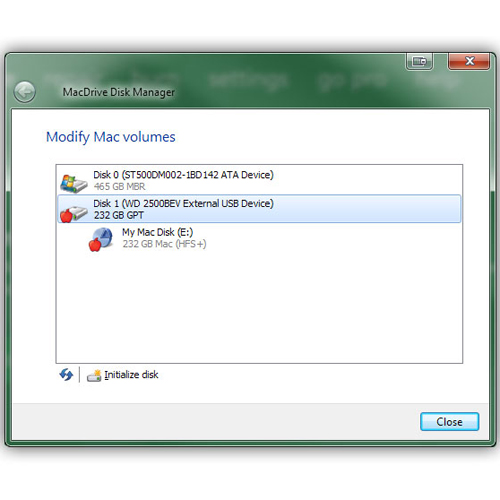
        The redesigned MacDrive is even easier to use. From seeing the Mac disks mounted to your computer to activating and deactivating, everything from top-to-bottom is easier. MacDrive 10 features an all-new Disk Management Window that displays any Mac disk mounted to your PC and gives you quick access to all of MacDrive's features. Open and edit your Mac files from the new window or access them direct from Windows Explorer or your favorite software.
        Fast and secure
        MacDrive has built a reputation on blazing quick read/write speeds and unparalleled data security. MacDrive 10 extends the lead with even faster access and more protection for your Mac disks and files. You're going to love the all-new MacDrive 10. Film makers, recording artists, IT professionals and thousands of other Windows users rely on MacDrive's speed as well as its data protection.
        Easy to use
        Simple and easy to use, MacDrive is recognized as the leader for accessing Mac disks from Windows for almost 20 years. Once you plug in your Mac disk, behind the scenes MacDrive works to seamlessly enable Windows understand HFS+ disks and allow you to read and write to the disk. There is nothing to launch or learn, MacDrive makes Mac disks look and act just like any other disk on your PC.
        Powerful software
        MacDrive also includes powerful features that enable you to create and partition Mac disks direct from your PC. And in the event that your Mac disks is having a problem, the robust repair feature can fix basic disk issues. Access almost any type of Mac-formatted disk including hard drives, DVDs, CDs and more. You can even mount a Mac in Target Disk mode! From floppies to hard drives, MacDrive can handle almost any disk you toss at it.
        Main Image
        • Gallery Pic 1
        • Gallery Pic 2
        • Gallery Pic 3
        • Gallery Pic 4
        • Gallery Pic 5
        Highlights
        • Blazing quick read/write speeds
        • Access almost any type of Mac-formatted disk including hard drives, DVDs, CDs and more
        • MacDrive is seamless, access your Mac disks through Windows Explorer
        • MacDrive's Disk Manager makes it easy to create, partition and delete your Mac disks on your PC.
        • MacDrive's Disk Repair can automatically find and safely fix most errors on Mac disks.
        • Browse through Time Machine backups as well as copy those files and folders to your PC
        • Use MacDrive on a Mac with Apple's Boot Camp utility and access drives with VMware Fusion or Parallels
        Need more power? Go Pro — MacDrive 10 Pro gives you the power of Mac RAID on your Windows PC.
        With MacDrive 10 Pro, you can access Apple formatted RAID disks as well as RAID sets created with SoftRAID. You can also securely delete files and folders from your disk and easily create ISO images and mount sparse images. MacDrive Pro is also constantly optimizing your disks with automatic file defragmentation.

        Check out all of the features of MacDrive 10 Pro and find out which version is right for you.
        • GALLERY
        • REQUIREMENTS

        Gallery


        Gallery Pic 1 Gallery Pic 2 Gallery Pic 3
        Gallery Pic 4 Gallery Pic 5

        System Requirements

        Minimum System Requirements (PC)

        • Windows 10, 8.1, 8, 7, and Server 2012

        Compatibility

        • Encryption and FileVault: MacDrive does not support encrypted Mac-formatted drives.
        • Network Drives: MacDrive is not usable in networking and/or network-attached storage scenarios (e.g. Mac-formatted hard drive connected to an Airport base station).
        • Parallels & VMWare Fusion: MacDrive works with Windows running virtually under Mac OS X using Parallels Desktop for Mac or VMware Fusion, with the exception in both cases that the Mac OS X system volume will be inaccessible.
        • Boot Camp drivers and Mac OS 10.9: MacDrive 10 Standard is compatible with Boot Camp drivers from Mac OS 10.9 Mavericks as well as previous versions of Boot Camp, such as from 10.6 Snow Leopard and prior.
        • 2TB Drives or larger on Windows XP: Windows XP does not support disks greater than 2TB.
        • DMG Files: MacDrive 10 offers a feature to "mount" or access the contents of unencrypted DMG files.
        • Apple RAID sets:
          • MacDrive 10 Standard does not support mounting Mac-formatted Software RAID sets. MacDrive 10 Pro is needed for this feature.
          • Supports mounting Mac-formatted Hardware RAID sets
        Mediafour MacDrive 10 Standard Access Mac Disks on Windows Mfr P/N: MD10-E0WR-ESD OWC SKU: MEDMD10EOWRB Access nearly any Mac formatted hard drives, DVDs, CDs and more. Includes disk repair & hardware RAID mounting. Ships: Pending
        Be the first
        only $49.99
        Sold OutSold OutMediafour MD10-E0WR-ESD, Click to Buy Now
        Additional Options:
        • MacDrive 12
          • Ships: In Stock
          • MacSales.com Price $59.99
        Recommended Items:
        Cable Mediafour MacDrive 10 Pro Access nearly any Mac formatted hard drives, DVDs, CDs and more. Includes disk repair and RAID support features. Only $69.99
        Helpful Links
        • About Us
        • DIY Install Videos
        • Join our Affiliate Network
        • Where to Buy
        • Accessibility Statement
        • Sustainability is Good Business
        • Join the OWC Team
        • Media+Newsroom
        • Privacy Promise
        • MacSales.com for Business
        Join the OWC Newsletter

        Join hundreds-of-thousands of tech enthusiasts across the planet and gain access to specials, clearance, and holiday savings on the OWC upgrades, drives, and docks everyone loves.

        • bbb
        © 2000-2026 Other World Computing, Inc., All Rights Reserved. Site Terms Guest ID:
        Your Privacy Choices
        This item has been added to your cart