Free shipping available on orders $99 & up!
  • Business Icon For Business & More icon arrow
    • Creative, Production & PostCreative, Production & Post
    • Corporate & EnterpriseCorporate & Enterprise
    • Higher EducationHigher Education
    • State, Local & K-12 EducationState, Local & K-12 Education
    • House of WorshipHouse of Worship
    • Systems IntegratorSystems Integrator
    • HealthcareHealthcare
    • Federal, State & Local GovernmentFederal, State & Local Government
    • Join Today!

      Already registered? Sign In

  • Region: US/Intl icon arrow
    • Select your preferredcountry / region:

    • USA RegionUSA + International
    • Canada RegionOWC Canada

    • Experience local shipping options and optimized product inventory for your region.

  • Phone Icon1-800-275-4576
  • Intl: 1-815-338-8685
MacSales.com Powered By OWC
Site Search
  • Blog
  • Support
  • Account
    • Hello, Sign In
    • My Account
    • Order Status
    • Write A Review
    • Warranty & Returns
  • Cart
MacSales.com Powered By OWC
  • Support
  • Chat Contact
  • Account
    • Hello, Sign In
    • My Account
    • Order Status
    • Write A Review
    • Warranty & Returns
  • Cart
  • Specials & Featured
  • Rocket Yard Blog
  • Chat
  • Support
      • Shop All
        • Internal Drives
        • External Drives
        • Apple & Macs
        • Docks & Connectivity
        • Cards & Readers
        • Batteries
        • Software & Apps
        • Cables & Adapters
        • Memory
        • PCIe Expansion
        • Specials & Featured
        Home » Expansion Cards

        We're sorry, but this item is no longer for sale. However, there may be more Expansion Cards items available.
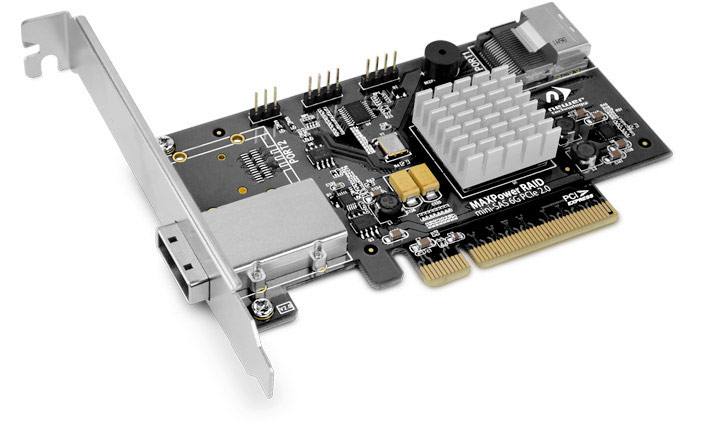
        MAXPower RAID mini-SAS 6G-1e1i
        One port external & one port internal mini-SAS 6Gb/s RAID controller card

        MAXPower RAID mini-SAS 6G

        Unleash your Performance Potential with up to 4800MB/s Data Transfer Rates!
        Eliminate the SATA drive bus speed limit! Adding the MAXPower RAID mini-SAS 6G-1e1i to your Mac or PC provides a SAS/SATA 6G (6.0Gb/s) drive bus with up to twice the data transfer speed, regardless  of your computer's built-in SATA 3G (3.0Gb/s) data bus. Utilizing the MAXPower's RAID processor, you can maximize your total performance up to 4800MB/s in RAID 0 mode or achieve the perfect balance of performance and protection in RAID 5 mode.

        This feature-rich, high-value mass storage controller card is an ideal solution for those working with multiple high-speed HD video streams and/or anyone seeking high performance daily IT operation and back-up for an SMB. With mini-SAS, there's no loss of throughput as it provides full data transfer of four drives through one connection.

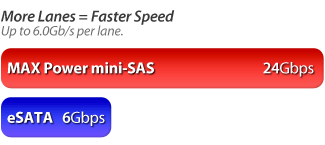
        More Lanes = Faster Speed
        Mini-SAS is like traffic moving on 4 lanes on the highway instead of just 1 lane.  Mini-SAS offers more "lanes" for data to travel, providing the ability to reach higher speeds.  Just like the SATA/eSATA interface, mini-SAS offers the convenience of a one cable connection. However, in a multi-drive SATA/eSATA solution which, only offers one lane for four drives to send/receive data on, mini-SAS provides four separate lanes so each drive can deliver its maximum capable data transfer rate. Now you can use one or more mini-SAS equipped external storage enclosures like the OWC Mercury Rack Pro for greater speed, protection, or both compared to single channel multi-drive eSATA RAID or eSATA Port Multiplier solutions.

        Why mini-SAS Chart

        Internal & External Ports
        The MAXPower RAID mini-SAS 6G-1e1i card features one external mini-SAS port and one internal mini-SAS port to connect and RAID external enclosures and internal drives.
        Automatic Device Passthrough
        The MAXPower RAID mini-SAS 6G-1e1i has an automatic passthrough feature that will pass any connected drive to the OS without needing to initialize it via the Web Manager. With other RAID cards, the card's RAID system takes immediate control of the drive rendering it unusable until you configure it. With the MAXPower RAID mini-SAS 6G-1e1i card, as soon as an unformatted drive is inserted, it is immediately available for formatting with no need to release it from the RAID system. This feature lets the card act like a non-RAID card, which is helpful when you just want to swap single non-RAIDed drives in and out quickly.

        Spare Pool Support
        The MAXPower RAID mini-SAS 6G-1e1i card can be configured to set aside extra drives in a "spare pool". If a drive should fail in RAID 1, 5, 10 or 50 modes, a drive from the spare pool is instantly implemented so a rebuild can start immediately, minimizing the risk of data loss.

        NewerTech RAID Manager Offers Easy Array Management
        This easy to use, web browser-based utility automatically logs all events that occur on the MAXPower RAID mini-SAS 6G-1e1i from minor issues like inconsistent data to major issues like a failed drive. The built-in scheduling system offers quick convenience in setting up RAID arrays, managing connected drives, viewing storage health status, and reviewing information about your connected storage. See RAID Manager tab below for specific details.
        What Is RAID?
        RAID stands for Redundant Array of Independent Drives. This means taking multiple matching drives and arranging them together to achieve a large storage space, high speed, data protection, or any combination of the three. The MAXPower RAID mini-SAS 6G-1e1i controller card supports RAID 0, 1, 5, 10 and 50 levels as well as supporting JBOD (SPAN and individual drive modes).

        JBOD (Independent Drives)
        Each drive appears independently with each drive presenting its stated capacity for use.
        JBOD (SPAN)
        Combines capacity of two or more drives of the same size without any RAID data distribution scheme into one logical desktop volume. Will also combine the capacity of varying size drives based on the lowest capacity drive in the set.
        RAID 0 (Stripe)
        Data is split into blocks over two or more drives at the same time for high speed and large capacity. This is the ideal RAID setting for demanding video production/editing.
        RAID 1 (Mirror)
        Data is written at the same time to two drives to provide a high level of data safety and redundancy.
        RAID 5 (Stripe with Parity)
        Data is Striped (RAID 0) while incorporating redundancy over three or more drives for the best combination of speed, capacity, and redundancy.
        RAID 10 (1+0)
        Data is Striped (RAID 0) over two Mirrored sets (RAID 1) of drives for fast redundancy.
        RAID 50 (5+0)
        Data is striped (RAID 0) over two RAID 5 sets to provide increased speed while maintaining redundancy.


        • FEATURES
        • INCLUDES
        • SPECS
        • RAID MANAGER
        • COMPATIBILITY
        • DOWNLOADS
        • RATINGS

        Features

        • High speed PCIe 2.0 x8 bandwidth for up to 4GB/s data throughput. PCIe 1.0 compatible with reduced speed.
        • Two mini-SAS Ports
          • 1x SFF-8088 external and 1x SFF-8087 internal mini-SAS port
        • SAS Expander support for connecting up to 128 SAS/SATA devices
        • Multiple RAID level support: 0/1/5/10/50 and JBOD
        • Hot plug and hot swap drive and solution support
        • Automatic device pass-through to OS
        • Easy to use browser based NewerTech RAID Manager interface
        • SHI (Storage Health Inspector) for monitoring and setting up reports, even via email, of array drives
        • Compatible with SAS and SATA based hard drives and SSDs
        • Compatibility
          • Intel-based Mac with OS X 10.6.8 or later (Including OS X Yosemite) and available PCIe x8 slot or through Thunderbolt with a PCIe expansion chassis.
          • PC with available PCIe x8 slot and Windows XP 32-bit and later;
          • x8 PCIe 2.0 slot or better required for optimal performance, but is backward compatible with PCIe 1.0.
        • 3 Year NewerTech Product Limited Warranty

        Includes

        MAXPower RAID mini-SAS 6G includes
        • MAXPower RAID mini-SAS 6G-1e1i RAID Controller Card
        • Low profile PCIe slot cover

        Product Specifications:

        Connector Type

        • External: 1x mini-SAS (SFF-8088)
        • Internal: 1x mini-SAS (SFF-8087)

        Channels

        • Eight total SAS/SATA 6.0Gb/s channels

        PCIe Slot Requirement

        • x8 (8 lane) PCIe 2.0 for optimum 4GB/s performance.
        • PCIe 1.0 compatible but delivers reduced speed up to 2GB/s.

        Bracket

        • Standard, full height with low profile option included

        Form factor

        • Low profile

        Drive support

        • SATA or SAS devices; larger than 2.2TB drive supported via 64bit LBA and sector size customization

        RAID Level

        • 0, 1, 5, 10, 50, JBOD (Independent and SPAN/Concatenated modes)

        Physical size

        • 4.96" (L) x 2.68" (W) (126.14mm (L) x 68.07mm (W)

        Weight

        • 2.9 ounces

        Color

        • Black PCB, silver heat sink

        Compatibility

        • Intel-based Mac with OS X 10.6.8 - 10.11 and available PCIe x8 slot or through Thunderbolt with a PCIe expansion chassis.
        • PC with available PCIe x8 slot and Windows XP 32-bit and later
        • x8 PCIe 2.0 slot or better required for optimal performance, but is backward compatible with PCIe 1.0.

        Bootability

        • Mac OS X Bootable: No
        • Windows Bootable: Yes from BIOS

        Operating Environment:

        Operating Temperature

        • +5 ~ +55 C

        Non-operating Temperature

        • -20 ~ +80 C

        Relative Humidity

        • 5%~60% non-condensing

        Operating Voltage

        • 3.3V (4W max) / 12V (1W max)
        * 48Gb/s total speed with up to 24Gb/s total speed per mini-SAS port. Speed depending on PCIe configuration, selected drives, RAID setting, and external mini-SAS equipped storage device. Manufacturer provided specifications for Newer Technology p/n NWTMXPRMS6G1E1I UPC#: 811643011977
        NewerTech® Web Manager
        RAID Manager Screenshot
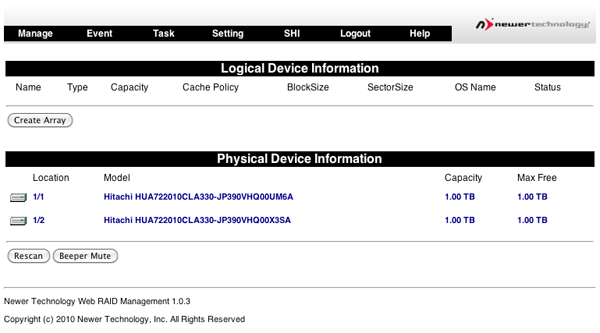
        The NewerTech® Web Manager is an easy-to-use browser-based utility to set up RAID arrays, manage connected drives, view storage health status, and view information about your connected storage.
        • Device management
        • Array management
        • Spare pool management
        • Event log
        • SHI (Storage Health Inspector)
        • Task scheduler
        • Settings
        Device Management
        RAID Manager Screenshot
        • Automatic Device Passthrough
        • Initializing Devices
        • Changing Device Settings
        • Rescanning for Devices
        • Unplugging Devices
        Array Management
        RAID Manager Screenshot
        The Array Management screen acts as the Web Manager's home screen, but to access it from any other screen click on the "Manage" menu item and select "Array" to enter the Array Management screen.
        Spare Pool Management
        RAID Manager Screenshot
        The purpose of a spare pool is to have drives in reserve to instantly take the place of any failed drives in a redundant RAID array such as a RAID 1, RAID 5, RAID 10, or RAID 50 array. This allows rebuilds to start instantly in order to minimize the risk of data loss.
        Events
        RAID Manager Screenshot
        The NewerTech Web Manager software will automatically log all events that occur on the MAXPower® controller card.
        • Indicates general information and occurrences.
        • Warning of minor occurrences and issues. These include plugging of devices into the card and minor issues such as inconsistent data that can be easily fixed by a verify or rebuild.
        • Warns of major occurrences and problems such as failed drives and improper disconnections of drives and arrays.
        Tasks
        RAID Manager Screenshot
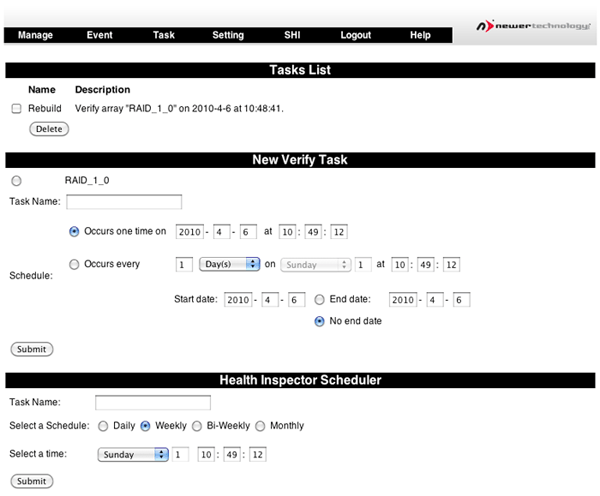
        The NewerTech® Web Manager has a built-in scheduling system to run background rebuilds, verifications, integrity, and health checks to the attached arrays and drives. To enter the task scheduling systems, click on "Task" menu item.
        Settings
        RAID Manager Screenshot
        General configuration settings for the NewerTech® MAXPower® RAID mini-SAS 6G controller card can be set in the Settings page by clicking on the "Setting" menu item.
        • Auto Rebuild
        • Continue Rebuilding on Error
        • Audible Alarm
        • Rebuild Priority
        • Spindown Idle Disk
        • SAF-TE
        • Listening Port
        • Password
        • SMTP Setting / Recipients / Add Recipient
        SHI (Storage Health Inspector)
        RAID Manager Screenshot
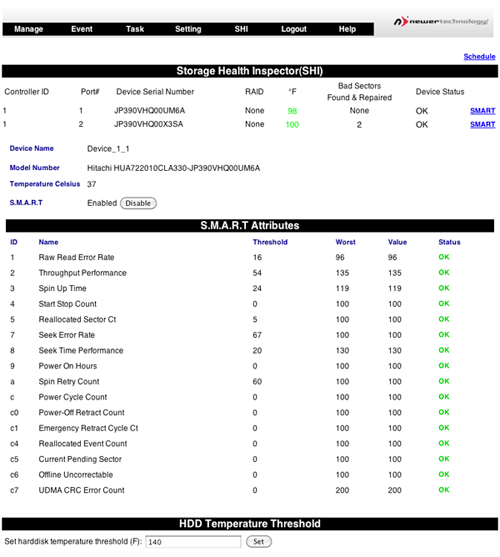
        The NewerTech® Web Manager has a built-in health monitoring system to allow for monitoring of drive characteristics and S.M.A.R.T status attributes. To access, click on the "SHI" menu item.

        Self-Monitoring, Analysis, and Reporting Technology (S.M.A.R.T.) is a monitoring system built into drives to monitor different health attributes to assist in warning of potential problems before catastrophic failure can occur. To view the S.M.A.R.T status attributes of an attached drive, click on "SMART" to expand the attributes for viewing.
        Does the MAXPower mini-SAS 6G card support tape devices? The MAXPower mini-SAS 6G card was optimized to RAID HDD's and SSD's and does not support tape devices.
        Which Connecting Cable Should You Choose? When using Passive/passthrough mini-SAS storage solutions equipped with "6G" 6Gb/s (SATA 3.0 Revision) drives, we strongly recommend only using connecting cables of 1 meter or shorter length due to the increased signal integrity requirements of 6G drives. Active storage solutions such as SAS expander systems equipped with 6G drives can utilize mini-SAS connecting cables up to 10 meters in length. This is dependent upon the external enclosure.
        Boot Camp Compatibility Please note that running the MAXPower RAID mini-SAS 6G card in Windows XP is only supported on a PC and is not supported via Boot Camp on a Mac.  Windows Vista and 7 are fully compatible with the MAXPower RAID mini-SAS 6G card via Boot Camp on a Mac.


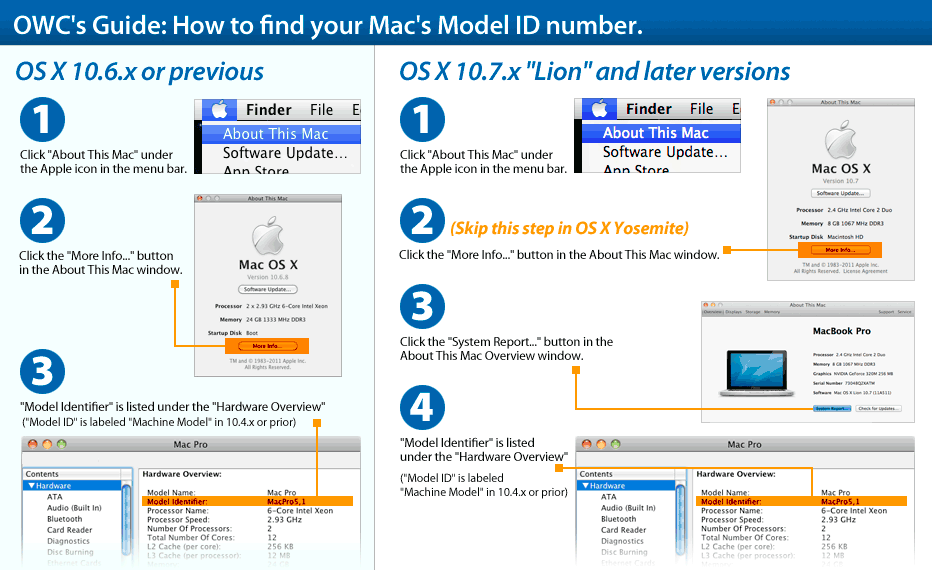
        This card is compatible with... Learn how to find your Mac's model ID
        Mac Pro
        Mac Pro 4-core (Mid 2006)
        (August, 2006)
        Model ID: MacPro1,1
        2.0GHz, 2.66GHz, 3.0GHz
        Detailed specs
        Install Videos
        Mac Pro
        Mac Pro 8-core (Early 2007)
        (April, 2007)
        Model ID: MacPro2,1
        3.0GHz
        Detailed specs
        Install Videos
        Mac Pro
        Mac Pro 4-Core (Early 2008)
        (January, 2008)
        Model ID: MacPro3,1
        2.8GHz
        Detailed specs
        Install Videos
        Mac Pro
        Mac Pro 8-Core (Early 2008)
        (January, 2008)
        Model ID: MacPro3,1
        2.8GHz, 3.0GHz, 3.2GHz
        Detailed specs
        Install Videos
        Mac Pro
        Mac Pro 4-Core (Early 2009)
        (March, 2009)
        Model ID: MacPro4,1
        2.66GHz, 2.93GHz, 3.33GHz
        Detailed specs
        Install Videos
        Mac Pro
        Mac Pro 12-Core (Mid 2012)
        (June, 2012)
        Model ID: MacPro5,1
        2.4GHz, 2.66GHz, 3.06GHz
        Detailed specs
        Install Videos
        Mac Pro
        Mac Pro 6-Core (Mid 2012)
        (June, 2012)
        Model ID: MacPro5,1
        3.33GHz
        Detailed specs
        Install Videos
        Mac Pro
        Mac Pro 4-Core (Mid 2012)
        (June, 2012)
        Model ID: MacPro5,1
        3.2GHz
        Detailed specs
        Install Videos
        Mac Pro
        Mac Pro 12-Core (Mid 2010)
        (July, 2010)
        Model ID: MacPro5,1
        2.66GHz, 2.93GHz
        Detailed specs
        Install Videos
        Mac Pro
        Mac Pro 8-Core (Mid 2010)
        (July, 2010)
        Model ID: MacPro5,1
        2.4GHz
        Detailed specs
        Install Videos
        Mac Pro
        Mac Pro 6-Core (Mid 2010)
        (July, 2010)
        Model ID: MacPro5,1
        3.33GHz
        Detailed specs
        Install Videos
        Mac Pro
        Mac Pro 4-Core (Mid 2010)
        (July, 2010)
        Model ID: MacPro5,1
        2.8GHz, 3.2GHz
        Detailed specs
        Install Videos
        Xserve Intel
        Xserve Quad-Core (Early 2009)
        (April, 2009)
        Model ID: Xserve3,1
        2.26GHz
        Detailed specs
        Xserve Intel
        Xserve 8-Core (Early 2009)
        (April, 2009)
        Model ID: Xserve3,1
        2.26GHz, 2.66GHz, 2.93GHz
        Detailed specs
        PC Desktop
        PC Desktops
        Compatible with Intel / AMD Process based PCs capable with the specifications listed above.
        OWC Helios
        OWC Mercury Helios
        Thunderbolt PCIe
        expansion chassis
        More info

        Downloads

        • Windows Drivers & Software ZIP file (5.2MB)
        • MAXPower RAID User Manual (3.3MB)
        • Download OS X Driver and Web RAID Manager for Mac (2.7MB)

        Customer Ratings

        Write a Review 4.7 / 5 58 out of 63 (92%) reviewers would recommend this product
        1 2 3
        Verified Buyer
        Reviewer: Anonymous Location: Tampa, FL Age: 25-34 Experience Level: Power User Owned Product: less than a month
        Rating: 5/5 Works great, but one caveat. November 18, 2014 I have a mid-2010 Mac Pro, (12 core). Works as described. The only con is that it disables sleep-mode. Other than that I'm very happy with this adapter.

        I would recommend this item to a friend! This review is from NewerTech MAXPower 2x2 USB + eSATA 6G PCIe Expansion Card for Mac OS X 10.6 to 10.8.2.

        Verified Buyer
        Reviewer: Anonymous Location: Beaverton, OR Age: Over 65 Experience Level: IT Professional Owned Product: 1-3 months
        Rating: 5/5 Works great in a Mac Pro 1,1 November 17, 2014 This is working great in my MacPro 1,1 running Lion. It was actually installed by my wife and it's driving a raid 1 box. No problems coming back from sleeping.

        I would recommend this item to a friend! This review is from NewerTech MAXPower 2x2 USB + eSATA 6G PCIe Expansion Card for Mac OS X 10.6 to 10.8.2.

        Verified Buyer
        Reviewer: Anonymous Location: new hampshire Age: 55-65 Experience Level: Power User
        Rating: 5/5 I installed in an original MacPro 2006 and it worked. October 3, 2014 Out of the box, this worked fine. I installed as per the instructions, plugged in a USB 3.0 drive and it took 2 minutes to move a 6 gigabyte file... from an internal drive to the external drive. The move between two internal drives was about 1 minute. There is one small bug: there is no icon to disconnect the drive so when you pull it, you get the nasty gram..... copying the same folder over USB 2 was about 5 minutes....

        I would recommend this item to a friend! This review is from NewerTech MAXPower 2x2 USB + eSATA 6G PCIe Expansion Card for Mac OS X 10.6 to 10.8.2.

        Verified Buyer
        Reviewer: Anonymous Location: Toronto, ON Experience Level: IT Professional Owned Product: 1-3 months
        Rating: 5/5 Works with Drobo 5D September 29, 2014 Bought this card for my 2008 Mac Pro because I needed a USB 3.0 card for my Drobo 5D. Works fine, though I had to have Drobo Robotics send me a new (USB 3-compatible USB cable). The performance is better than the original Drobo at Firewire 800.

        I have not tried the eSATA ports, and probably never will. Unfortunately OWC doesn't sell an expansion card with USB 3 only.

        I would recommend this item to a friend! This review is from NewerTech MAXPower 2x2 USB + eSATA 6G PCIe Expansion Card.

        Verified Buyer
        Reviewer: Anonymous Location: Seattle Age: Over 65 Experience Level: Home User
        Rating: 5/5 Product worked perfectly. September 20, 2014 Great to have USB 3.0 on my 2009 Mac Pro. It works perfectly. Had an issue in downloading software but switched to Safari and it downloaded and installed with no problem. OWC tech was very helpful. Totally happy with the product and OWC.

        I would recommend this item to a friend! This review is from NewerTech MAXPower 2x2 USB + eSATA 6G PCIe Expansion Card for Mac OS X 10.6 to 10.8.2.

        Verified Buyer
        Reviewer: Anonymous Location: Sydney, Australia Age: 45-54 Experience Level: IT Professional Owned Product: less than a month
        Rating: 5/5 Rock solid! September 8, 2014 After years of using other controllers that were four times the price and having them burn out or be infuriating to install and get working, I tried this controller. WOW! I was up and running in 5 mins. This card even recognised my existing RAID 5 array built with a different controller and mounted it and I was ready to go. Didn't even have to rebuild. How awesome is that? The card is super fast, the NewerTech website is easy to navigate and find product information and updates, the support is brilliant and there's a 3 year warranty. What more do you want? As a professional filmmaker and video editor I have tried cards from HighPoint, Adaptec and ATTO. All expensive and in the case of HighPoint, over-engineered, painful and no customer support. This controller gives me a consistent ~750MB/s using RAID 5 on an 8 drive PROAVIO enclosure - and these are 5 year old SATA III WD RE2's! Not even SATA 6! ADOBE Premiere CC and After Effects CC sing on this card.Never dropping a frame and giving you beautiful smooth playback, even with a fully loaded timeline and all app's open.

        I also have many RAID chassis and arrays like 2 of the OWC RackPro Units and a two drive Mercury Elite and I keep coming back to OWC as they just work like they should. OWC are the only brand that have never failed in my studio. NEVER. Not once. Everything else has, costing me time, money and business. Try this card. You won't regret it.

        I would recommend this item to a friend! This review is from NewerTech MAXPower RAID Mini-SAS 6G 6G-2e PCIe Expansion Card.

        Verified Buyer Top 250 Contributor
        Reviewer: Anonymous Age: 45-54 Experience Level: Hobbiest Owned Product: 1-3 months
        Rating: 4/5 Great August 5, 2014 Great Product, No issues.

        I would recommend this item to a friend! This review is from NewerTech MAXPower 2x2 USB + eSATA 6G PCIe Expansion Card for Mac OS X 10.6 to 10.8.2.

        Verified Buyer
        Reviewer: Anonymous Location: Jackson, MS Age: 25-34 Experience Level: IT Professional Owned Product: less than a month
        Rating: 5/5 Works Great! June 10, 2014 This works great! Added USB 3 and eSata to my MAC pro. Just make sure you install the drivers too. Didn't work with out drivers. Now I just wish they would make a Thunderbolt 2 card!

        I would recommend this item to a friend! This review is from NewerTech MAXPower 2x2 USB + eSATA 6G PCIe Expansion Card for Mac OS X 10.6 to 10.8.2.

        Verified Buyer
        Reviewer: Anonymous Location: North Yorkshire UK Age: 55-65 Experience Level: Home User Owned Product: over 6 months
        Rating: 4/5 Hope they get the OSx boot control soon for this May 24, 2014 Easy to install on my Mac Pro 1.1. And am now running the raid 0 with 4 X SSD 480Gb's. In the beginning, 3 weeks or so it kept loosing the Array from my desktop but now no problems. It is if my Mac has accepted it as one of the family now. If it could at some time in the future be able to handle the OSx boot system then WOW it would be worth double the money for MacPro 1.1 owners like me who just refuse to retire the old architecture after improving it over the years. I also have place most of the applications in the raid array together with movies and music and documents. Very quick. Regards, SFR

        I would recommend this item to a friend!

        Verified Buyer
        Reviewer: Anonymous Location: Illinois Age: Over 65 Experience Level: Power User Owned Product: 1-3 months
        Rating: 4/5 Very fast May 17, 2014 I bought this card to speedup external HD interface. It's very fast and was very simple to install in my Mac Pro. I didn't realize I couldn't boot my computer through this card although the product description says so (my error). Otherwise I'm completely satisfied with the card and thrilled at how fast eSATA transfers data between my Mac and external drives.

        I would recommend this item to a friend! This review is from NewerTech MAXPower 2x2 USB + eSATA 6G PCIe Expansion Card for Mac OS X 10.6 to 10.8.2.

        Verified Buyer
        Reviewer: Anonymous Location: Astoria, NY Age: 55-65 Experience Level: IT Professional Owned Product: less than a month
        Rating: 5/5 Host Adapter Works in 2008 Mac Pro May 2, 2014 Both USB 3.0 and SATA III functional well via this host adapter. Performance is in the expected range for USB 3.0 devices--200MB/sec read and write for Fantom 3TB external "Green Drive." SanDisk Extreme 64GB 182.4 MB/s Write; 256.2 MB/s Read. [Blackmagicdesign Disk Speed Test] No measurements for SATA drive. Similar (slightly slower) speeds with an Anker 10 port USB 3.0 hub.

        I would recommend this item to a friend! This review is from NewerTech MAXPower 2x2 USB + eSATA 6G PCIe Expansion Card.

        Verified Buyer
        Reviewer: Anonymous Location: Noblesville IN Age: 45-54 Experience Level: Hobbiest Owned Product: over 6 months
        Rating: 5/5 Great addition to Mac Pro August 6, 2013 I added this card and love the additional speed of the 2 eSATA ports. I followed the video instructions you can find on this site, and it was really rather easy to install, even though I am not mechanically inclined. I pair it with the Mercury Pro 4TB external HD to clone my old library, and then use TimeMachine for only my new and current photography.

        I would recommend this item to a friend! This review is from (*) NewerTech MAXPower 2-Port eSATA 6G Pro PCIe Expansion Card.

        Reviewer: AdamDZ Location: New York City Age: 35-44 Experience Level: IT Professional Owned Product: less than a month
        Rating: 5/5 Works great, fast transfers, no drivers needed! June 23, 2012 It really works without any drivers in my MacPro 4,1, running Lion. Also works under 10.8 Dev Preview. I also bought the dual drive RAID0 Mercury Pro enclosure and I get around 250MB/se R/W speeds with a pair of older hard dives. I'm very happy with both products. No software to fuss around with. Now I have really fast TimeMachine backups.

        It's showing in the System Profiler as Unknown Controller, but still works. I copied several terabytes of files with no errors and I've run TimeMachine backups for few days just fine.

        Yeah, it doesn't support Port Multiplier, but don't give a product a bad review because you bought the wrong product. It does everything as advertised.

        It's more expensive than cards I use in PCs but the driverless operation is worth the premium. In the past, adding a SATA card to a Mac was always a problem due to poor drivers and drivers being broken with nearly each OSX update.

        I would recommend this item to a friend! This review is from NewerTech MAXPower 2-Port eSATA 6G PCIe Expansion Card.

        Verified Buyer
        Reviewer: mj662 Location: Los Angeles
        Rating: 3/5 Does not support Port Multiplier April 12, 2012 If you have a drive dock with 2 drives this will not work for you

        This review is from NewerTech MAXPower 2-Port eSATA 6G PCIe Expansion Card.

        Response from OWC, Technical Support April 13, 2012 You are correct - the Port Multiplier version of this card can be found here: http://eshop.macsales.com/item/NewerTech/MXPCIE6GRS/
        Verified Buyer
        Reviewer: mjsais Location: Columbus, OH Age: 45-54 Experience Level: Power User Owned Product: less than a month
        Rating: 4/5 Works Great, but!!! January 30, 2012 Works great, but my 2007 Mac Pro won't go to sleep now!

        I would recommend this item to a friend! This review is from NewerTech MAXPower 2-Port eSATA 6G PCIe Expansion Card.

        Reviewer: JonW Location: VT Age: 25-34 Experience Level: IT Professional Owned Product: over 6 months
        Rating: 3/5 Works fine, but doesn't support hot swapping December 7, 2011 This card is great if you have two or fewer external drives you wish to connect, and if you intend to leave them powered on 100% of the time. If you have more than two drives or if you plan to be turning the drives on and off, this card is not for you. If you so much as unmount a connected volume, a reboot will be required to remount it. Had I realized this before purchasing I would have bought something else, as I use eSATA for project-specific drives and off-site backups, meaning I have many drives and swap them out frequently.

        With that said, I have had zero issues with the card aside from this design limitation, so if you do plan to use it with two or fewer always-on drives, this card is certainly a good value.

        This review is from NewerTech MAXPower 2-Port eSATA 6G PCIe Expansion Card.

        Response from OWC, Marketing December 15, 2011 On a Mac, Hot Plug/Hot Swap is supported in OS X 10.7.2 and later. Due to a bug in Apple's AHCI implementation, previous OS versions do not reliably support this feature.
        Verified Buyer
        Reviewer: packetman Location: St. Louis, MO Age: 35-44 Experience Level: IT Professional Owned Product: 3-4 months
        Rating: 4/5 Great card but BEWARE November 16, 2011 Another review mentions that it does not support hot swap. I would like to also say that if you plan to connect your Drobo S to this device it will work BUT the Drobo Dasboard will not work. I have also had problems with the power saving taking my Drobo offline and then it not connecting until I reboot.

        So overall the card is great. It install very easily and when it's working its fast. Just be aware of what your connecting to it.

        This review is from NewerTech MAXPower 2-Port eSATA 6G PCIe Expansion Card.

        Response from OWC, Marketing December 15, 2011 On a Mac, Hot Plug/Hot Swap is supported in OS X 10.7.2 and later. Due to a bug in Apple's AHCI implementation, previous OS versions do not reliably support this feature.
        Verified Buyer
        Reviewer: wintermute
        Rating: 5/5 Super, Terrific, Fast, Fast, Fast... October 22, 2011 ...and very affordable. I'll be installing these on a few more machines. Goodbye, Firewire800. Hello eSATA!

        I would recommend this item to a friend! This review is from NewerTech MAXPower 2-Port eSATA 6G PCIe Expansion Card.
        Verified Buyer
        Reviewer: Marcel Location: Belgium Experience Level: Power User Owned Product: less than a month
        Rating: 2/5 Does NOT support hot-swapping October 21, 2011 Unless the drive you intend to connect will always remain on, from boot to shutdown, this card isn't for you. Whenever you disconnect the external drive connected to this, for whatever reason (like power-saving, multiple drives...), you will have to reboot your Mac/PC for the drive to be recognized again.

        The RAID version supposedly does support hot-swapping.

        This review is from NewerTech MAXPower 2-Port eSATA 6G PCIe Expansion Card.

        Response from OWC, Marketing December 15, 2011 On a Mac, Hot Plug/Hot Swap is supported in OS X 10.7.2 and later. Due to a bug in Apple's AHCI implementation, previous OS versions do not reliably support this feature.
        Verified Buyer
        Reviewer: Bibow Location: Denmark Age: 45-54 Experience Level: IT Professional Owned Product: less than a month
        Rating: 5/5 Piece of cake significant upgrade September 28, 2011 This PCIe 2-port controller is a terrific upgrade to a stock MacPro. It´s a piece of cake upgrade, done in 10 minutes, and the performance when working with large media files is significantly increased. A no brainer, I should have installed this a long time ago.

        I would recommend this item to a friend! This review is from NewerTech MAXPower 2-Port eSATA 6G PCIe Expansion Card.

        Verified Buyer
        Reviewer: Cameopro77 Location: Chicago, Il Age: 25-34 Experience Level: Power User Owned Product: less than a month
        Rating: 4/5 Easy like sunday morning August 11, 2011 Easy to install and works great. Plug and play.

        I would recommend this item to a friend! This review is from NewerTech MAXPower 2-Port eSATA 6G PCIe Expansion Card.

        Reviewer: billw Location: WA Age: 35-44 Experience Level: IT Professional Owned Product: less than a month
        Rating: 4/5 Great card for the price August 5, 2011 I'm not often inclined to write reviews, but I had a hard time finding much information on this card when I considered buying it.

        I already had the non-RAID version of this card, which gave me two eSATA ports, but not with port-multiplier support. I was looking for at least two more ports that I could use with my Cavalry 4 x 1TB enclosure and a future enclosure. Every card that I considered in the <$300 category had a range of limitations. This card appeared to have good throughput, support for drive power management, and RAID was a nice touch for the price.

        Overall, I am quite pleased with it, but I did note some difficulties along the way. I installed this card in my 2009 Mac Pro, then booted up and installed the software on the included disk. After a reboot, that gave me access to the web interface. The web interface is pretty simple, although not always intuitive. After a few stumbles, I got my external enclosure set up with RAID 5. It took about 24 hours to initialize.

        Before I got to that point, I had some difficulties. I am running Lion, so that may be a contributing factor. After I set the web interface to initialize the new array, OS X panicked. On reboot, it panicked again, so that I was unable to boot the machine. Powering down the enclosure fixed that problem. I then went to the Newertech web site and downloaded and installed the latest software. After that, I was able to reboot, turn on the enclosure, and the array proceeded to build without further incident. So, I recommend getting the latest and greatest from Newertech's site before trying to build an array.

        Once the array was built, OS X didn't see it. I thought that I might power off the enclosure and power it back on to get the system to recognize the new drive. That not only didn't work, but it triggered a very loud alarm buzzer that took me several minutes to figure out how to turn off. It turned out that I just needed to reboot to get OS X to see the new drive.

        I initialized it in the Disk Utility and proceeded to copy about 1 TB of stuff to the drive. I didn't run any benchmarks, but the transfer speed was indistinguishable from my internal SATA drives and much, much better than over the USB interface I had previously used.

        Anyway, so far, so good.

        I would recommend this item to a friend! This review is from NewerTech MAXPower 2-Port eSATA 6G PCIe Expansion Card.

        Verified Buyer
        Reviewer: dandeliondigital Age: 55-65 Experience Level: IT Professional Owned Product: 1-3 months
        Rating: 5/5 Get it! March 14, 2011 I purchased the NewerTech MAXPower 6G PCIe eSATA RAID Controller card with port multiplier support, and am glad I did. Now I can hook up eSATA drives easily to my 2008 MacPro. Installation is a snap, and no drivers to install. It simply works. If you couple this with the NewerTech Voyager Q- Quad Interface FireWire 800/400/USB 2.0/eSATA - SATA I/II Hard Drive Docking Solution, You have the Easiest Way To Access Data From ANY 2.5" or 3.5" Serial ATA (SATA) Hard Drive Up To 2.0TB!

        I would recommend this item to a friend! This review is from NewerTech MAXPower 2-Port eSATA 6G PCIe Expansion Card.

        1 2 3
        NewerTech® MAXPower RAID mini-SAS 6G-1e1i One port external & one port internal mini-SAS 6Gb/s RAID controller card Mfr P/N: NWTMXPRMS6G1E1I OWC SKU: NWTMXPRMS6G1E1I 3 Year Newer Technology Limited Warranty Ships: Sold Out
        Reviews (63)
        Only $279.99MacSales.com Price $229.00
        Sold OutSold OutNewer Technology NWTMXPRMS6G1E1I, Click to Buy Now
        Additional Options: With USB 3.2 (5Gb/s) Ports
        • 4 x USB
          • Ships: In Stock
          • Only $49.99
          • CyberSaver $44.99
        Related Items:
        OWC Mercury EXTREME Pro SSD OWC 1 Meter External Mini-SAS Cable For greater speed, protection, or both compared to single channel multi-drive eSATA RAID or eSATA Port Multiplier solutions. only $29.75
        Micro Accessories OWC Mercury Rack Pro 4 Bay 1U Rackmount RAID Ready Solution with SAS Interface. from $649.99
        Helpful Links
        • About Us
        • DIY Install Videos
        • Join our Affiliate Network
        • Where to Buy (opens in a new tab)
        • Accessibility Statement
        • Sustainability is Good Business
        • Join the MacSales.com Team
        • Media+Newsroom
        • Privacy Promise
        • MacSales.com for Business
        Join the MacSales.com Newsletter

        Join hundreds-of-thousands of tech enthusiasts across the planet and gain access to specials, clearance, and holiday savings on the OWC upgrades, drives, and docks everyone loves.

        Newsletter Subscription

        Please enter a valid email address.

        • bbb
        © 2000-2026 Other World Computing, Inc., All Rights Reserved. Site Terms Guest ID:
        Your Privacy Choices
        This item has been added to your cart