Free shipping available on orders $99 & up!
  • Business Icon For Business & More icon arrow
    • Creative, Production & PostCreative, Production & Post
    • Corporate & EnterpriseCorporate & Enterprise
    • Higher EducationHigher Education
    • State, Local & K-12 EducationState, Local & K-12 Education
    • House of WorshipHouse of Worship
    • Systems IntegratorSystems Integrator
    • HealthcareHealthcare
    • Federal, State & Local GovernmentFederal, State & Local Government
    • Join Today!

      Already registered? Sign In

  • Region: US/Intl icon arrow
    • Select your preferredcountry / region:

    • USA RegionUSA + International
    • Canada RegionOWC Canada

    • Experience local shipping options and optimized product inventory for your region.

  • Phone Icon1-800-275-4576
  • Intl: 1-815-338-8685
MacSales.com Powered By OWC
  • Blog
  • Support
  • Account
    • Hello, Sign In
    • My Account
    • Order Status
    • Write A Review
    • Warranty & Returns
  • Cart
MacSales.com Powered By OWC
  • Support
  • Chat Contact
  • Account
    • Hello, Sign In
    • My Account
    • Order Status
    • Write A Review
    • Warranty & Returns
  • Cart
  • Specials & Featured
  • Rocket Yard Blog
  • Chat
  • Support
      • Shop All
        • Internal Drives
        • External Drives
        • Apple & Macs
        • Docks & Connectivity
        • Cards & Readers
        • Batteries
        • Software & Apps
        • Cables & Adapters
        • Memory
        • PCIe Expansion
        • Specials & Featured
        Home » Software » Utilities

        We're sorry, but this item is no longer for sale. However, there may be more Software » Utilities items available.

        Prosoft

        Data Rescue 4 For Mac
        Do-it-Yourself Hard Drive Recovery Software

        Mac
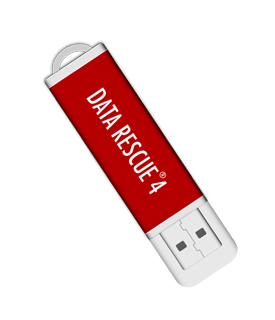
        Data Rescue 4 is shipped on a 16GB USB drive
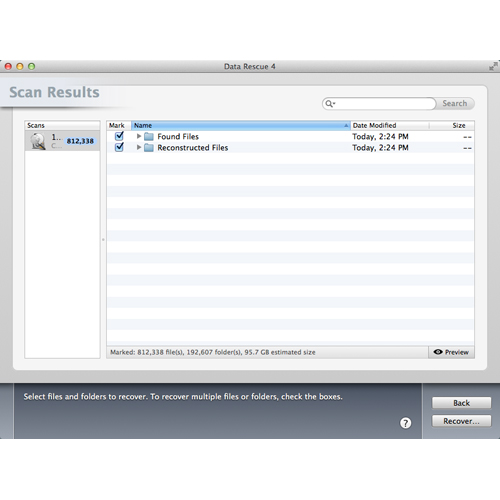
        The Best Mac Data Recovery
        Data Rescue is completely safe to use. It does not write to the hard drive or attempt any risky repairs. Data Rescue is the safest, most powerful data recovery software for Mac. It is the very same software used by many data recovery services, law enforcement, all major branches of the U.S. Military and major intelligence agencies.
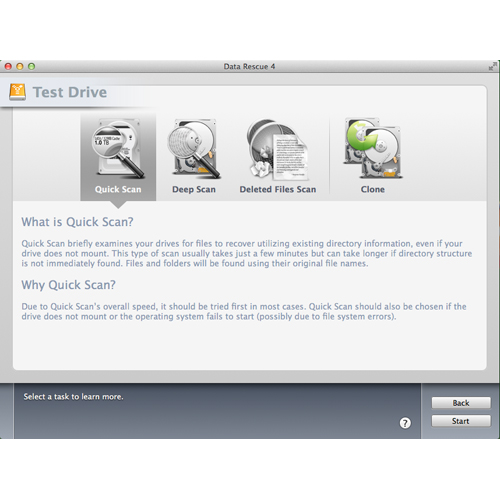
        Quick Scan
        Utilizes existing directory info even if your Mac hard drive does not mount. This type of scan usually takes just a few minutes but can take longer in more severe cases. Quick Scan should be tried first in most cases.
        Deep Scan
        Utilizes the most advanced techniques to find every recoverable file on your Mac hard drive. This type of scan typically takes three minutes per gigabyte but can take longer in more severe data loss cases.
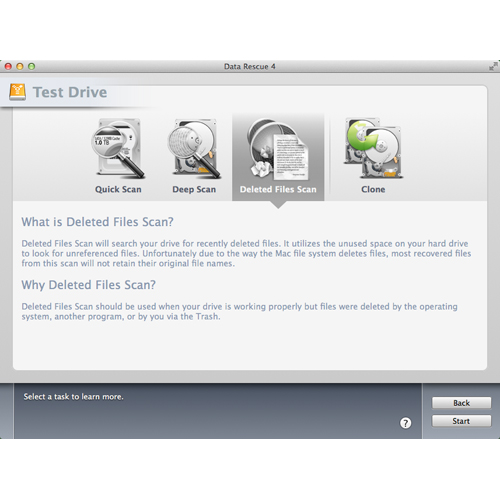
        Deleted Files Scan
        Will search your Mac hard drive for recently deleted files. Use this scan when your Mac hard drive is working properly but you accidentally deleted one or more Mac files.
        Clone
        Makes an exact copy of your Mac hard drive. The clone can then be scanned which helps improve recoverability. This function is used in the most severe cases where hardware problems may be present.
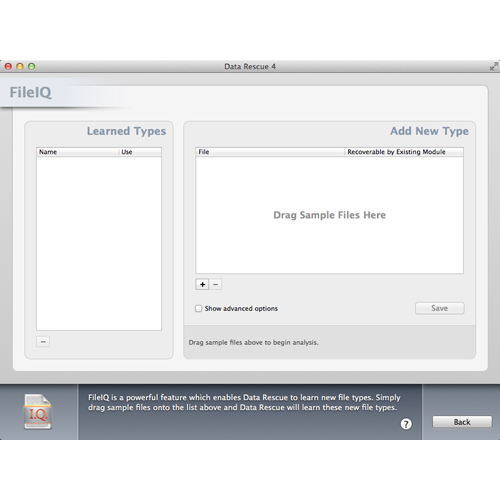
        FileIQ
        Is a powerful feature which enables Data Rescue® 4 to learn new Mac file types. Simply drag sample files to the Data Rescue® 4 drop-in bin and Data Rescue® 4 will learn these new Mac file types.
        Main Image
        • Gallery Pic 1
        • Gallery Pic 2
        • Gallery Pic 3
        • Gallery Pic 4
        • Gallery Pic 5
        • Gallery Pic 6
        Highlights
        • Works on all Mac hard drives even if they fail to mount or only partially operate.
        • Recovers deleted, lost and damaged files.
        • Recovers digital pictures from your camera media even after it has been erased or reformatted.
        • Recover your entire Mac hard drive or just the files you need.
        • Proprietary BootWell technology - boot and recover files from from 64-bit Intel Macs.
        • Recovers all file types from any HFS/HFS+ formatted hard drive.
        • Tuned for all modern Mac OS versions 10.7.5 through Mavericks.
        • Recovers from any iMac, MacBook Air, Mac mini, MacPro, including Retina displays.
        • RAW data recovery is enabled from the entire Mac hard drive.
        • Supports Data recovery from NTFS-based Boot Camp Partitions
        • SCREENSHOTS
        • REQUIREMENTS
        • RATINGS

        Screenshots


        Gallery Pic 1 Gallery Pic 2 Gallery Pic 3
        Gallery Pic 4 Gallery Pic 5 Gallery Pic 6

        System Requirements

        System Requirements

        • Mac OS X 10.7.5 and later
        • Intel Core 2 Duo and newer
        • 64-bit kernel
        • 2GB of RAM
        • To prevent your files from being overwritten, Data Rescue® 4 requires you to have a second hard drive to recover to.
        • Data Rescue® cannot recover an ethernet or WiFi-connected hard drive.

        Designed & Supported in the US

        • Free technical support via phone or email.
        • Risk Free Performance Guarantee $200 credit towards data recovery service through Prosoft Engineering if your hard drive is physically broken.

        Personal License

        • This License is to only be used by the home user on up to 5 drives or storage devices that are owned by the home user within one household and immediate family. It is not to be used as part of a business, in support of a business, nor any other type of compensated endeavor. For more information please see Prosoft's End User License Agreement (EULA).

        Customer Ratings

        Write a Review 4.6 / 5 10 out of 11 (91%) reviewers would recommend this product
        Verified Buyer Top 100 Contributor
        Reviewer: CyclingDan Location: Pittsburgh PA Age: Over 65 Experience Level: Power User Owned Product: 1-3 months
        Rating: 3/5 Data Rescue 4 Drive November 11, 2016 The first one didn't work properly. I had call ProSoft to get a replacement. Not a good practice when someone is having a hard time recovering data from a crashed hard disk. Eventually, I did get all my video transferred to a new drive, but i was nervous about the delay. Not OWC's problem. Their service is excellent and have never had a problem with their excellent support.

        Verified Buyer Top 250 Contributor
        Reviewer: Norvgen Location: Sun City West, AZ Age: Over 65 Experience Level: Home User Owned Product: 1-3 months
        Rating: 5/5 Good product! November 8, 2016 For Emergency's!!

        I would recommend this item to a friend!

        Verified Buyer
        Reviewer: Photowfind
        Rating: 4/5 Worked for this Luddite August 22, 2016 You can unring the bell! I thought I had lost 40 gb of raw images - three weeks on the road, some pictures I thought might be important. Gone and I don't know how. (Getting some idea about my geek quotient here?) After the scan I began to open files but only got cryptic symbols that had no resmblence to what I was hoping for. So I began the process of acceptance - which is what I would have had to do if I hadn't peeked at the files folder before I trashed it. And they were the NEF files I'd lost. Got them back just as I'd lost them, without a clue. So, if Data Rescue worked for me, it can work for anybody.

        I would recommend this item to a friend!

        Verified Buyer
        Reviewer: Anonymous Location: Portland, OR Age: 55-65 Experience Level: IT Professional Owned Product: 1-3 months
        Rating: 5/5 Simple, powerful, effective recovery tool March 27, 2016 Data Rescue 4 got me out of a jamb. A failed 1TB drive with critical docs on it that I had tried resurrecting for over two months. I had a noisy mechanical failure on a low usage drive (it does happen more than you think it would). It wouldn't even mount, and was invisible to everything else.

        Data Rescue 4 could see it, mount it and recover almost everything on it. Docs resurrected, as well as audio and video files. It did take over two days to block-segment scan and clone the drive to another drive ... just let it run. Then I did my successful file recovery on the clone. Be sure to read all of the manual before you begin; it's short, and will get you started quickly.

        Here's another tip: Also get a dock from OWC that positions your dying drive in a VERTICAL POSITION. Reading a mechanically failing drive in that orientation is far more likely to work. Pulling data off in that fashion gives you your best chance at maximum data recovery. Good Luck!

        I would recommend this item to a friend!

        Verified Buyer
        Reviewer: Anonymous Location: Poland Age: 45-54 Experience Level: Home User Owned Product: 1-3 months
        Rating: 5/5 This product has great features March 20, 2016 I would recommend this item to a friend!
        Verified Buyer
        Reviewer: Anonymous
        Rating: 4/5 Great Drive Tool ! March 4, 2016 I would recommend this item to a friend!
        Verified Buyer
        Reviewer: Anonymous Location: NataL - Brazil Age: 55-65 Experience Level: IT Professional Owned Product: less than a month
        Rating: 5/5 This product the show August 4, 2015 Product of excellent quality. I used in my first macbook. I liked to buy more often. thanks!

        I would recommend this item to a friend!

        Verified Buyer Top 50 Contributor
        Reviewer: Anonymous Location: Star Prairie, WI Age: 35-44 Experience Level: IT Professional Owned Product: 5-6 months
        Rating: 5/5 I hope I never have to use it April 17, 2015 It may sound negative at first, but the idea of having to perform an "Emergency Hard Drive or File Recovery" is not appealing to me, at all. Having such a quality product & software available, offers just enough peace of mind, that I can say I'm ready, if something drastic should happen.

        I would recommend this item to a friend!

        Verified Buyer
        Reviewer: Anonymous Location: Phoenix, AZ Age: 45-54 Experience Level: IT Professional Owned Product: 1-3 months
        Rating: 5/5 Extraordinary recovery! January 15, 2015 100% recovery from a "dead" laptop HD that absolutely refused to mount! Couldn't be happier with a product, but over the years I've always been pleased by Prosoft Engineering's products! This is another well-executed piece of software!

        I would recommend this item to a friend!

        Verified Buyer
        Reviewer: Anonymous Location: Rangiora, New Zealand Age: Over 65 Experience Level: Home User Owned Product: 1-3 months
        Rating: 5/5 A must-have in case of HD problems January 12, 2015 Not yet used.

        I would recommend this item to a friend!

        Verified Buyer
        Reviewer: OWCisGreat Location: SE North Carolina Age: Over 65 Experience Level: Home User Owned Product: 1-3 months
        Rating: 5/5 Worked as advertised December 28, 2014 The Data Rescue worked as described. Thank you.

        I would recommend this item to a friend!

        Prosoft Data Rescue 4 For Mac Mfr P/N: 54100 OWC SKU: PRS54100 Emergency Hard Drive Recovery and File Recovery. Do-it-Yourself hard drive recovery software. The same tool the professionals use! Ships: Sold Out
        Reviews (11)
        Pre/Back-Order: Limit 5 per Customer
        Only $114.00CyberSaver $79.75
        Sold OutSold OutProsoft Engineering 54100, Click to Buy Now
        Helpful Links
        • About Us
        • DIY Install Videos
        • Join our Affiliate Network
        • Where to Buy
        • Accessibility Statement
        • Sustainability is Good Business
        • Join the OWC Team
        • Media+Newsroom
        • Privacy Promise
        • MacSales.com for Business
        Join the OWC Newsletter

        Join hundreds-of-thousands of tech enthusiasts across the planet and gain access to specials, clearance, and holiday savings on the OWC upgrades, drives, and docks everyone loves.

        • bbb
        © 2000-2026 Other World Computing, Inc., All Rights Reserved. Site Terms Guest ID:
        Your Privacy Choices
        This item has been added to your cart