


 1-800-275-4576

OWC Mercury G3 & G4 ZIF
Installation Instructions
Please visit http://eshop.macsales.com/Tech/index.cfm?load=zif.html for our detailed online instruction manuals. The online instruction manuals are for Beige G3 systems, and the Blue & White G3 / G4 “Yikes” systems.
Quick Start Instructions
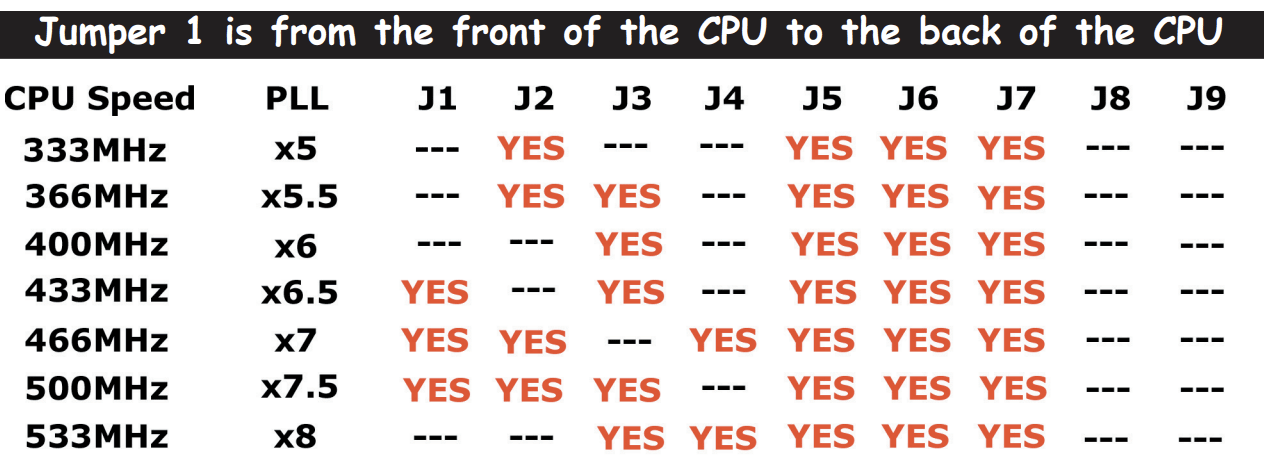
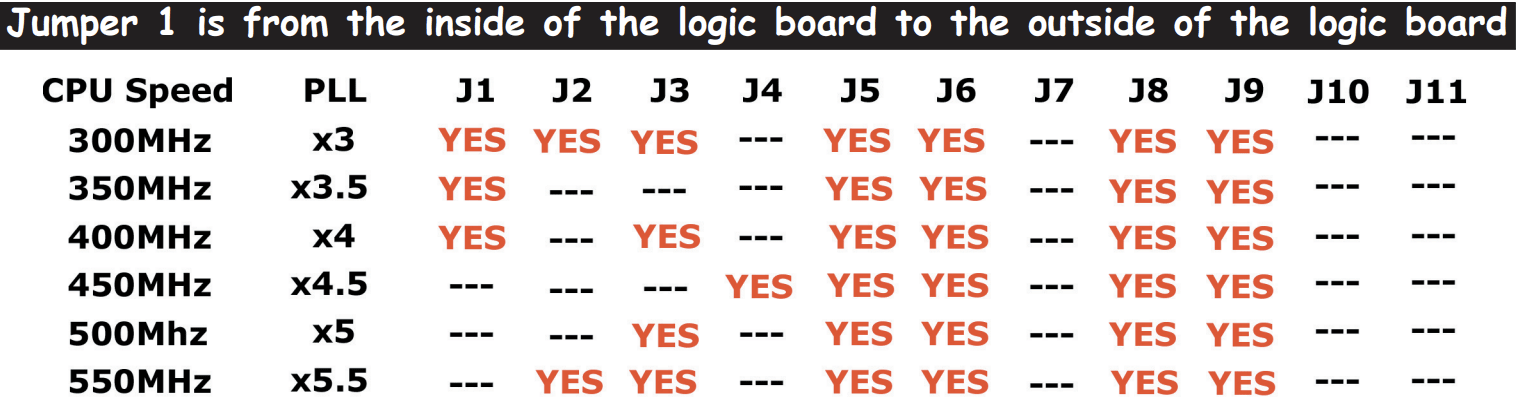
If you are already experienced with replacing a G3 or a G4 processor, use these jumper reference charts to aid in setting the proper speed for the upgrade you purchased. Start by removing the heatsink clip and heatsink from your existing ZIF. Lift the arm securing the ZIF into the socket. Remove the ZIF and replace it with the new ZIF, it will only fit in one direction. Replace the heatsink, orienting the clip the same way you removed it. Remove the jumper block on the logic board, and place the included jumpers in the proper order as listed below, depending on the processor speed you purchased. See the back of this sheet for pictures, or the online instruction manual for detailed step by step instructions.
Jumper settings for Beige G3 systems:
Jumper settings for Blue & White G3 systems / G4 “Yikes” systems:
Thank you for purchasing your acceleration product from OWC!
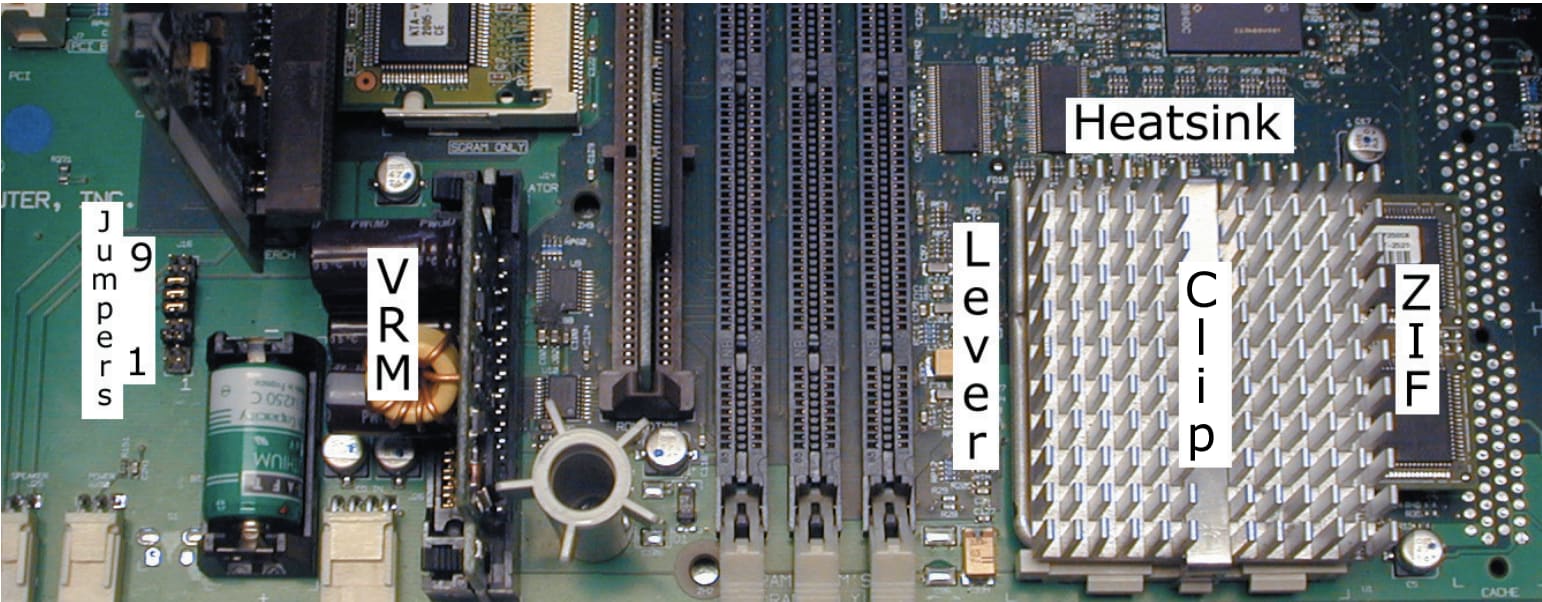
Beige G3 logic board showing the jumper block, VRM (Voltage Regulator Module), ZIF socket with ZIF installed and the heatsink attached. You will need to work with each of these components during the installation process.
For a detailed color manual, please visit our online tech center at:http://eshop.macsales.com/Tech/index.cfm?load=zif.html
ATTENTION: - if you have a Royal VRM (Voltage Regulator Module) installed, you will need to replace it before using a G4 processor from any manufacturer. It is estimated that this issue affects less than 2% of all Beige G3 systems.
For more information about the Royal VRM, please visit our tech center at: http://eshop.macsales.com/Tech/index.cfm?load=zif.html
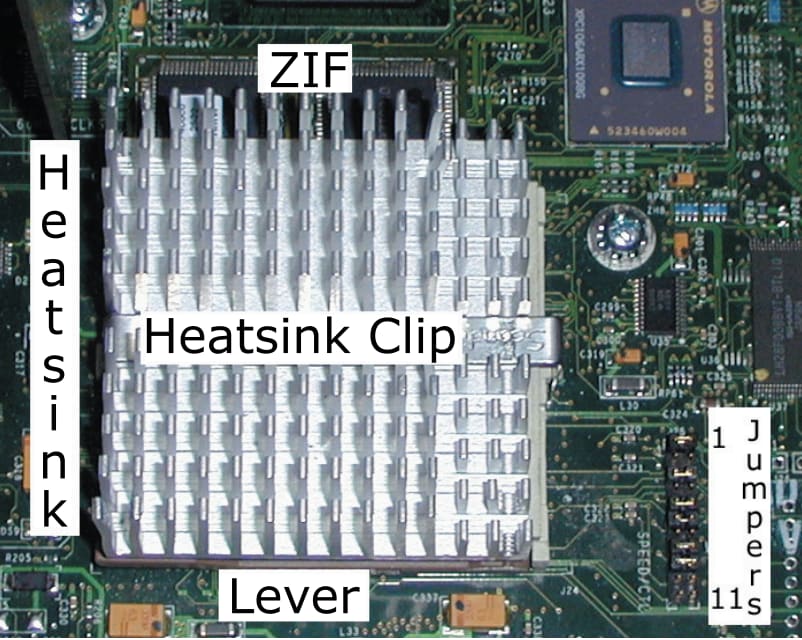
Blue & White G3 / G4 “Yikes” Logic board showing the jumper block, heatsink, ZIF socket with ZIF installed and the heatsink attached. You will need to work with each of these components during the installation process.
If you have a G3 B&W system, you will need to unlock the ROM to allow the use of a G4 processor. Visit the tech center for that information.
For a detailed color manual, please visit our online tech center at: http://eshop.macsales.com/Tech/index.cfm?load=zif.html
Free Support Chat
Our free award-winning support team is ready to answer all of your questions. Technical support is available Monday - Friday: 9AM - 6PM. Customer Support & Sales is available Monday - Friday: 9AM - 6PM. Support is unavailable on U.S. Federal holidays. Talk to a human today.