Free shipping available on orders $99 & up!
  • Business Icon For Business & More icon arrow
    • Creative, Production & PostCreative, Production & Post
    • Corporate & EnterpriseCorporate & Enterprise
    • Higher EducationHigher Education
    • State, Local & K-12 EducationState, Local & K-12 Education
    • House of WorshipHouse of Worship
    • Systems IntegratorSystems Integrator
    • HealthcareHealthcare
    • Federal, State & Local GovernmentFederal, State & Local Government
    • Join Today!

      Already registered? Sign In

  • Region: US/Intl icon arrow
    • Select your preferredcountry / region:

    • USA RegionUSA + International
    • Canada RegionOWC Canada

    • Experience local shipping options and optimized product inventory for your region.

  • Phone Icon1-800-275-4576
  • Intl: 1-815-338-8685
MacSales.com Powered By OWC
  • Blog
  • Support
  • Account
    • Hello, Sign In
    • My Account
    • Order Status
    • Write A Review
    • Warranty & Returns
  • Cart
MacSales.com Powered By OWC
  • Support
  • Chat Contact
  • Account
    • Hello, Sign In
    • My Account
    • Order Status
    • Write A Review
    • Warranty & Returns
  • Cart
  • Specials & Featured
  • Rocket Yard Blog
  • Chat
  • Support
      • Shop All
        • Internal Drives
        • External Drives
        • Apple & Macs
        • Docks & Connectivity
        • Cards & Readers
        • Batteries
        • Software & Apps
        • Cables & Adapters
        • Memory
        • PCIe Expansion
        • Specials & Featured
        Home » Software » Utilities

        We're sorry, but this item is no longer for sale. However, there may be more Software » Utilities items available.

        Prosoft

        Drive Genius 3.2.x

        Mac / 10.8 Compatible
        Maintain, Manage, Optimize & Repair your Hard Drives
        Is your Mac running slower? Is your hard drive filling up and you don't know why? Are you seeing the beach ball more or having other issues with your hard drive?
        Drive Genius 3.2.x is used by Apple at the Genius Bar as part of the ProCare Yearly Tune Up.
        Drive Genius 3 now runs as a 64-bit application and includes new features such as DrivePulse®, the best way to monitor the overall health of your Mac hard drive, alerting you to possible hard drive issues before they become major problems, RAID Support, Email Notifications, and has enhanced previous features including Defrag, Repartition and Scan from the previous version Drive Genius 2.

        Drive Genius 3 is the best Mac hard drive utility for the Mac platform. A new user interface, Drive Pulse®, 64-bit, Enhanced Defrag, RAID Support, Enhanced Repartition, Scan and Email Notifications are only a few of the award-winning features of Drive Genius 3. Optimize your Mac hard drive with Drive Genius 3. Yes, this is the same product used by Apple at the Genius Bar to defrag your Mac hard drive and speed up your Mac!*

        Traditionally, Mac hard drive maintenance and management has been difficult, time-consuming and confusing. In many cases, people skip these critical activities - sometimes leading to disaster. Thankfully, Drive Genius 3 makes these tedious tasks painless, fast and easy.

        *Part of ProCare Yearly TuneUp
        The importance to defragment your Mac hard drives
        Mac users always ask, "How can I speed up my Mac?" If you want to speed up your mac, you can do it with the most-awarded mac utility software, Drive Genius 3- Your Mac hard drive has tens of thousands of important computer files on it. Your hard drive, also referred to as your Mac HD, is where all your digital pictures, emails, work files, videos and other files are stored. With so many important files being stored in one location, it's important that you take steps to make sure your Mac is not only running smoothly and optimized for peak performance, but also that the files themselves are managed better so that if there ever is a need for emergency file recovery, you will stand a better chance at recovering your files.

        Defragging your hard drive, also referred to as optimizing your hard drive or Mac, is an important task to run on a regular basis. Defragging your hard drive with Drive Genius will improve the performance of your Mac as well as improve the recovery chances should your Mac become corrupted.

        Better performance for your Mac hard drive is accomplished by defragmenting each file that the Mac Operating System skips. The Mac OS only defrags files if they are under 20mb in size. You have thousands of files larger than that threshold, including most of your important files like pictures and videos. Drive Genius' award-winning, used-by-apple defrag tool makes the file one contiguous file again. This is great for performance as your Mac doesn't have to piece fragments of files together upon opening it. Also, this is great for recovery, should your Mac crash. Recovery of a single, contiguous file is much more successful and likely compared to recovery of a highly fragmented file. In other words, if your drive contains a lot of fragmented files then the recovery success is usually lower, compared to a drive contains mostly unfragmented files.

        So when someone asks, "I need to speed up my Mac. What should you do?" one answer would be to clean up the Mac hard drive with a defragmentation routine. Drive Genius 3's defrag tool is the number one selling, most-used Mac defrag tool for Mac OS X. Apple has been using it at the Genius Bar for over 5 years now.

        Drive Genius 3 will reorganize the larger files and defrag them (consolidating the file into one contiguous file), improving seek and opening times. This reduces wear on the Mac hard drive because the read/write heads do not need to travel as much across the media when searching for a file. Drive Genius 3 also compacts the larger files to allow them to be saved without fragmentation.
        Main Image
        Features
        • DrivePulse® — Monitors the overall health of your drive, alerting you to possible issues before they become major problems.
        • 64-bit — Runs as a 64-bit application on Mac OS 10.6 or later with a compatible 64-bit processor.
        • Enhanced Defrag — Provides even better defragmentation of your files and even more fragmentation information in a new user interface.
        • RAID Support — Support for hardware RAID and Apple's software RAID.
        • Enhanced Repartition — Add, delete, hide, expand or shrink OS X partitions so you can organize your drive more efficiently.
        • Scan — Realtime bad-block scanning and an extended block verification that stress tests the read/write validity.
        • Email Notifications — E-mail notifications can be sent when long-running tasks complete and you are away from your computer.
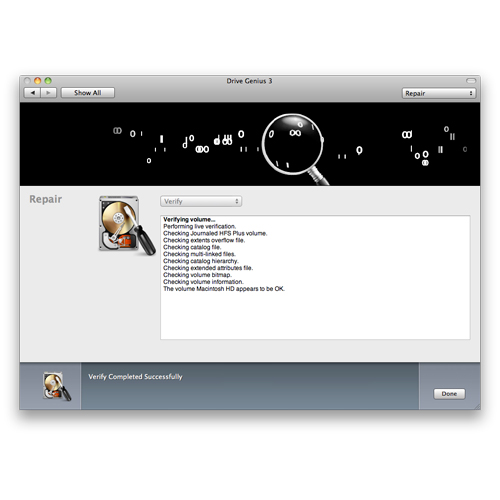
        • Repair — Quickly fix corruption and errors to get your damaged drive up and running fast.
        • Sector Editor — Fine tune all aspects of your system with direct, advanced byte viewing and editing of all data on your drives, volumes and files (for expert users only).
        • Information — In-depth report of specifications and space utilization of all drives or OS X volumes.
        • Initialize — Easy, high level OS X formatting to prepare new hard drives for use on your computer.
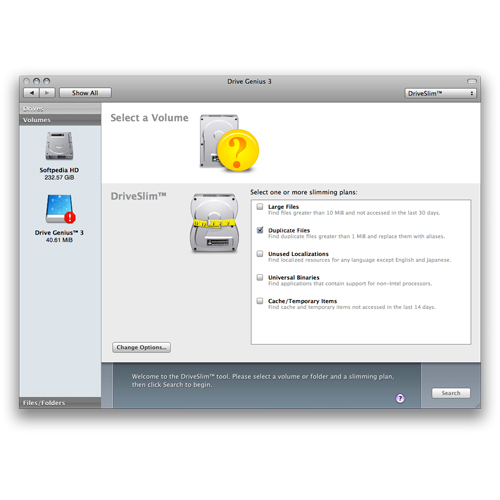
        • DriveSlim™ — Free up more space on your hard drive with Duplicate Files Search, Large Files Search, Language Support Removal and Universal Binary slimming.
        • Benchtest — Make sure your hard drive performance is what it should be with comprehensive speed tests and graphical comparisons to other common configurations.
        • Shred — Stop prying eyes with DoD compliant (5220.22 - m) secure erase. Removes all traces of data from free space and deleted data on any drive or OS X volume.
        • Clone — Fast and easy volume or entire drive cloning.
        • Integrity Check — Find problems before they find you with these comprehensive hardware verification tests.
        • Supports Hot File Adaptive Clustering — OS X monitors the files that you access the most often (read only). It then moves them to a special "hot zone" on the hard drive. During this process OS X defragments them and then stores them on an area of the hard drive that has the fastest access time.
        • SCREENSHOTS
        • REVIEWS
        • REQUIREMENTS
        • RATINGS

        Screenshots


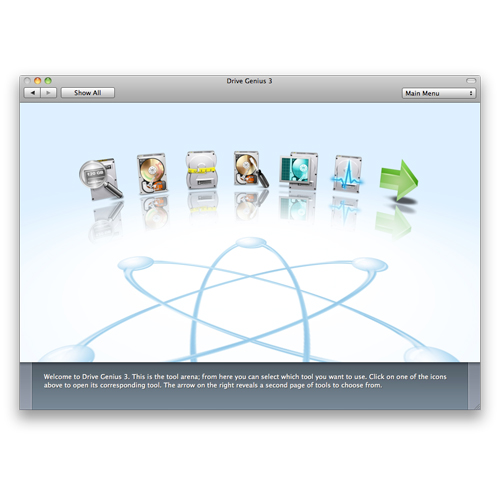
        Gallery Pic 1 Gallery Pic 2 Gallery Pic 3

        Reviews

        • review "This is a rock-solid program that works as advertised. Drive Genius is definitely worth a place in your utility closet."

        • review "Beyond tasks that will directly diagnose or solve problems, Drive Genius has options to help you manage your drives."

        • review "If you're interested in keeping your Mac in tip-top shape, it's hard to go wrong with a tool that the pros use."

        • review "A wonderful application, well-executed, easy to use and well worth five stars."

        • review "Prosoft picked up where Norton's left off and frankly did a much better job."

        • review "Prosoft's Drive Genius lives up to its name by providing comprehensive disk-repair tools and performance enhancing defragmentation routines to keep your Mac's drive in tip-top condition."

        • review "You may not need DriveGenius, but your Mac will be more efficient if you get it."

        • review "For users who absolutely rely on their computer, DrivePulse will help detect small problems."

        • review "A good update that makes this excellent precautionary tool even better."

        • review "Drive Genius 3 is such a serious and comprehensive upgrade, it could be the only disk management tool you need."

        • review "With an interface that's close to foolproof, Drive Genius mixes advanced features with ease of use."

        • review "We'd recommend this app for any technical Mac user as well as sysadmins looking for some GUI aid for that occasional maintainence and service of a fleet of Macintoshs."

        • review "Drive Genius 3 is used by Apple at the Genius Bar as part of the ProCare Yearly Tune Up."

        • review "As far as Mac recovery software goes, Drive Genius 3 is a shining example of what happens when developers put thought and care into their software."

        System Requirements

        Current Release Version: 3.2.2

        Drive Genius 3 requires an Intel Processor-based Mac

        • Apple OS X version 10.6.8 or later, including 10.9.x 'Mavericks'
        • 1GB RAM Minimum
        • Intel® Processor

        Drive Genius 3 can be installed onto your Startup Disk and run as an application

        Drive Genius 3, when run as an application from your Startup Disk, allows you to run the following tools/features on the startup disk of your Mac, as well as any other non-startup drives that are connected:
        • Info
        • Defrag *
        • DriveSlim
        • Verify / Repair Permissions
        • Standard Scan
        • Free-space only Shred
        • DrivePulse

        You can run Drive Genius 3 from a secondary Startup Disk

        • Repartition
        • Repair
        • Extended Scan
        • Initialize
        • Duplicate
        • Non-Free Space Shred
        • Sector Edit
        • Integrity
        • Benchtest

        Apple Fusion Drive Support

        Apple Fusion Drive is a concept which combines high storage capacity of traditional hard drives with the high performance of flash storage.

        The list below indicates which of the Drive Genius 3 features are currently supported with Apple Fusion Drives.

        • Supported
          • Defrag (from 2nd startup disk)
          • Repair/Rebuild
          • Volume Duplication
          • Volume Scan
        • Not Supported
          • Live Defrag
          • Repartiton
          • Drive Duplication
          • Drive Scan

        Notes

        * LiveDefrag is not available if you are running File Vault 2 full disk encryption. In that set up, you must startup from a secondary startup disk.

        Customer Ratings

        Write a Review 4.3 / 5 18 out of 21 (86%) reviewers would recommend this product
        Verified Buyer Top 100 Contributor
        Reviewer: Kaner Location: Mokena Age: Over 65 Experience Level: Power User Owned Product: over 6 months
        Rating: 5/5 Life saver October 21, 2016 Bought this to keep my Mac intune. Saved my hard drive and other family/friends hard drives after they crashed. Use it now for general upkeep and maintenance of my and others hard drives. So impressed I later upgraded to version 4. A must have if you own a Mac.

        I would recommend this item to a friend! This review is from Prosoft Drive Genius v3.2.x: Maintain, Manage, Optimize & Repair your Hard Drives *Download*.

        Verified Buyer Top 100 Contributor
        Reviewer: Anonymous Location: Apple Valley, CA Age: 55-65 Experience Level: Home User Owned Product: over 6 months
        Rating: 5/5 Maintanence software February 6, 2016 Drive Genius is the choice of Apple to diagnose, repair and maintain your computer. I have used it on several occasions successfully and as a result kept my Mac running smoothly and efficiently. This would be my first choice among all other software of this kind.

        I would recommend this item to a friend! This review is from Prosoft Drive Genius 3.1 - OWC Special: 60% Savings vs. $99 Retail Price.

        Verified Buyer
        Reviewer: Anonymous Location: Nashville Age: Over 65 Experience Level: Power User Owned Product: 1-3 months
        Rating: 5/5 Prosoft Drive Genius October 24, 2015 Good product !

        I would recommend this item to a friend! This review is from Prosoft Drive Genius v3.2.x: Maintain, Manage, Optimize & Repair your Hard Drives *Download*.

        Verified Buyer
        Reviewer: Anonymous Location: Bullhead City Age: 55-65 Experience Level: Power User Owned Product: over 6 months
        Rating: 5/5 I have been using Drive Genius since V1 September 17, 2015 I am real happy with Drive Genius because it is customize-able and I can pick what I want to fix and not fix and of course sometimes revert back (for some things)

        I would recommend this item to a friend! This review is from SPECIAL OFFER - Prosoft Drive Genius 4 Download for $39.00!.

        Verified Buyer Top 100 Contributor
        Reviewer: Anonymous Location: BrisVegas Age: 45-54 Experience Level: IT Professional Owned Product: 1-3 months
        Rating: 4/5 Nice, but only for newer machines July 6, 2015 Nice piece of software, which is now running sweetly on all of my macs, except for my 2007 iMac, which is a pity because one of the reasons I got this was to check that computer. Other than that I'm happy.

        I would recommend this item to a friend! This review is from SPECIAL OFFER - Prosoft Drive Genius 4 Download for $39.00!.

        Verified Buyer Top 250 Contributor
        Reviewer: Anonymous Location: Calgary, Ab Age: 55-65 Experience Level: Home User Owned Product: 1-3 months
        Rating: 4/5 Identified issues immediately March 27, 2015 Installed along with 480GB SSS as system drive and 4 TB as data drive. Within days of the install identified consistency errors on the SSD which were fixed with the software. Initial download required serial id code and I have been prompted again to supply the code after using the software for the introductory period? Now the software is registered…hope no more prompts for serial key.

        I would recommend this item to a friend! This review is from SPECIAL OFFER - Prosoft Drive Genius 4 Download for $39.00!.

        Verified Buyer Top 50 Contributor
        Reviewer: Anonymous Location: Black Mountain, NC Age: 55-65 Experience Level: Power User Owned Product: over 6 months
        Rating: 5/5 Not that blown away with this one. December 6, 2014 It's ok but I expected more. A real pain to make a USB boot drive to run it. You have to actually install the whole system software onto the USB boot and then install the drive software onto that.

        I would recommend this item to a friend! This review is from SPECIAL OFFER - Prosoft Drive Genius 3 Download for $25.00!.

        Verified Buyer
        Reviewer: Anonymous Location: Chicago, IL Age: 55-65 Experience Level: Home User Owned Product: 1-3 months
        Rating: 5/5 Fixed My Hard Drive! November 23, 2014 Drive Genius helped get rid of reported errors on my hard drive.

        I would recommend this item to a friend! This review is from Prosoft Drive Genius v3.2.x: Maintain, Manage, Optimize & Repair your Hard Drives *Download*.

        Verified Buyer Top 50 Contributor
        Reviewer: Anonymous Location: Boston, MA Age: Over 65 Experience Level: Power User Owned Product: over 6 months
        Rating: 5/5 Does The Job November 11, 2014 Every now and then the integrity of disk structures become less than perfect. Drive Genius has, in my experience, been able to detect such problems early when they are easily fixable. The only time that DG has failed to fix a disk has been when the disk hardware is failing.

        I would recommend this item to a friend! This review is from SPECIAL OFFER - Prosoft Drive Genius 3 for $39.00!.

        Verified Buyer Top 250 Contributor
        Reviewer: Anonymous Location: Florida Age: 55-65 Experience Level: Home User Owned Product: 1-3 months
        Rating: 5/5 Best All-Purpose Mac Utility October 23, 2014 Having used various Mac system Utility software over the years including Techtool, Micromat, Norton among others, DriveGenius has performed well and consistently for me in two separate Mac machines starting with version-2. Features are simple to understand and use safely. Greatly recommended.

        I would recommend this item to a friend! This review is from Prosoft Drive Genius v3.2.x: Maintain, Manage, Optimize & Repair your Hard Drives.

        Verified Buyer
        Reviewer: Anonymous Location: LA Age: 55-65 Experience Level: Power User Owned Product: 3-4 months
        Rating: 4/5 Drive Genius is a great product but.... August 30, 2014 the help could be updated for current Mac OS software which is internet based.

        (i.e. booting up from a CD is a nonstarter literally especially since most Macs don't ship with CD drives anymore.)

        Also the help could explain how to make a bootable flash drive that mere mortals like me could understand.

        I gave up and went to the Apple support site to figure out how to do it.

        Other than that the software itself works well and does what its supposed to.

        I'm currently running the pulse drive on 10.10 and its running fine.

        Also the price was right.

        I would recommend this item to a friend! This review is from Prosoft Drive Genius v3.2.x: Maintain, Manage, Optimize & Repair your Hard Drives *Download*.

        Verified Buyer
        Reviewer: Anonymous Location: Burleigh Heads, QLD Australia Age: 35-44 Experience Level: IT Professional Owned Product: over 6 months
        Rating: 4/5 Handy utility August 27, 2014 For Mac repair work, I generally don't use Drive Genius 3 except for one feature - Duplicate. I find the duplicate function easier to use than the OS X Disk Utility for cloning images to hard drives. Drive Pulse is good for monitoring issues on your drives and there are many more features, that I simply don't use. There are better options for serious drive error repairs aka Disk Warrior.

        This review is from Prosoft Drive Genius v3.2.x: Maintain, Manage, Optimize & Repair your Hard Drives *Download*.

        Verified Buyer
        Reviewer: Anonymous Location: Arvada, CO Age: 55-65 Experience Level: Power User Owned Product: 1-3 months
        Rating: 5/5 Excellent Software August 1, 2014 This software is just incredible. It does what it claims.

        I would recommend this item to a friend! This review is from Prosoft Drive Genius v3.2.x: Maintain, Manage, Optimize & Repair your Hard Drives.

        Verified Buyer
        Reviewer: Anonymous Location: Bethany, OK Age: 18-24 Experience Level: Hobbiest Owned Product: 1-3 months
        Rating: 5/5 Perfect for what I need July 8, 2014 This product was exactly what I was looking for, and I found it here at Other World Computing for a very competitive price.

        I would recommend this item to a friend! This review is from Prosoft Drive Genius v3.2.x: Maintain, Manage, Optimize & Repair your Hard Drives *Download*.

        Verified Buyer
        Reviewer: Anonymous Location: Maryland Age: 45-54 Experience Level: IT Professional Owned Product: 1-3 months
        Rating: 2/5 Complicated, partially useful product May 23, 2014 Not worth the price for it's complexity and there are other readily available tools that accomplish the same results.

        This review is from Prosoft Drive Genius v3.2.x: Maintain, Manage, Optimize & Repair your Hard Drives *Download*.

        Verified Buyer
        Reviewer: Anonymous Location: VA, USA Age: 45-54 Owned Product: 1-3 months
        Rating: 1/5 How people recommend this is beyond me May 6, 2014 I figured I would start with something simple. I have used other programs in the past to remove unnecessary languages and temporary files this program totally ruined my drive image to the point I had to restore from a backup image. This program was also unable to make a mirror image of a drive after I upgraded to SSD (it said active drives could not be copied or some such) and I had to use another program SuperDuper to actually complete the mirror. Given these two things, and how well they did not work, I've actually been scared to use the program any further. Uninstalled! If you need these utilities I can recommend Duplicate Detector (to find dupes), Onyx (to clear caches, delete temps, fix file permissions etc), MonoLingual (to remove unwanted languages), and SuperDuper to make fast bootable mirror images and Appcleaner (to make sure when you delete a program it gets all the little breadcrumbs it may leave on your Mac).

        This review is from Prosoft Drive Genius v3.2.x: Maintain, Manage, Optimize & Repair your Hard Drives *Download*.

        Verified Buyer Top 250 Contributor
        Reviewer: Anonymous Location: new york Age: 55-65 Experience Level: Power User
        Rating: 5/5 the most useful and used utility sw that I own May 1, 2014 Drive Genius is awesome... Knowledge Is Power... and this utility tells me what I need to know with respect to my drives... making me powerful... yea!

        I would recommend this item to a friend! This review is from Prosoft Drive Genius v3.2.x: Maintain, Manage, Optimize & Repair your Hard Drives.

        Verified Buyer
        Reviewer: Anonymous Location: Indianapolis, IN Age: 55-65 Experience Level: IT Professional Owned Product: over 6 months
        Rating: 5/5 Without a Doubt - Great Software - Hardware Company March 15, 2014 I have used Data Rescue for years from Prosoft Engineering. Drive Genius combines SOME RESCUE features of Data rescue into a full time drive monitoring system. It will monitor SMART HARD DRIVES including SSD's and all attached (via Firewire) external drives. It is an indispensable tool to have installed on (any Mac really) especially all heavily used production Macintosh computers.

        I have used OWC since the company was started and had just a few employees. I lived on Dean Street in Woodstock, IL on the other side of the "Square" where the company was started. Larry O'connor is a genius entrepreneur and one of the most responsive, generous CEO's of any company I have ever dealt with.

        The company itself is very "GREEN" with all of their power to run the warehouse provided by a wind turbine. I have made 100's of purchases for myself and clients, and directed Mac users to this website without hesitation. IT IS THE NUMBER ONE MACINTOSH support site for upgrades and storage. Their original products are superior and have better pre/post-sales than ANY OTHER COMPANY.

        I would recommend this item to a friend!

        Verified Buyer
        Reviewer: Anonymous Location: Dallas, TX Age: 55-65 Experience Level: Home User Owned Product: over 6 months
        Rating: 3/5 Useful Features, But Not Best Drive Repair February 12, 2014 Drive Genius has useful features not otherwise included in OS X's disk utility, such as the defragmenter, and drive monitor. For those features alone, it is probably worth the asking price. However, many of its features are redundant of those already included in Disk Utility, albeit with a less entertaining user interface. If you are looking primarily for software that will fix drive directories and indices, Disk Warrior is a far superior (though more costly with fewer features) repair tool. It accomplishes repairs Drive Genius does not.

        I would recommend this item to a friend! This review is from SPECIAL OFFER - Prosoft Drive Genius 3 for $39.00!.

        Verified Buyer
        Reviewer: Anonymous Location: Woodstock, MD Age: 55-65 Experience Level: Power User Owned Product: over 6 months
        Rating: 5/5 OWC has best in class customer/technical support December 22, 2013 I have been buying upgrades for my Macs from OWC for years. Great products at competitive prices. On several occasions I have contacted tech support when ordering and have always been impressed that they would tell me not to buy a product that wouldn't improve my macs performance. That kind of integrity is very rare and greatly appreciated!! Keep up the great work!

        I would recommend this item to a friend! This review is from SPECIAL OFFER - Prosoft Drive Genius 3 for $39.00!.

        Verified Buyer
        Reviewer: Anonymous Location: Los Angeles Age: 35-44 Experience Level: Home User Owned Product: less than a month
        Rating: 5/5 A comprehensive Program for a low price August 31, 2013 I have always been interested in Drive Genius and have tried the demo version a few years ago but wasn't prepared to pay elevated price of $99. However with the special offer I was more than happy to give it a shot. Since than I have used it extensively and been able to already solve some drive issues with Drive Pulse before the problem became more severe. I also had an external drive which was corrupt and wasn't even aware of it for years. However Drive Genius was able to fix the problem with ease. So, yes I think anybody who has several drives should be running Drive Genius 3 in order an expensive trip to the Apple Store can be avoided.

        I would recommend this item to a friend! This review is from Prosoft Drive Genius v3.2.x: Maintain, Manage, Optimize & Repair your Hard Drives *Download*.

        Prosoft Drive Genius 3.2.x Mfr P/N: OWCDRIVEGEN29 OWC SKU: OWCDRIVEGEN29 Maintain, Manage, Optimize & Repair your Hard Drives. Drive Genius 3 now includes DrivePulse, the easiest way to monitor the overall health of your drive. The same product used at the Genius Bar to defrag hard drives! 30 Day OWC Limited Warranty Ships: In Stock
        Reviews (21)
        only $29.00
        Sold OutSold OutOther World Computing OWCDRIVEGEN29, Click to Buy Now
        Recommended Items:
        Cable Special Offer Drive Genius for as low as $29 with Qualifying Storage Item Purchase. Click for Details
        Helpful Links
        • About Us
        • DIY Install Videos
        • Join our Affiliate Network
        • Where to Buy
        • Accessibility Statement
        • Sustainability is Good Business
        • Join the OWC Team
        • Media+Newsroom
        • Privacy Promise
        • MacSales.com for Business
        Join the OWC Newsletter

        Join hundreds-of-thousands of tech enthusiasts across the planet and gain access to specials, clearance, and holiday savings on the OWC upgrades, drives, and docks everyone loves.

        • bbb
        © 2000-2026 Other World Computing, Inc., All Rights Reserved. Site Terms Guest ID:
        Your Privacy Choices
        This item has been added to your cart