Free shipping available on orders $99 & up!
  • Business Icon For Business & More icon arrow
    • Creative, Production & PostCreative, Production & Post
    • Corporate & EnterpriseCorporate & Enterprise
    • Higher EducationHigher Education
    • State, Local & K-12 EducationState, Local & K-12 Education
    • House of WorshipHouse of Worship
    • Systems IntegratorSystems Integrator
    • HealthcareHealthcare
    • Federal, State & Local GovernmentFederal, State & Local Government
    • Join Today!

      Already registered? Sign In

  • Region: US/Intl icon arrow
    • Select your preferredcountry / region:

    • USA RegionUSA + International
    • Canada RegionOWC Canada

    • Experience local shipping options and optimized product inventory for your region.

  • Phone Icon1-800-275-4576
  • Intl: 1-815-338-8685
MacSales.com Powered By OWC
  • Blog
  • Support
  • Account
    • Hello, Sign In
    • My Account
    • Order Status
    • Write A Review
    • Warranty & Returns
  • Cart
MacSales.com Powered By OWC
  • Support
  • Chat Contact
  • Account
    • Hello, Sign In
    • My Account
    • Order Status
    • Write A Review
    • Warranty & Returns
  • Cart
  • Specials & Featured
  • Rocket Yard Blog
  • Chat
  • Support
      • Shop All
        • Internal Drives
        • External Drives
        • Apple & Macs
        • Docks & Connectivity
        • Cards & Readers
        • Batteries
        • Software & Apps
        • Cables & Adapters
        • Memory
        • PCIe Expansion
        • Specials & Featured
        Home » Software » Utilities

        We're sorry, but this item is no longer for sale. However, there may be more Software » Utilities items available.

        We recommend Parallels Desktop 11 for Mac - Use Windows Applications alongside your Mac Apps! *Free V12 Upgrade* (Mfr P/N: PDFM11XL-OEM1DVD-EN) from Parallels for $49.00 as a suitable alternative.

        SSD Optical Drives Memory
        OWC Instant Rebates when you purchase Parallels with other items.

        Parallels

        Desktop 10 For Mac

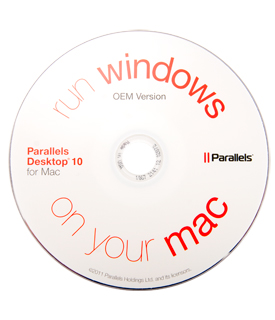
        OEM Version | No Retail Box

        OWC Note: All purchases of Parallels 10 dated July 29th, 2015 through October 31st, 2015 are entitled to a FREE online upgrade to Parallels 11 when it is released on August 19th, 2015.
        Parallels Desktop 10 for Mac is the #1 choice of OWC customers who want to seamlessly run Windows and Mac applications side-by-side, without rebooting or compromising performance.
        The Mac you Love. The Windows you Need.
        Parallels Desktop® 10 for Mac is the world's easiest, fastest, and most powerful solution for running Windows applications on a Mac — without rebooting.

        Install Windows or move your PC documents, files and applications on to your Mac in few easy steps. Use the full-fledged Windows versions of your productivity apps like Excel, Outlook, Internet Explorer, Windows Media Player, Access, and other applications not available on the Mac

        If you're new to Mac, keep the familiar Windows experience on your Mac including using them in full screen. If you love the Mac OS interface, use Windows apps like they were native Mac apps
        Seamless Integration
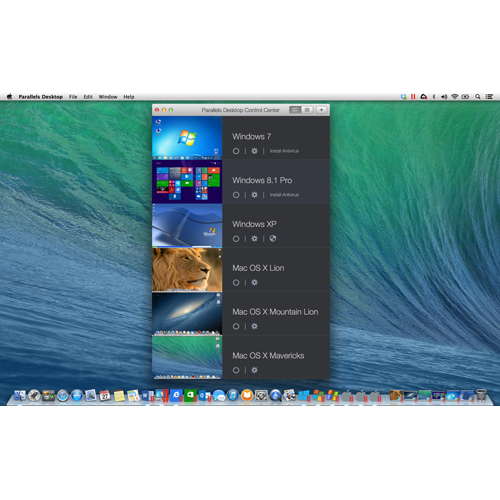
        Copy & paste text and images and drag & drop files between Windows and Mac and launch and access Windows applications directly from the Mac Dock and use Mac gestures in Windows applications
        Versatile for Home, Work and School
        Parallels Desktop 10 for Mac enables one Mac to handle all of your computing needs. Run the PC programs you need for work or play and the Mac applications you need and love side-by-side without rebooting.
        Getting started is easy
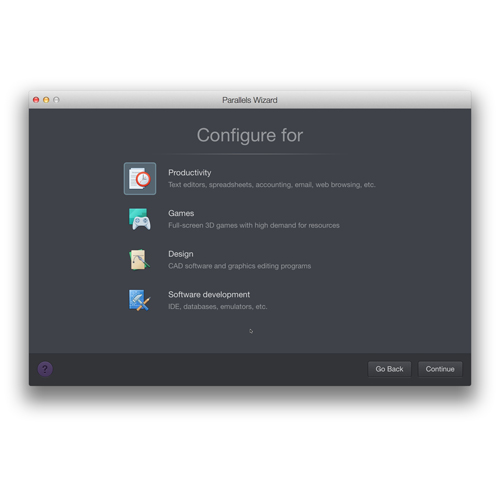
        The Parallels Wizard helps you get going. Move your existing Windows installation including your applications and files to your Mac or install a fresh copy of Windows with just a few clicks.
        Main Image
        • Gallery Pic 1
        • Gallery Pic 2
        • Gallery Pic 3
        • Gallery Pic 4
        • Gallery Pic 5
        • Gallery Pic 6
        New in Desktop 10
        • Get ready for OS X Yosemite (10.10) You'll enjoy cool new features of Yosemite in your Windows apps.
        • Open Windows documents 48% faster!
        • Best performance ever - up to 50% faster and 30% longer battery life
        • Disk Space Wizard reclaims disk space in a few easy clicks when you need it most
        • 1-click optimization automatically set your virtual machine settings for optimal performance based on what you do most
        • Mac native "Save as" in Microsoft Office 2013 applications to Dropbox, Google Drive, and iCloud Drive (when Yosemite is available) if they are set up on your Mac.
        • Mac native "Share" to Twitter, Facebook, Vimeo etc. in Windows applications
        Mac OS X Mavericks and Yosemite Support
        Run Windows applications like they were made for Mac. Experience Mavericks intuitive features like Dictionary, Dictation, Launchpad and Mission Control in your Windows applications
        Fast performance
        Work with graphic and resource hungry applications with lightning speed or play your favorite PC game on Mac.
        A must-have in the Mac-based business
        An office full of Macs can still run the business-critical Windows applications that you, your customers and your partners need.
        Need More than Windows?
        Run Google Chrome, Linux and many other operating systems simultaneously. With Parallels Desktop 10 for Mac, you've made the leap to anywhere, anytime, any platform computing. Unite your Mac and Windows world into one harmonious universe.
        • GALLERY
        • REQUIREMENTS
        • RATINGS

        Screenshots


        Gallery Pic 1 Gallery Pic 2 Gallery Pic 3
        Gallery Pic 4 Gallery Pic 5 Gallery Pic 6

        System Requirements

        Minimum System Requirements (Mac)

        • An Intel Core 2 Duo processor or better
        • At least 2GB of RAM (4GB recommended)
        • At least 850 MB of space available on the boot volume (the volume that has Mac OS X) for Parallels Desktop installation
        • Enough free disk space for each virtual machine and its applications (at least 15 GB for each installation of Windows)
        • OS X 10.10 Yosemite or later, OS X 10.9.3 Mavericks or later, OS X 10.8.5 Mountain Lion or later, or OS X 10.7.6 Lion or later.
          To identify your computer's processor, memory, and Mac OS X version, choose Apple menu > About This Mac.
        • Internet connection required for product activation, select features, and online updates.

        One of the following:

        • A Windows installation disc, or other installation media for the operating systems you want to use alongside Mac OS X
        • An Internet connection to download and install freely available operating system such as Ubuntu or Google Chrome.

        Notes

        If you're using OS X Lion or later, you can setup a second copy of OS X to be used as a guest operating system alongside your main system, without having to purchase or download another copy of OS X.
        Manufacturer provided specifications for Parallels p/n PDFM10XL-OEM1DVD-EN UPC#: 846829003002

        Customer Ratings

        Write a Review 4.4 / 5 36 out of 43 (84%) reviewers would recommend this product
        1 2
        Verified Buyer
        Reviewer: Anonymous Location: Kankakee, IL Age: 45-54 Experience Level: Power User Owned Product: less than a month
        Rating: 4/5 Very good solution if you NEED to run Win April 27, 2015 I have been using Parallels almost as long as I have been using a Mac. (~ 5 years) My big concern when switching to the Mac was....would I need to rebuy a lot of the software that I was using. With Parallels the issue was moot. Most of the applications I use are either supplied within OSX or I was able to find cost-effective equivalents. But for the things that I just couldn't afford to replace, Parallels allow me to run them in a Win VM without a hitch.

        When Yosemite was released I held off upgrading because I didn't want to pay the full upgrade price. But then I had a HD that was failing so I decided to replace it with an SSD. OWC was offering a hefty discount when purchasing Parallels with an SSD so I opted to upgrade after all.

        I currently maintain VM's for WinXP, Win7, Snow Leopard, Mavericks and Linux. Mostly for sandboxing and testing, but the XP VM I have to keep running for some legacy software. On a conventional HD the performance is rather good. But when coupled with an SSD the performance increases dramatically.

        The only issue that I have had is that sometimes after upgrading from a previous version, you will need to "re-authorize" your copy of Windows. For XP it worked easily. Win7 was a bit more troublesome.

        I would recommend this item to a friend!

        Verified Buyer
        Reviewer: Anonymous Location: Marco Island, FL Age: 45-54 Experience Level: IT Professional Owned Product: over 6 months
        Rating: 5/5 A solid VM environment March 16, 2015 Having been a Parallels user for years, each new version brings better performance and other refinements - v10 continues this tradition. I've explored alternative VMs, but for me, the features and ease of use Parallels provides makes it the clear choice.

        I would recommend this item to a friend!

        Verified Buyer Top 250 Contributor
        Reviewer: Anonymous Location: Antioch,CA Age: 55-65 Experience Level: IT Professional Owned Product: 1-3 months
        Rating: 5/5 An Easy way to run Multiple OS February 19, 2015 I was looking for an easy way to run multiple OS's on my MBP. I do computer repair and personally have used Linux for years but I like the Apple OS as well. I tend to fix many Windows computers so I needed that one too. Now instead of haveing to carry 3 Laptops to locations I can carry one and take care of all 3 OS's at once.

        This software makes installing another OS as easy as getting the Distro or OEM Disk and installing it. Its so simple anyone can do it.

        I have tried several Windows software titles and all run well. As do all the Linux software apps I have tried and believe me I really tried to cause a problem.

        Great Software...

        I would recommend this item to a friend!

        Verified Buyer Top 100 Contributor
        Reviewer: Anonymous
        Rating: 5/5 Best Version Yet February 1, 2015 I was a Parallel's version 3 user but left for VMware when I ran in to support issues when version 4 was released. I returned to Parallel's when 8 was released and happy that I did. I haven't noticed a considerable difference going from 8 to 10, but took advantage of the upgrade offer when I purchased a Mercury SSD.

        I would recommend this item to a friend!

        Verified Buyer
        Reviewer: Anonymous Location: North Carolina Age: Over 65 Experience Level: Home User Owned Product: 3-4 months
        Rating: 5/5 easy install January 18, 2015 I was able to install Windows 7 home premium in a flash.

        I would recommend this item to a friend!

        Verified Buyer Top 50 Contributor
        Reviewer: Anonymous Location: central VA Age: 55-65 Experience Level: Home User Owned Product: less than a month
        Rating: 5/5 Works as advertised. January 5, 2015 Love it. Installed this and XP Pro. No need to partition a certain amount of space, Parallels does this automatically, I guess. I only have one program I use, so it's easy, but you (I) open to FireFox and go from there. I open Parallels, click on FF, enter the site I want and I'm there. The site I want to go to has "only IE 8 and Windows 7 will work." in their requirements page, I have neither and the site opens as usual. Had to jump through hoops for that, but Parallels 10 made it happen. Very easy.

        Can't add any durability info, too new.

        I would recommend this item to a friend!

        Verified Buyer
        Reviewer: Anonymous Location: Zurrieq, Malta Age: 18-24 Experience Level: Hobbiest Owned Product: less than a month
        Rating: 5/5 Great software! December 27, 2014 Being a student, and much of the software is available only on this platform, this software helped me work and browse seamlessly on both operating systems.

        I would recommend this item to a friend!

        Verified Buyer Top 250 Contributor
        Reviewer: Anonymous Location: Spain Age: 25-34 Experience Level: IT Professional Owned Product: 1-3 months
        Rating: 5/5 Good price! December 12, 2014 Parallels Desktop is the best OS virtualization software for Mac and at OWC we can get it at a fraction of the official price. That's great!

        I would recommend this item to a friend!

        Verified Buyer
        Reviewer: Anonymous Location: New York Age: 55-65 Experience Level: IT Professional Owned Product: less than a month
        Rating: 4/5 Parallels Continues To Be The Best Virtualization System October 27, 2014 Thank you to OWC for a kind Parallels upgrade discount! I continue to be pleased with the work Parallels has put into Parallels desktop. It offers more features and functionality that all the other options, at least for my needs. It continues to rule the speed and functionality tests. I keep waiting for a moment of regret that I didn't choose the competition instead, and that moment never happens. Please keep up the great work!

        I would recommend this item to a friend! This review is from Parallels Desktop 10 for Mac - OWC Customer Exclusive New Version Special.

        Verified Buyer Top 50 Contributor
        Reviewer: Anonymous Location: Indiana Age: 55-65 Experience Level: IT Professional Owned Product: 1-3 months
        Rating: 4/5 Not the easiest product to configure August 3, 2014 Parallels works for running my old Microsoft apps on the new Mac system, but it takes a lot of room and wasn't the easiest install. I think it would have been easier to make a separate boot partition with a separate install of Windows. On the other hand Parallels had good chat support to get me up and running, and it's nice to be able to punch up an app without rebooting. Just be patient and you should be able to get things working fine.

        I would recommend this item to a friend! This review is from Parallels Desktop for Mac - Use Windows Applications alongside your Mac Apps!.

        Verified Buyer Top 250 Contributor
        Reviewer: Anonymous Location: Fayetteville, GA Age: 55-65 Experience Level: Power User Owned Product: 1-3 months
        Rating: 5/5 Alternative to Bootcamp on a Mac June 21, 2014 I have used VMFusion in the past and have found Parallels to be very good.

        I would recommend this item to a friend! This review is from Parallels Desktop 9 (Free Upgrade to v10) for Mac - Use Windows Applications alongside your Mac Apps.

        Verified Buyer
        Reviewer: Anonymous Location: SoCal Age: 55-65 Experience Level: Power User Owned Product: 1-3 months
        Rating: 3/5 Ok I guess May 22, 2014 You will only want this if you moved to Mavericks and still run a PC on your Mac. I was happy with the earlier version and only upgraded because OWC gave me a good discount. I have moved almost completely away from the PC side so I don't really feel like I wanted to make the switch and I'm not sue it was worth it except for the compatibility with 10.9.x.

        I would recommend this item to a friend! This review is from Parallels Desktop for Mac - Use Windows Applications alongside your Mac Apps!.

        Verified Buyer
        Reviewer: Anonymous Location: Miami, FL Age: 35-44 Experience Level: Home User Owned Product: 3-4 months
        Rating: 5/5 Fantastic - Whoever thought of this should get an award! May 12, 2014 If you want to work on Windows because software in your business only lets you use Windows, but love your Mac, then install this on your Mac and have the best of both worlds. My friend recommended this to me and as much as he raved about it, I think I can go on a tour promoting this product - simply amazing.

        I would recommend this item to a friend! This review is from Parallels Desktop for Mac - Use Windows Applications alongside your Mac Apps!.

        Verified Buyer
        Reviewer: Anonymous Location: Central NY Age: Over 65 Experience Level: IT Professional Owned Product: 1-3 months
        Rating: 5/5 Works well running a Windows 7 VHD February 26, 2014 As much as I like iMacs, I need to do professional Windows based programming using Visual Studio 2013. I decided to eliminate my Windows workstation and virtualize it using Parallels 9. I virtualized my existing computer using Parallels tools and was amazed how smoothly it went. I can't tell the difference in performance between the virtual machine and my old workstation. All my Windows apps have worked with no problems. As they point out in their instructions, I did have to reauthorize the Windows installation I do allocate it 16 GB of memory which is probably overkill. I find Coherence Mode very useful.

        I would recommend this item to a friend! This review is from Parallels Desktop for Mac - Use Windows Applications alongside your Mac Apps!.

        Reviewer: Anonymous Location: Rochester NY Age: 35-44 Experience Level: Power User Owned Product: over 6 months
        Rating: 4/5 Paralells Customer Review October 29, 2013 I've been using Paralells on multiple Macbook and Macbook Pro 13" machines for over 7 years. I like the software very much. It's stable and allows me to run older Microsoft XP Pro applications. Currently running Paralells on my late 2011 Macbook Pro Core 2 Duo 2.8GHZ. I'm writing this as I check out with OWC's offer of Paralells 9 for $39.00 and saw there was only one review of this product and thought I should share my experience with Paralells. I am a professional photographer and run intensive Photoshop and other intensive imaging software on both sides of my Mac simultaneously. Paralells gives me the best of both worlds.

        I would recommend this item to a friend! This review is from Parallels Desktop for Mac - Use Windows Applications alongside your Mac Apps!.

        Verified Buyer
        Reviewer: Anonymous Location: Tri-Cities, WA Age: 55-65 Experience Level: Home User Owned Product: less than a month
        Rating: 5/5 Parallels Desktop 9 for Mac - Ready for Mavericks Release October 7, 2013 Parallels 9 installed without incident. The installation process offered additional software that allows remote control of my iMac using an iPad. Bring on Mavericks!!!

        I would recommend this item to a friend! This review is from Parallels Desktop 9 for Mac - Use Windows Applications alongside your Mac Apps!.

        Reviewer: Jesse Location: Tulsa, OK Age: 25-34 Experience Level: IT Professional Owned Product: over 6 months
        Rating: 3/5 I love Parallels, but they got cocky September 9, 2013 I am writing this review and rating it only 3 stars, but I continue to love Parallels. I actually hope that others will buy Parallels 9 and then call, write, and chat with the support team to complain about the loss of Parallels Mobile and its replacement with a more expensive, but more functional version called Parallels Access. Hopefully, people reaching out and complaining will push them to re-visit their idea.

        So, here's my review of the actual software.

        Parallels makes upgrading easy. I just popped in the Desktop 9 CD, then realized that they will let me download it. I prefer to download as the CD will never survive in my house. If I ever needed to re-install, then I will have to have it. So, I downloaded the software and hit install. It found my Parallels 8 and replaced it. All of my OS's are still there.

        Now my Dropbox and Google drive docs are available on the Windows machine. This may seem like nothing, but I can access my Photo Stream, my iCloud Docs (which I don't use), and my Google Drive docs straight from my Windows machine without having to create shares and links or by installing and mirroring the same data on the Windows machine. This is very nice and makes it much easier for me to update a file and know it will be pushed to Google Drive or Dropbox.

        The last time I upgraded my Mac, I had an issue because Parallels stopped working. Apparently, Parallels Desktop 7 worked for Lion (10.7), but not Mountain Lion (10.8). That was a frustration that I wanted to avoid. When Mavericks (10.9) comes out, I can upgrade my laptop without worrying that all of my Parallels Operating Systems will shut down. I use the windows side for some of the work that I do and that was frustrating to realize that I couldn't access Windows until I upgraded Parallels. In their defense, they notated this on their website and had sent emails that I must have missed. I was pleased that the issue was documented and easy to see if I searched.

        Parallels has replaced Parallels Mobile with Parallels Access as of this version. First off, what are these things, you might ask. These are Apps that you run on your iPhone/iPad which allows you to takeover your remote machine. I can sit at the coffee shop and remember I needed to hit send on an email. I grab my phone, open the Parallels Mobile app, and it connects to my laptop at home, shows me the desktop, and lets me do what I need to do. You don't have to setup your router or anything. Just have Parallels running and you're good to go. * The downside, Parallels Mobile worked for iPhone and iPad. This meant that if I just had my phone, I was still good. Parallels Mobile was introduced around version 7 and now it's being phased out. It's being phased out in favor of Parallels Access, which does the same thing, but costs $79.99/yr and doesn't currently work on the iPhone. When you connect with Parallels Access, the computer you takeover gets all funky as Parallels us tweaking the desktop resolution so that it can show you one Mac/Windows application at a time. * The upside, Parallels Access is pretty sweet. You can takeover just one Mac/Windows Application at a time. You don't have to re-size the application to perfectly fit in the screen. They have taken the iPad finger strokes and made them work when you are taking over a remote computer. It's pretty amazing and has allowed me to get more done faster.

        Parallels Access might be worth $20/yr to me, but not $79.99. It's worth even less to me because I don't have a choice. Parallels Mobile is End of Purchase. http://www.parallels.com/support/desktop-virtualization/mobile/ This means that you can't get it anymore and those of us that have been with them for years can't use it if we want to upgrade. If the next Mac upgrade to Mavericks works the same, then once I upgrade my Mac, I will have to upgrade Parallels and lose access to Parallels Mobile. (This is what I was talking about on the first paragraph. Please phone, chat, Skype, and email support. Please push for Parallels Mobile to come back or Parallels Access to be reasonably priced.)

        I love Parallels and they have always come out with something new and some reason that it's worth it to me to upgrade. This is the first time I wouldn't want to give 5 stars. I still love them and want to stick with them. If you are choosing between Parallels and Fusion, I'd still say to go with Parallels. We just need them to get a little less cocky and be more open with us the consumers.

        I would recommend this item to a friend! This review is from Parallels Desktop for Mac - Use Windows Applications alongside your Mac Apps!.

        Verified Buyer
        Reviewer: Anonymous Location: Northern Ontario, Canada Age: 45-54 Experience Level: Home User Owned Product: less than a month
        Rating: 5/5 Ordered but not installed January 3, 2013 Good product no doubt many of you know that already...what I wasn't clear on when I ordered it was the need to do a complete install of Win8 and possibly allow sharing of my file structure with Windows. Not prepared to do that so I uninstalled. No complaints with product though I just wasn't exactly clear on how much integration was expected to have it work smoothly. I don't need the one Win8 app I was looking to use enough to justify the install.

        I would recommend this item to a friend! This review is from (*) Parallels Desktop 8 for Mac - Use Windows Applications alongside your Mac Apps! *Free v9 Upgrade!*.

        1 2
        Parallels Desktop 10 For Mac Mfr P/N: PDFM10XL-OEM1DVD-EN OWC SKU: PARPDFM10XL Whatever your needs are, run Windows and Mac applications side-by-side with no compromises in performance. It's like your Windows apps were made for your Mac. Software: non-refundable Ships: Sold Out
        Reviews (43)
        Only $79.99MacSales.com Price $49.99
        Sold OutSold OutParallels PDFM10XL-OEM1DVD-EN, Click to Buy Now
        Options & Bundles: Parallels Desktop Pro Edition
        • 1 Year License
          • Ships: In Stock
          • MacSales.com Price $119.99
        Helpful Links
        • About Us
        • DIY Install Videos
        • Join our Affiliate Network
        • Where to Buy
        • Accessibility Statement
        • Sustainability is Good Business
        • Join the OWC Team
        • Media+Newsroom
        • Privacy Promise
        • MacSales.com for Business
        Join the OWC Newsletter

        Join hundreds-of-thousands of tech enthusiasts across the planet and gain access to specials, clearance, and holiday savings on the OWC upgrades, drives, and docks everyone loves.

        • bbb
        © 2000-2026 Other World Computing, Inc., All Rights Reserved. Site Terms Guest ID:
        Your Privacy Choices
        This item has been added to your cart