Free shipping available on orders $99 & up!
  • Business Icon For Business & More icon arrow
    • Creative, Production & PostCreative, Production & Post
    • Corporate & EnterpriseCorporate & Enterprise
    • Higher EducationHigher Education
    • State, Local & K-12 EducationState, Local & K-12 Education
    • House of WorshipHouse of Worship
    • Systems IntegratorSystems Integrator
    • HealthcareHealthcare
    • Federal, State & Local GovernmentFederal, State & Local Government
    • Join Today!

      Already registered? Sign In

  • Region: US/Intl icon arrow
    • Select your preferredcountry / region:

    • USA RegionUSA + International
    • Canada RegionOWC Canada

    • Experience local shipping options and optimized product inventory for your region.

  • Phone Icon1-800-275-4576
  • Intl: 1-815-338-8685
MacSales.com Powered By OWC
  • Blog
  • Support
  • Account
    • Hello, Sign In
    • My Account
    • Order Status
    • Write A Review
    • Warranty & Returns
  • Cart
MacSales.com Powered By OWC
  • Support
  • Chat Contact
  • Account
    • Hello, Sign In
    • My Account
    • Order Status
    • Write A Review
    • Warranty & Returns
  • Cart
  • Specials & Featured
  • Rocket Yard Blog
  • Chat
  • Support
      • Shop All
        • Internal Drives
        • External Drives
        • Apple & Macs
        • Docks & Connectivity
        • Cards & Readers
        • Batteries
        • Software & Apps
        • Cables & Adapters
        • Memory
        • PCIe Expansion
        • Specials & Featured
        Home » Thunderbolt » Thunderbolt Expansion Chassis

        We're sorry, but this item is no longer for sale. However, there may be more Thunderbolt » Thunderbolt Expansion Chassis items available.

        We recommend OWC Mercury Helios 2 Thunderbolt 2 Dual Slot Expansion Chassis For PCIe Cards (Mfr P/N: HELIOS2TB2) from Other World Computing for $479.00 as a suitable alternative.

        OWC
        Mercury Helios

        Thunderbolt PCIe Expansion Chassis

        Mac / Thunderbolt
        • Mac
        • Thunderbolt
        Tap Into Power of PCIe and Thunderbolt
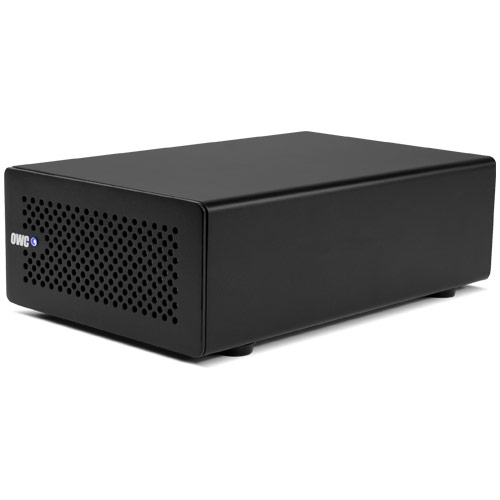
        The OWC Mercury Helios PCIe Expansion Chassis gives users of Thunderbolt port equipped computers like the Mac mini, iMac, MacBook Air, and MacBook Pro the ability to tap into a wide variety of professional-level performance PCIe cards that were once the sole domain of desktop workstations. Helios utilizes any half-length PCIe 2.0 card (up to 6.5") to provide a massive boost to your workflow.

        Helios is fast and flexible with throughput up to 10Gb/s, and is the perfect solution for high-performance PCIe cards made for video capture/editing, media transcoding, audio processing, and data storage. Finally, users of portable and all-in-one computers can enjoy the functionality and productivity gains of these PCIe cards wherever their work takes them.
        Outstanding Features
        • Use any half-length (up to 6.5" long), full-height, single-width x1, x4 or x8 PCIe card via Thunderbolt technology.
        • PCIe card expansion offers: up to 10Gb/s SSD data transfer, uncompressed HD video capture, 10 Gigabit Ethernet connectivity, and more.
        • Daisy-chain up to six Thunderbolt devices and one Mini Display port at end of chain.
        • Plug and Play...no drivers needed.*
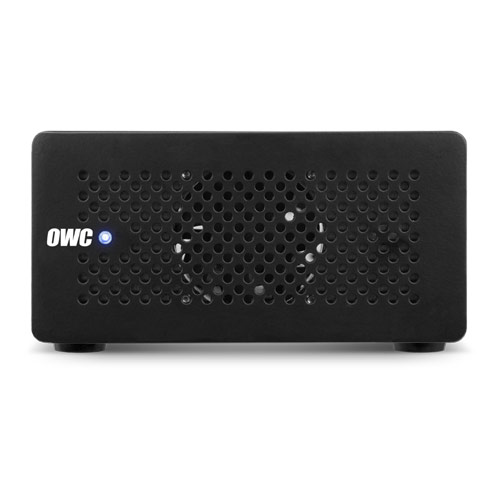
        • Ventilated cooling with a variable speed fan.
        • Automatically powers on/off with your computer.
        • Hot-pluggable...connect and disconnect while unit is on.**
        • Bus-powers one Thunderbolt device that supports bus-powering.***
        • Rugged yet lightweight aluminum housing can go anywhere your work takes you.
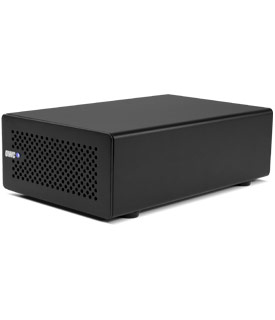
        OWC Mercury Helios
        • Gallery
        • Arrow
        • Gallery Pic 1
        • Gallery Pic 2
        • Gallery Pic 3
        •  
        • Gallery Pic 4

        If your OWC or NewerTech brand product should require service during the warranty coverage period, we are committed to delivering the fastest possible service.


        Upon receipt of your unit, OWC will make every attempt to service it and arrange shipping back to you all within 48 weekday (Monday-Friday) business hours, excluding U.S. national holidays. This warranty service timeframe does not include data recovery attempts, out of stock items/components, or upgrade/product replacements.


        Read additional information.

        • 48 Hour Warranty Service
        OWC's Step-by-Step Install Video

        How to install a PCIe card in the OWC
        Mercury Helios Thunderbolt Enclosure.
        Boosts Workflow Productivity
        Mercury Helios is fast and flexible with throughput up to 10Gb/s, and is the perfect solution to massively boost workflow productivity. It's bootable with AHCI compliant cards and can daisy-chain up to six devices. Types of PCIe cards Helios can use include: Fibre Channel • 10Gb Ethernet • RAID controller • Video capture • Digital audio • Solid State Drive • SAS controllers such as the OWC Jupiter • and FireWire, USB 3.0, eSATA host adapter cards. Click here for compatibility list.

        * Thunderbolt-aware drivers may be needed for PCIe card.
        ** If any devices are connected to the PCIe card, make sure to properly remove them before disconnecting Helios.
        *** Thunderbolt bus-powered device has to be the last device on the chain.
        • INCLUDES
        • GALLERY
        • SPECS
        • REVIEWS
        • COMPATIBILITY

        Includes

        • OWC Mercury Helios External Enclosure
        • External Auto-Switching 100/240v 50/60Hz Power Adapter
        • Requires Thunderbolt Cable. NOT included – available separately.
        • Color User Manual (4.2MB PDF)
        • 3 Year OWC Helios Limited Warranty with 48-Hour Turnaround Time

        Gallery

        Gallery Pic 1 Gallery Pic 2 Gallery Pic 3 Gallery Pic 3

        Product Specifications:

        PCIe cards supported

        • One half-length (up to 6.5" long), single width, full-height PCIe card

        Expansion slot

        • One PCIe 2.0 x8 (x4 mode)

        Device Interface

        • PCIe (PCI Express)

        Port Configuration

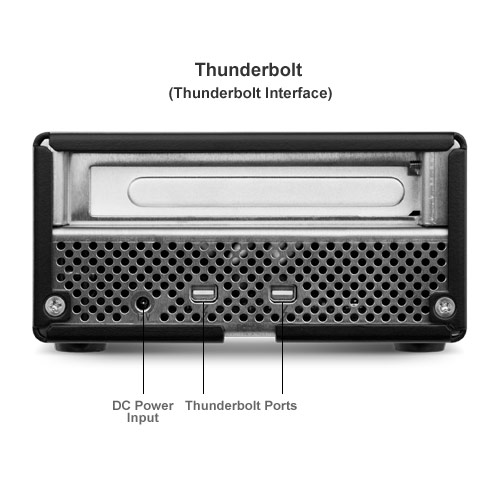
        • Thunderbolt – (2) 20 pin port

        Max Data Transfer Rate

        • Thunderbolt – 10Gbit/s (or 1250MB/sec)

        Port/Interface Bootability

          Bootable as long as the specific PCIe card installed is bootable
        • Thunderbolt: Supported on Macs meeting minimum requirements.

        Macintosh System Requirements

        • Mac OS X 10.6.8 or later. Including 'Mavericks' 10.9.x
        • Available Thunderbolt port.

        External Case Dimensions

        • 5.7 in (W) x 8.8 in (D) x 2.9 in (H)
        • 114.78mm x 223.52mm x 73.66mm

        Enclosure Weight (without card)

        • Approximately 2.4 pounds (1.08kg)

        Product Manual

        • Helios Manual (4.2MB PDF)

        Operating Environment:

        Temperature

        • Varies depending on drive mechanism installed

        Shock

        • Varies depending on drive mechanism installed

        Warranty

        3 Year OWC Helios Limited Warranty

        The best warranty is one you never have to use – but should the need occur – we're proud to provide a superior level of support and service coverage to our customers. OWC and NewerTech storage solutions come fully backed by an Industry-leading 48-hour turnaround time, for complete peace of mind ownership confidence.

        View more information about the 3 Year OWC Helios Limited Warranty

        Manufacturer provided specifications for Other World Computing p/n HELIOSTB1 UPC#: 794504764529

        Reviews/Awards

        • DigLloyd "...the OWC Helios + Mercury Accelsior combination handily outperforms the internal Apple 512GB SSD by a very large margin..." — Lloyd Chambers, DigLloyd Mac Performance Guide
        • The SSD Review "...we were very impressed with the speeds... ...Helios and Thunderbolt come together like fish in water. ...deserving of our Innovation Award!" — Les Tokar, The SSD Review
        • Bare Feats "The combo of the Helios and the Accelsior was "lethal." It matched the speed of the fastest Thunderbolt storage devices we've tested." — Rob Art Morgan, Bare Feats – 120GB
        • The Mac Observer "The Best of Thunderbolt's Potential ...the benefit of the unit is priceless." — Jim Tanous, The Mac Observer
        • MacNN "...very impressive... robust... enabled us to achieve data transfer rates as fast as an internally-mounted SSD..." — Justin King, MacNN
        • About.com "...brought our MacBook Pro to performance levels we've never seen before. ...well constructed... well designed..." — Tom Nelson, About.com
        • Storage Review logo "...robust performance..." — Josh Shaman, Storage Review
        Note about compatibility and throughput:
        • Thunderbolt Daisy-chain capable: OWC Mercury Helios can daisy-chain up to six Thunderbolt devices, plus one display.
        • eSATA Compatibility:
          OWC Mercury Accelsior_E2 is compatible with SATA 1.5Gb/s, 3Gb/s, and 6Gb/s eSATA equipped storage solutions.*
        • eSATA Expansion Ports:
          OWC Mercury Accelsior_E2 is compatible with all eSATA equipped storage solutions.*


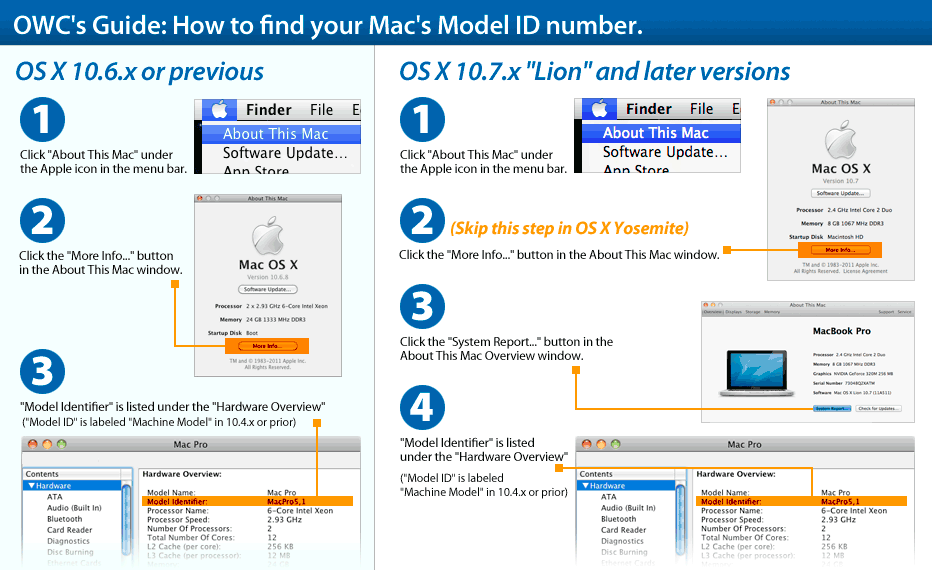
        Compatible with the following Thunderbolt enabled computers:Learn how to find your Mac's model ID
        Mac Pro
        Mac Pro
        (December, 2013)
        Model ID: MacPro6,1
        2.7GHz 3.0GHz, 3.5GHz, 3.7GHz
        Detailed specs
        Install Videos
        iMac Intel
        iMac (27-inch Late 2012)
        (November, 2012)
        Model ID: iMac13,2
        2.9GHz i5, 3.2GHz i5, 3.4GHz i7
        Detailed specs
        Install Videos
        iMac Intel
        iMac (21.5-inch Late 2012)
        (November, 2012)
        Model ID: iMac13,1
        2.7GHz i5, 2.9GHz i5, 3.1GHz i7
        Detailed specs
        Install Videos
        iMac Intel
        iMac (21.5-inch Late 2011)
        (August, 2011)
        Model ID: iMac12,1
        3.1GHz i3
        Detailed specs
        Install Videos
        iMac Intel
        iMac (27-inch Mid 2011)
        (May, 2011)
        Model ID: iMac12,2
        2.7GHz i5, 3.1GHz i5, 3.4GHz i7
        Detailed specs
        Install Videos
        iMac Intel
        iMac (21.5-inch Mid 2011)
        (May, 2011)
        Model ID: iMac12,1
        2.5GHz i5, 2.7GHz i5, 2.8GHz i7
        Detailed specs
        Install Videos
        MacBook Pro Retina
        MacBook Pro (15-inch Retina Display 2013)
        (January, 2013)
        Model ID: MacBookPro10,1
        2.4GHz, 2.7GHz, 2.8GHz
        Detailed specs
        MacBook Pro Retina
        MacBook Pro (13-inch Retina Display 2013)
        (January, 2013)
        Model ID: MacBookPro10,2
        2.5GHz, 2.6GHz, 2.9GHz, 3.0GHz
        Detailed specs
        MacBook Pro Retina
        MacBook Pro (13-inch Retina Display 2012-2013)
        (October, 2012)
        Model ID: MacBookPro10,2
        2.5GHz, 2.9GHz
        Detailed specs
        MacBook Pro Retina
        MacBook Pro (15-inch Retina Display 2012)
        (June, 2012)
        Model ID: MacBookPro10,1
        2.3GHz, 2.6GHz, 2.7GHz
        Detailed specs
        Install Videos
        MacBook Pro Unibody
        MacBook Pro (17-inch 2011)
        (October, 2011)
        Model ID: MacBookPro8,3
        2.4GHz, 2.5GHz
        Install Videos
        MacBook Pro Unibody
        MacBook Pro (17-inch Early 2011)
        (February, 2011)
        Model ID: MacBookPro8,3
        2.2GHz, 2.3GHz
        Detailed specs
        Install Videos
        MacBook Pro Unibody
        MacBook Pro (15-inch 2012)
        (June, 2012)
        Model ID: MacBookPro9,1
        2.3GHz, 2.6GHz, 2.7GHz
        Install Videos
        MacBook Pro Unibody
        MacBook Pro (15-inch 2011)
        (October, 2011)
        Model ID: MacBookPro8,2
        2.2GHz, 2.4GHz, 2.5GHz
        Install Videos
        MacBook Pro Unibody
        MacBook Pro (15-inch Early 2011)
        (February, 2011)
        Model ID: MacBookPro8,2
        2.0GHz, 2.2GHz, 2.3GHz
        Detailed specs
        Install Videos
        MacBook Pro Unibody
        MacBook Pro (13-inch 2012)
        (June, 2012)
        Model ID: MacBookPro9,2
        2.5GHz, 2.9GHz
        Install Videos
        MacBook Pro Unibody
        MacBook Pro (13-inch 2011)
        (October, 2011)
        Model ID: MacBookPro8,1
        2.4GHz, 2.8GHz
        Detailed specs
        Install Videos
        MacBook Pro Unibody
        MacBook Pro (13-inch Early 2011)
        (February, 2011)
        Model ID: MacBookPro8,1
        2.3GHz, 2.7GHz
        Detailed specs
        Install Videos
        MacBook Air
        MacBook Air (13-inch Mid 2012)
        (June, 2012)
        Model ID: MacBookAir5,2
        1.8GHz, 2.0GHz
        Detailed specs
        Install Videos
        MacBook Air
        MacBook Air (11-inch Mid 2012)
        (June, 2012)
        Model ID: MacBookAir5,1
        1.7GHz, 2.0GHz
        Detailed specs
        Install Videos
        MacBook Air
        MacBook Air (13-inch Mid 2011)
        (July, 2011)
        Model ID: MacBookAir4,2
        1.7GHz, 1.8GHz
        Detailed specs
        Install Videos
        MacBook Air
        MacBook Air (11-inch Mid 2011)
        (July, 2011)
        Model ID: MacBookAir4,1
        1.6GHz, 1.8GHz
        Detailed specs
        Install Videos
        Mac mini Intel
        Mac mini (Late 2012)
        (October, 2012)
        Model ID: Macmini6,1 & Macmini6,2
        2.3GHz, 2.5GHz, 2.6GHz
        Detailed specs
        Install Videos
        Mac mini Intel
        Mac mini (Late 2012 Server)
        (October, 2012)
        Model ID: Macmini6,2
        2.3GHz, 2.6GHz
        Detailed specs
        Install Videos
        Mac mini Intel
        Mac mini (Mid 2011)
        (July, 2011)
        Model ID: Macmini5,1 & Macmini5,2
        2.3GHz, 2.5GHz, 2.7GHz
        Detailed specs
        Install Videos
        Mac mini Intel
        Mac mini (Mid 2011 Server)
        (July, 2011)
        Model ID: Macmini5,3
        2.0GHz
        Detailed specs
        Install Videos
        PC Desktop
        PC Desktops
        Compatible with Intel / AMD Process based PCs capable with the specifications listed above.
        * Not compatible with port-multiplier enclosures.
        * A sleep conflict may be encountered when using certain eSATA chipsets via the eSATA ports when booted to the Accelsior_E2. See the specifications tab for affected solutions where System Sleep mode MUST be disabled in order to ensure reliable operation. Allowing system sleep to occur while one of the affected external drives is connected via the Accelsior_E2 eSATA ports could result in loss of data following wake from sleep. Although the above are our general recommendations for use, wake from sleep has been determined to only be an issue when the Accelsior PCIe is used for startup (SSD or eSATA connected device). We are working with our partners to see that the sleep/wake function is fully supported with all solutions and startup scenarios.
        OWC Mercury Helios Mfr P/N: HELIOSTB1 OWC SKU: OWCHELIOSTB1 Thunderbolt™ PCIe Expansion Chassis 60 Day OWC Limited Warranty Ships: Sold Out
        Be the first
        only $364.99
        Sold OutSold OutOther World Computing HELIOSTB1, Click to Buy Now
        Helpful Links
        • About Us
        • DIY Install Videos
        • Join our Affiliate Network
        • Where to Buy
        • Accessibility Statement
        • Sustainability is Good Business
        • Join the OWC Team
        • Media+Newsroom
        • Privacy Promise
        • MacSales.com for Business
        Join the OWC Newsletter

        Join hundreds-of-thousands of tech enthusiasts across the planet and gain access to specials, clearance, and holiday savings on the OWC upgrades, drives, and docks everyone loves.

        • bbb
        © 2000-2026 Other World Computing, Inc., All Rights Reserved. Site Terms Guest ID:
        Your Privacy Choices
        This item has been added to your cart