Free shipping available on orders $99 & up!
  • Business Icon For Business & More icon arrow
    • Creative, Production & PostCreative, Production & Post
    • Corporate & EnterpriseCorporate & Enterprise
    • Higher EducationHigher Education
    • State, Local & K-12 EducationState, Local & K-12 Education
    • House of WorshipHouse of Worship
    • Systems IntegratorSystems Integrator
    • HealthcareHealthcare
    • Federal, State & Local GovernmentFederal, State & Local Government
    • Join Today!

      Already registered? Sign In

  • Region: US/Intl icon arrow
    • Select your preferredcountry / region:

    • USA RegionUSA + International
    • Canada RegionOWC Canada

    • Experience local shipping options and optimized product inventory for your region.

  • Phone Icon1-800-275-4576
  • Intl: 1-815-338-8685
MacSales.com Powered By OWC
  • Blog
  • Support
  • Account
    • Hello, Sign In
    • My Account
    • Order Status
    • Write A Review
    • Warranty & Returns
  • Cart
MacSales.com Powered By OWC
  • Support
  • Chat Contact
  • Account
    • Hello, Sign In
    • My Account
    • Order Status
    • Write A Review
    • Warranty & Returns
  • Cart
  • Specials & Featured
  • Rocket Yard Blog
  • Chat
  • Support
      • Shop All
        • Internal Drives
        • External Drives
        • Apple & Macs
        • Docks & Connectivity
        • Cards & Readers
        • Batteries
        • Software & Apps
        • Cables & Adapters
        • Memory
        • PCIe Expansion
        • Specials & Featured

        What's coming in OS X Lion

        An OWC Mac Operating System Transition Guide
        Apple Family
        Natural Scrolling

        "Natural" Scrolling

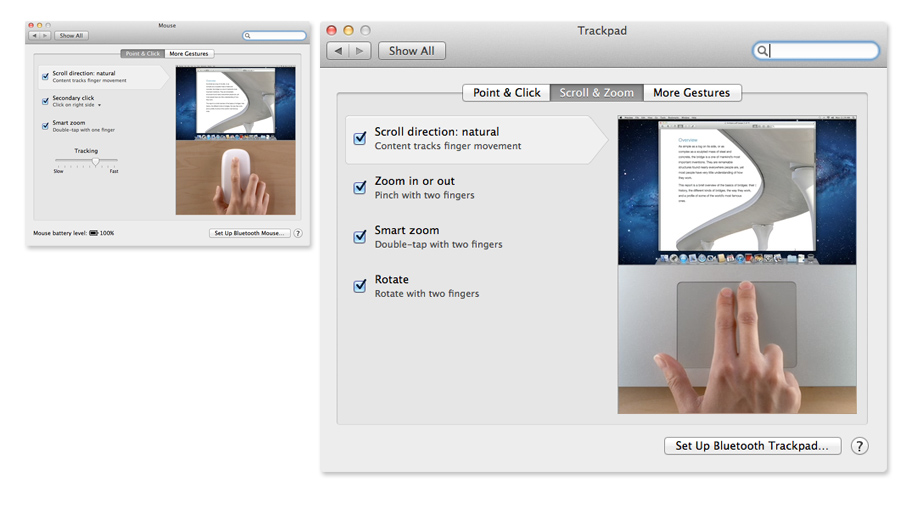
        This biggest immediate shocker users upgrading to Lion will experience is the reversal of scrolling directions to a "natural" scrolling motion. This new "natural" scrolling motion is part of Apple's effort to make Lion more like iOS. It helps to imagine your finger on the screen pulling a page down in order to view what is at the top of the page. Thankfully for the traditionalists out there, Apple also provides a way to disable "natural" scrolling. This option can be found in both Trackpad and Mouse settings sections within System Preferences.

        To turn "natural" scrolling off:
        Open System Preferences by clicking on the Apple Menu and selecting System Preferences.
        Click on either the Trackpad or Mouse preference panes.
        From within Trackpad preferences, click on the "Scroll & Zoom" tab, then uncheck the "Scroll direction: natural" option.
        From within Mouse preferences, click on the "Point & Click tab, then uncheck the "Scroll direction: natural" option.

        Previous Next
        OS X Lion Home
        Feature List
        • Mission Control
        • Dashboard
        • Launchpad
        • Finder
        • AirDrop
        • About This Mac
        • Full Disk Encryption
        • Migration Assistant
        • "Natural" Scrolling
        The information contained on the OWC OS Update Guide page is provided as a resource and does not include any implicit or implied guarantee. Usage environments are all slightly different and results may vary from what has been reported. Every effort is made to provide the most accurate information possible, however it is upon your sole judgment as to whether the information and content is applicable to your situation.

        By use of this page, you agree to indemnify and hold Other World Computing, Inc., its parent operating company, New Concepts Development Corporation, and its officers, directors, shareholders, predecessors, successors in interest, employees, agents, subsidiaries and affiliates, harmless from any demands, loss, liability, claims or expenses (including attorneys' fees), made against OWC by any third party due to or arising out of or in connection with your use of the Site.

        YOU FURTHER AGREE THAT THE SITE AND ITS CONTENT, INCLUDING, BUT NOT LIMITED TO THE OWC OS UPDATE GUIDE PAGE, ARE DELIVERED ON AN "AS-IS" AND "AS-AVAILABLE" BASIS. ALL INFORMATION PROVIDED ON THE SITE IS SUBJECT TO CHANGE WITHOUT NOTICE. OWC DISCLAIMS ALL WARRANTIES, EXPRESS OR IMPLIED, INCLUDING ANY WARRANTIES OF ACCURACY, NON-INFRINGEMENT, MERCHANTABILITY AND FITNESS FOR A PARTICULAR PURPOSE. OWC DISCLAIMS ANY AND ALL LIABILITY FOR THE ACTS, OMISSIONS AND CONDUCT OF ANY THIRD PARTIES IN CONNECTION WITH OR RELATED TO YOUR USE OF THE SITE AND/OR ANY OWC SERVICES. YOU ASSUME TOTAL RESPONSIBILITY FOR YOUR USE OF THE SITE AND ANY LINKED SITES. YOUR SOLE REMEDY AGAINST OWC FOR DISSATISFACTION WITH THE SITE OR ANY CONTENT IS TO STOP USING THE SITE OR ANY SUCH CONTENT.

        For the full Site Terms, please visit: http://eshop.macsales.com/service/terms
        Helpful Links
        • About Us
        • DIY Install Videos
        • Join our Affiliate Network
        • Where to Buy
        • Accessibility Statement
        • Sustainability is Good Business
        • Join the OWC Team
        • Media+Newsroom
        • Privacy Promise
        • MacSales.com for Business
        Join the OWC Newsletter

        Join hundreds-of-thousands of tech enthusiasts across the planet and gain access to specials, clearance, and holiday savings on the OWC upgrades, drives, and docks everyone loves.

        • bbb
        © 2000-2026 Other World Computing, Inc., All Rights Reserved. Site Terms Guest ID:
        Your Privacy Choices
        This item has been added to your cart