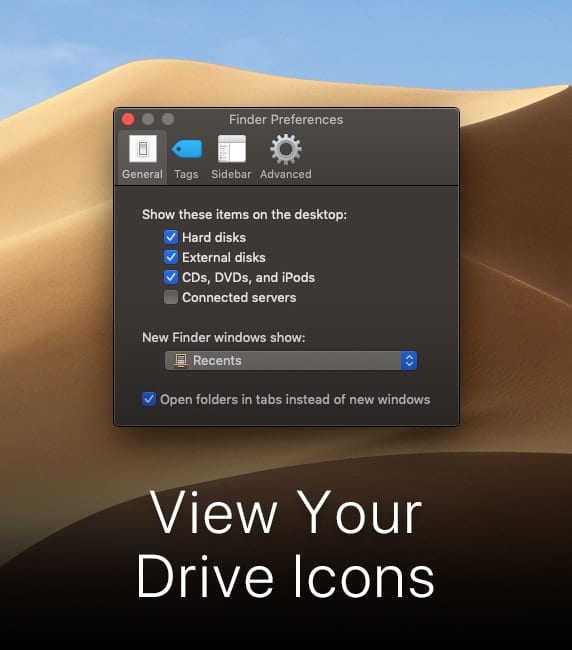
macos mojave desktop with finder preferences window and text that says "view your drive icons"

How to Make Your Drive Icons Show up in macOS

Apple apparently thinks that you’d prefer not to see the icons for your Mac’s built-in hard drive, solid-state drive, or those of any external drives on the desktop of macOS. However, I want those icons on my desktop. If you’re like me, here’s how to make them show up. Click on the desktop so the Finder is “active.”  Select Preferences...

Petty Mester Headshot OWC RADiO

OWC RADiO Podcast: Patty Mester – Publishing Your Film with PBS

An Enlighting Interview with WDSE-WRPT's Patty Mester (Duluth, Minnesota, August 24, 2019) Want to publish your film on PBS? Patty Mester is President and General Manager of WDSE-WRPT in Duluth, Minnesota. This PBS affiliate is one of the top ten...

How to Sort Files Alphabetically in a Finder Window

If you’re like me, you have lots and lots of folders on your Mac. However, they can be hard to find. I make my life easier by putting them in alphabetical order in List view in the Finder. Here’s how...

Upgrade Install macOS Catalina

How to Upgrade Install macOS Catalina Safely

If you’re getting ready to install macOS Catalina on your Mac, you have some preparations to make and a few choices to make. While many people just download the new operating system and let the installer do its thing, it’s...

macOS Catalina Features: iCloud Drive Shared Folders

I love iCloud Drive, but there's always been one missing feature that has forced me to use another cloud storage solution (Dropbox) as well as iCloud. That missing feature? Shared folders. macOS 10.15 Catalina finally brings shared folders to iCloud...

1 327 328 329 1,008
Page 328 of 1008