



Reuse, Recycle: Set Up a Mac mini as a Linux Server
I recently showed you how to use a used Mac mini as a media server for your home. Today, I continue the theme of recycling and reusing older Mac minis by turning one into a Linux server.



I recently showed you how to use a used Mac mini as a media server for your home. Today, I continue the theme of recycling and reusing older Mac minis by turning one into a Linux server.

An Apple event titled "One more thing" is scheduled for November 10 at 10 AM PDT. This marks the third month in a row that new products have been announced. The title hearkens back to Steve Jobs's keynotes. The late Apple CEO used to make a series of announcements and then say, "One more thing..." before announcing something really spectacular. Here's a Rocket Yard take on what Apple may announce at the event.

Once the dust has settled from the excitement of the annual Apple Worldwide Developer Conference (WWDC), it’s always time to start loading beta operating systems just to see how current apps work with them. If you only have one Mac and can’t “sacrifice” one to running beta software, it’s useful to install the operating system on an external drive, then boot from it when you wish to test the beta. That’s what I attempted...until it didn't work.

Spring is traditionally the time to clean out the cobwebs, dust, and dirt that have collected after you’ve been closed up in the house all winter. As long as you’re in a cleaning mode, it’s a good idea to take the time to clean up your Mac and other electronic equipment. Dust, dirt, and even cobwebs have been known to cling to a Mac, and not only mar the look, but also block airflow, or hinder the working of mechanical components. Taking the time to clean your Mac can help extend its useful life. As long as you’re doing a bit of cleaning, you may as well do a little Mac maintenance as well, to ensure your Mac not only looks good, but also continues to perform at its best.
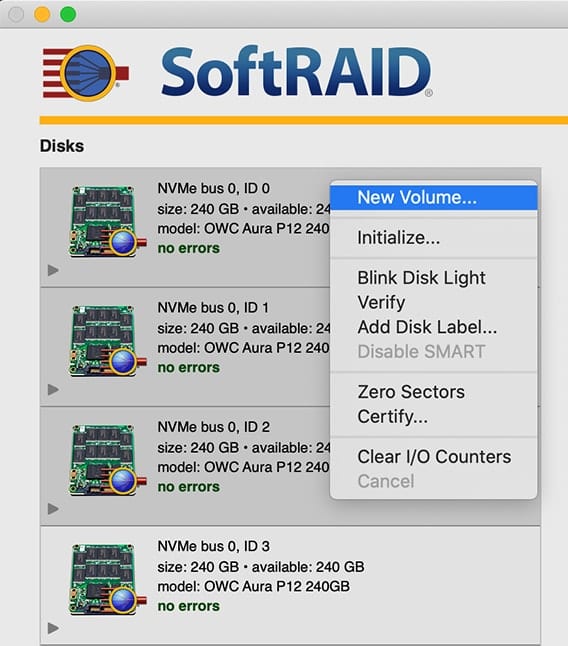
Occasionally customers who purchased the Accelsior 4M2 ask if it’s possible to “set aside” one of the four installed M.2 SSDs as a macOS boot volume, while the remaining three are used as a RAID 0. This setup will reduce the maximum performance levels as compared to the factory RAID 0 config, but it is possible. The steps in this Rocket Yard Guide provide an overview of the process.
Snapshots are a feature of APFS (Apple File System) that has been part of the macOS since High Sierra. A snapshot captures the state of an APFS formatted drive, and preserves all the files on the drive, as they appeared when the snapshot was taken. If you ever need to, you can roll back the drive to its previous state. In this Rocket Yard guide, we're going to take a look at APFS snapshots, how they’re created, managed, and deleted, as well as the advantages and disadvantages of snapshots.

Did you upgrade to macOS Catalina and decide it's not for you? Perhaps a favorite app isn’t Catalina compatible, or changes in some of the apps Apple provides are not to your taste. Maybe your Mac just seems to be...

Installing a new version of the Mac OS is generally a fairly pain-free process; this trend continues with macOS Catalina. Even so, it's a good idea to review our Rocket Yard guides for a clean install of macOS Catalina as well as...
If you’re getting ready to install macOS Catalina on your Mac, you have some preparations to make and a few choices to make. While many people just download the new operating system and let the installer do its thing, it’s...

